Corrupt or Otherwise Broken Audacity Project Recovery

A new 64-bit Windows/Linux/macOS command-line utility is available to help repair broken or corrupt 3.x.x .aup3 Audacity projects. These include projects that fail to open with Error codes 11, 13, 101, and/or with the message “Audacity failed to read from a file in X:”. The utility will not run under 32-bit Windows and it will not work with older 2.x.x .aup files and _data directories. Complete or partial recovery is not guaranteed.

Before attempting a project “recovery”, it is best to update to the current version of Audacity. (Would you believe that some broken projects are simply due to bugs in the program?)

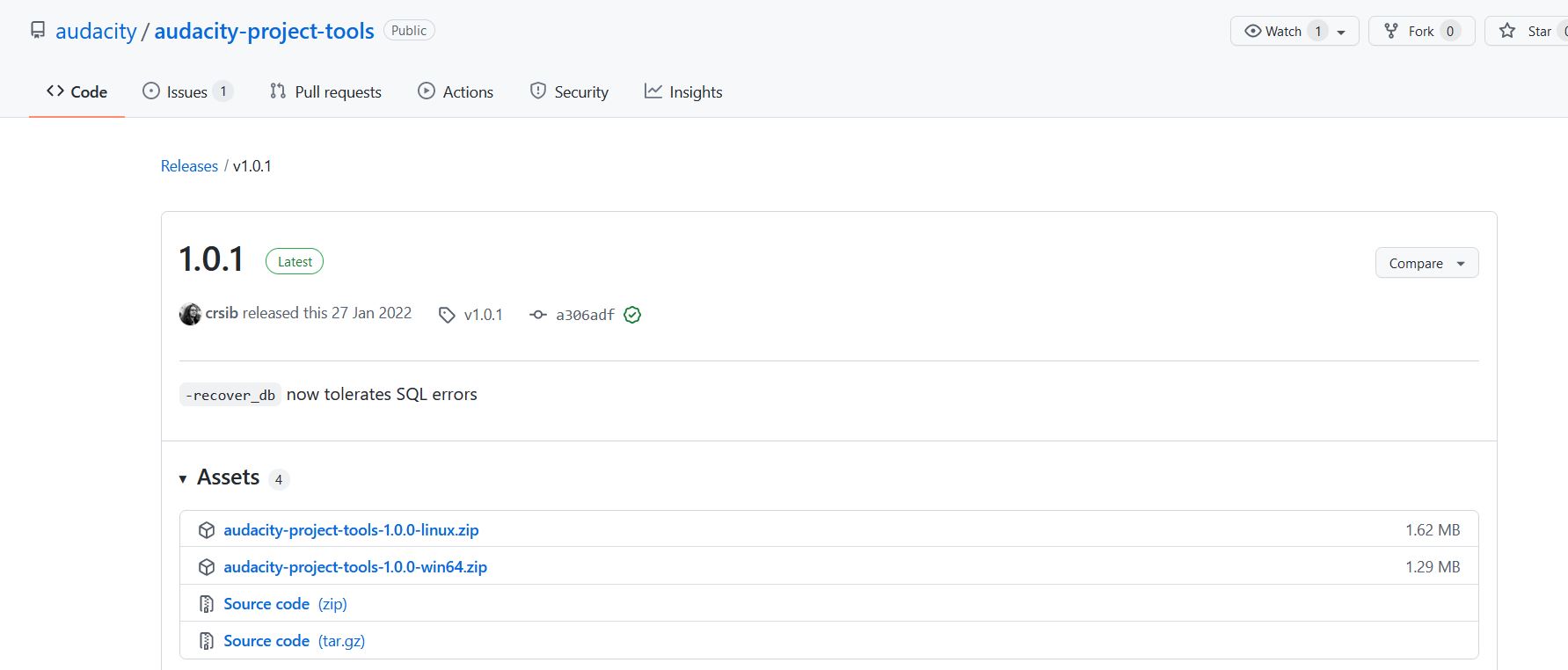
The utility is available here: GitHub - audacity/audacity-project-tools
In the right-hand column, look under “Releases” and click on the lastest release (currently 1.01). Then download the appropriate .zip file. I use the win64 package. I have not tested the Linux package. The Windows zip file contains audacity-project-tools.exe and sqlite3.exe nestled neatly inside of a audacity-project-tools-1.0.0-win64 folder. You many need to go to Windows File Explorer > View Tabs > and Check the “File Name Extensions” box to see the .exe file extensions.

Here are the steps I use for Windows:

  1. Check there is sufficient storage to recover your project. You will need roughly 4 times the size of your .aup3 for a successful recovery. If you have a 10GB file, you should have at lease 40GB available.
  2. In your Downloads directory, create a new sub-directory “AudRepair”.
  3. Unzip the audacity-project-tools which you downloaded and move the two .exe files into AudRepair.
  4. Copy your defective .aup3 project, then move the copy to this same AudRepair directory, and rename it to “broken.aup3”.
  5. Press [Windows Key]+R, and type “cmd”. A (black) cmd screen will appear.
  6. Navigate to your Downloads directory by typing the line “cd Downloads”.
  7. Navigate to your AudRepair directory by typing “cd AudRepair”.
  8. Type “dir”. The following three files should be listed: audacity-project-tools.exe, broken.aup3, and sqlite3.exe
  9. Type “audacity-project-tools -drop_autosave broken.aup3
  10. The message “Project requires Audacity 3.0.0” will appear. If you see the message, “unable to open database file”, you have simply mistyped the file name or the .aup3 file name extension.
  11. When the command prompt reappears, type “dir” again. If a “broken.recovered.aup3” file appears, try opening this file in Audacity. If this opens properly, we are done.
  12. Otherwise, type “audacity-project-tools -recover_db -recover_project broken.aup3
  13. The messages “Project requires Audacity 3.0.0”, and “Using ‘sqlite3.exe’ for recovery” will appear. Later the message “Executing query #xxxx…” will appear as the rescued file is being recreated. Note: This process can take quite a while depending on your specific machine. There is no status (or % completion) indicator, so you just have to be patient. I plan 15-30 minutes per GB. Hopefully, your machine is faster. Keep an eye on available disk space. Also, due to a glitch in the software, or Windows, or on my machine, I type-ahead one charater, for example “z”. This character will appear on the command line when I am done, and I simply backspace over it. If I do not do this, the process may never complete. Why? I have no idea.
  14. If the messages “Invalid block xxxx: Block not found”, check to see if some audio was silenced - typically near your most recent edits. Usually these message are spurious.
  15. When the process completes, your should be able to open the “broken.recovered.aup3” in Audacity. The message “File not saved properly” will appear the first time you open the recovered project. This is normal and you can ignore this message.

Rarely, you may get the message: “Unsupported project version”. Then, see here: Recover project - Audacity 80.156.6 - #5 by nick_gordon

Also, rarely, you may get the message: “database disk image is malformed” at step 9. If this happens, simply skip ahead to step 12.

Updated 1/10/2023.
Updated 1/30/2023 to highlight commands.
Updated 2/20/2023 to add Unsupported project version note.
Updated 3/32/2023 to add “database disk image is malformed” note.

2 Likes
"Failed to open database file" error
Audacity failed to read from a file in D:
Project is corrupt
audacity didn’t save my PROJECT
Project Crashed While Compressing, Now I Can't Open It At All!
Audacity failed to write to a file. Perhaps C:is not writable or the disk is full
Audacity failed to read from a file in D error after an update
Project is corrupt (Unable to work with blockfiles) Windows
Is there a way to repair a corrupted AUP3 file?
Audacity aup.3 is too large (or too long) to open
Audacity failed to read from a file (Mac)
Is there a way to repair a corrupted AUP3 file?
Crash recovery has erased my project -- any way back?
Audacity failed to read from a file (Mac)
Database error -> All project work lost
"Failed to open database file" error
Re: Audacity cannot read file in /users/name/... anymore
Project is corrupt
"Failed to read from a file in C" when opening project
HELP: Can anyone help me recover a corrupt file?
Monterey and Now My Files Won't Open
Can't access file -- seeking help
HELP: Can anyone help me recover a corrupt file?
Audacity Failed To Read a File in C:
Audacity failed to read from a File in E:
corupt file
Lost my entire recording. Can someone help me please?
Audio file won't open
"Audacity Failed To Read File in C:"
The dreaded "Audacity failed to read from a file" error :'(
Corrupt project file
Please help! Audacity failed to read/write...Any way to recover??
Audacity ha fallado al leer de un archivo...
Ubuntu 20.04 & 3.1.3 Errors: Networked Drive
Got the message "Project is corrupt (Unable to work with the blockfiles) and need help?
You ruined this software [CLOSED]
Help with File that has a bug-can't open
You ruined this software [CLOSED]
Audacity 3.0.3 cannot recover
Multiple problems since upgrading to 3.1.3 and Windows 11
Audacity failed to read a file
"type": "Error_Opening_Project"
Can't open saved fine
Audacity failed to read from a file in : C:.
Audacity failed to read from a file in C:
Audacity failed to read from a file in C
Audacity failed to read from a file....
Audacity failed to read from a file (Mac)
Project is corrupt (unable to work with the blockfiles)
Unable to parse project info
Unable to open project due to "Unable to parse project Information" message
Failed to open project
Recordings cleared
Large Corrupted Project
Recovering Corrupted File, -unable to open database file
Unable to open file because "project is corrupt"
analysing the informations of the project couldn't be possible
Audacity Projects not saving
How to recover .aup3unsaved file into wav
Failed to open database error
can't read the file...
Faile to open database file on my mac os High sierra
Audacity failed to read from a file in D:
Audacity Project Recovery causes error msg: database disk image is malformed
Audacity ha fallado al leer de un archivo...
Dilan
Project is Corrupt ( unable to work with the block files)
Error Opening Project on Mac
Corrupted project. Please help!
Corrupt Mac .AUP3 file
Cant open Aup3 anymore
Project destroyed by project recovery
Error Opening Project: Failed to Open Database File
Project is corrupt (niet in staat te werken met de blockfiles)
Failed to Read from a File in C
Unable to recover unsaved aup3 file
My difficulties with Audacityt 3.2.1
Backup of the file, if it’s already corrupted
I can't open all of my aup3 files
Nightmare! Audacity failed to read from a file in <path>
Problemas ao abrir e recuperar arquivos na versão 3.3.3 (Flatpak)
New User Corrupt File
Audacity .aup3 files don't open
Cannot save project (Audacity 3.3.3) storage full
I have a problem with restoring the project
The "snapshot" state of my recovered file doesn't reflect data
EXCEPTION ACCESS VIOLATION READ error
Checking for avaiable disk space before failing to apply an effect
Error opening unsaved project (already running in another window message, which is not true)
Error Exporting MP3 File Never Seen Before
Internal error at WaveClip.cpp line 161 in Windows
Project is Corrupt (Unable to Work with the Block Files)
Audacity Project Tools "database disk image is malformed"
Corrupt file (unable to work with the blockfiles)
Crash recovery assistance needed
Is there a way to repair a corrupted AUP3 file?
Slowdowns and lag after 15-20 minutes of editing
Can't save project to network storage on Mac
Corrupted Files? Dear God I'm Hoping Someone Can Help D:
HELP PLS! Failed to open/ read in <drive>
Audacity 3.4 is out now!
Help! Lost two weeks of work after a crash
Unable to recover unsaved aup3 file
"user_version pragma appears to be broken" basically requires me to update to a non-existing version
Corrupted File please help me recover!
Error reading/writing from C: disk
Failed to open database file, please help
"Audacity Failed to Read From a File in C" Can't Open file
I 've a crash in my project of sound audacity files aup3
Help! Project can no longer be opened! Error 101. Disaster!
Audacity 3.5.1 - Extreme Slow Down with Almost Every Operation I Attempt
Audacity project on USB is very slow... but when transferred on desktop, it gives an "Audacity failed to write to a file"
Repeating thudding/clipping sort of noise in audio file
HELP NEEDED! Project is corrupt (unable to work with the blockfiles)
Me again - SAME PROBLEM
Recorded all day FOR DAYS, error opening file... losing my mind!
Audacity failed to write to file
Failed to open Database file Macbook Pro
Corrupt file - blockfiles
Help Error Message: “project is corrupt unable to work with file blocks
Recovered corrupt file says its made in a newer version
Project is Corrupt from the Desktop
Opening Project "Project is corrupt"
Help, please - a recording is corrupted
"Audacity failed to read a file in C:" Ran out of space when editing audio, any way to recover? Unable to even open audacity
Incredibly Large Files in Audacity
Didn't save changes
Please HELP ! Audacity failed to read from a file in C
The Project Was Created with a newer version of Audacity
Audacity is Not Responding
Save audio from a corromped aup3 project
Audacity failed to read from file in C:
Jademan,help, Audacity has failed to read an archive...

Thanks for making this available - hopefully I won’t need to use it :smiley:

Are there any solid tips for preventing projects from getting messed up in the first place? I’ve had two major project files in the last two months both randomly stop working, they just won’t open, and I have had to use this utility.

2 Likes

Not from me. :wink: Some people who have had broken projects reported that they kept their project on a network or cloud drive (not recommended) and when they moved the project back to their internal hard drive the problem went away. Of course any kind of hardware problem could contribute to a broken project. If you continue to have issues, perhaps there are some hardware diagnostics you could run - search on the internet (I have no recent experience with any such tests.) If you are using an external USB device, it may be worthwhile trying a different port or replacing the cable and putting it in location where it will not get bumped accidentally.
I am glad to hear that this utility has been working for you. :smiley:

Thank you so much for this.
I was going mad about this problem and am SO grateful for the fix.
(yes, I registered just for thanking you)

@jademan, is it worth creating a page in the Manual for this mandraulic recovery of damaged projects?

If you think so than I can have a crack at creating that page.

Ideally this corruption should be a non-issue that does not occur - but unless and until the developers can fix the underlying issue than this procees will be needed.

Peter.

While I’m sorry to hear about your problem, I am glad to hear that this solution worked out for you. :smiley:

What do you think? I suppose that I am not the right person to ask. Perhaps this question is better asked of Leo or Dmitry or Peter. :wink:

Did we have a recovery page for 2.4.2 projects?

Did we have a recovery issue with 2.4.2 projects? :wink:

Not in 2.4.2, but we did in earlier 2.x versions - we took ut out as the manual recovery was too hard for mosrt folk and in many cases unrecoverable, we felt that it offered false hop to too many people.

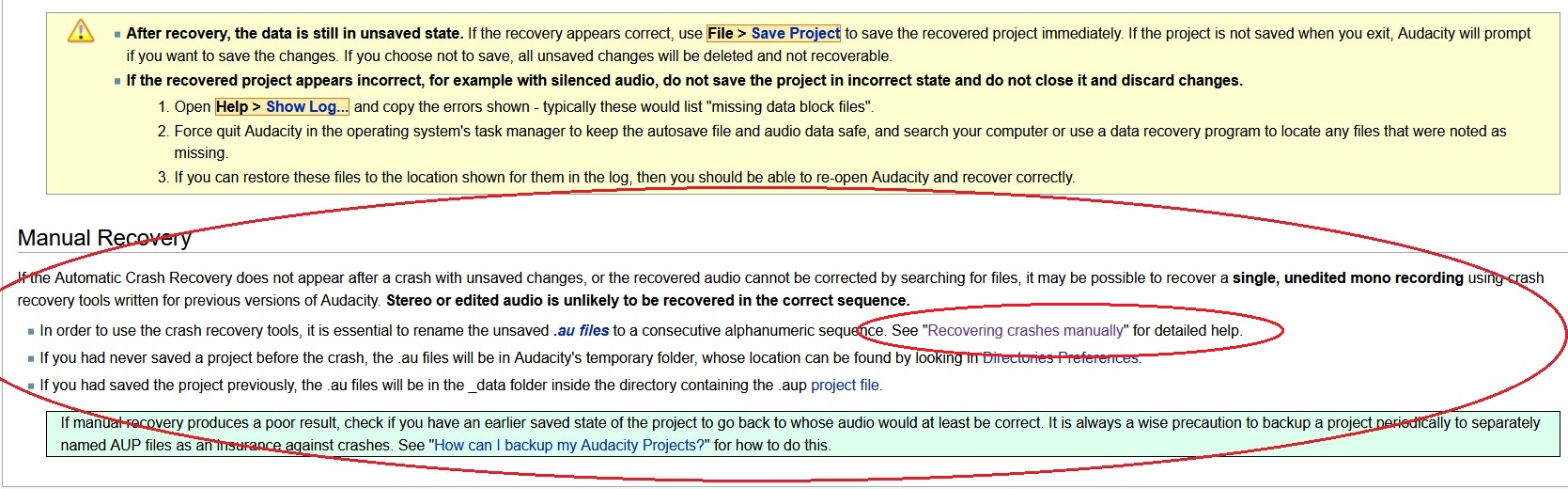
For example this is the bottom of the Automatic Crash Recovery page as it was in 2.1.0


The link on that page led to this detailed page in the Wiki

Personally, if we are to add your Magicke Spelle, I would prefer to keep it all in the Manual (to keep it all the one place) - but we could link out to the Wiki. But this is not really my call these days, but I’m prepared to give it a try.

My choice would be to add a footnote to the current alpha Automatic Crash Recovery page - and create a new page for your corrupted project revovery. The only advantage to placing it in the Wiki is that is publicly availbele immediately, whereas in the Manual it would’t get published until 3.2.0 release - but in the interrim we do have this thread in the Forum to point folk at. Though I’m not sure how many folk read the Wiki, precious few is my guess …

Peter

By far the most common problem with the old “.AUP” format was users accidentally losing / deleting the “_data” folder. As you might expect, there is no chance of recovery if the folder could not be found.

Corrupt .AUP files did happen occasionally, though quite rarely in later 2.x versions.
In later 2.x versions, automatic recovery was about as good as it could get - if automatic recovery failed, then manual recovery would probably not be possible either.

Old “manual recovery” documentation: Recovering crashes manually - Audacity Development Manual

Then I think that answers your question. :smiley:

As I have mentioned elsewhere, these are not my spells. Although I did write some procedures in the past that helped in some small way, they were rendered mostly obsolete by newer releases of Audacity. Fortunately, Dmitry stepped up to the rescue and has assembled a package that is better, faster, more effective, and easier to use than my methods.

I think this should be handed over to whoever is charge of documentation. I’m guessing that is LWinterberg(?), who can be contacted via discord.

Thanks for this tool first of all, even if it didn’t work for me in this case.
The -drop command gave me the reply “database disk image is malformed”.

Maybe because I’m running 32-Bit Audacity (on Win10 Pro build 10.0.19044)? I don’t know anything about the differences of 32/64-Bit, will provide more info on system specs if anyone cares :slight_smile:

Edit: I just realized that on the DL page for version 1.0.1 the packages are still named 1.0.0…?

Is this a typo or is the latest version not available from there? The extracted folder in my downloads also says 1.0.0. Any chance my recovery might work with v 1.0.1 and where do I get it?
project tools dl page.JPG

If you care to zip up your original damaged .aup3 file and upload it to a public file sharing service, then PM me the link, I’ll take a look at it over weekend. (I’ll be out of town tomorrow).

It is unlikely that this would make a difference. I believe Audacity projects are completely interchangeable between different operating systems. For example, I have run Mac projects on my Windows machine.

Thanks for pointing this out. The 1.0.1 version is indeed named “1.0.0” - I have mentioned this discrepancy to the developer. The latest version is dated 1/27/2022 7:27AM.

We can redo the lost interview, but if it might help you to improve the repair tool i can send you the file.

Those were my thoughts exactly. :smiley:

I sent you a PM

When I ran the tools on your project, I received the same message. In fact the tools did not seem to like your project at all. However, when I skipped down to step 12 and continued with the recovery, I got the message, “Database is badly broken. Running recovery…”, and the file was recovered for me and looks just fine! :smiley:

I tried again and also skipped to step 12…i guess it partly worked…it created a recovered file which couldn’t be opened because “This file was created with a newer version of Audacity. You need to upgrade to open it”. And what is Audacity 58.115.6 ?? :smiley: