You haven’t actually mastered anything yet, right? It’s not just making it louder. Mastering is only three effects, but they interact with each other and each one helps the sound along.
Thank you so much! I’ve downloaded the ACX plugin and will figure out how to install and use it. I’ve learned so much, so quickly, thanks to you. Exactly what I needed. I’m eager to learn way more. And your encouragement is priceless.
We would add saving your original WAV recordings against computer failure, and create WAVs of the Mastered Work in addition to the ACX submitted MP3. That’s your archive. You can’t easily change or edit the MP3 without sound damage.
Be able to point to two separate places that have valuable work. Your computer and a separate drive counts as does cloud storage or thumb drives. Two different places on your computer does not count.
“And this is 9 mastered with gentle 666 noise reduction. First three readings and sentence 2/3 down.”
I’m not understanding what you’re referring to with 666 noise reduction. Or what readings and sentence you’re referring to.
I’m assuming that I’m to just do this:
Select the whole reading or chapter by clicking just to the right of the Collapse/Expand button linlk= at the bottom of the Track Control Panel.
Effect > Equalization > Select Curve: Low roll-off for speech, Length of Filter: about 5000 > OK.
Effect > RMS Normalize: Target RMS Level -20dB > OK.
Effect > Limiter: Soft Limit, 0, 0, -3.5dB, 10, No > OK.
Analyze > ACX-Check.
And that’s when it’s passing ACX. Though I’m not equating the 666 (mark of the beast) to any of those specs. It’s soundy a bit boomy to me, though I’ve got my headphones playing through the computer full blast. At 50% it sounds normal.
One goal of Mastering was to make your submission pass ACX and still sound like you. Some of the other techniques change your vocal tone or in some other way affect your voice. Excessive Noise Reduction can mess up your voice and ACX Quality Control is on the alert for that kind of damage.
You will note that you need to install RMS Normalize and ACX Check. Neither of those comes with Audacity. If you read the whole Mastering page, it talks you through all that.
Noise Reduction is the step that pushes you over the edge into acceptance. Without it, you juuuuust miss.
Noise Reduction is two steps. Drag-select some of your clean background noise (one reason it’s terrifically important to have background noise) and Effect > Noise Reduction > Profile. This lets Noise Reduction “sniff” the noise so it knows what to attack. Then you select the whole show, usually by clicking just right of the up arrow…
…and Effect > Noise Reduction > 6, 6, 6 (top to bottom) > OK.
Hmm. I’m not getting it to pass ACX until I do the Limiter, RMS Normalization and Equalization filters I quoted above. If I then do the noise reduction with the 666’s it still passes, though it does sound better to me. The ambient noise is cleaner.
As above, your mastered work without noise reduction just misses passing. If you created a new clip and announced slightly louder, the clip would pass without noise reduction. But all these tracks are dancing right on the edge and you can’t do that with a book. It will drive you nuts.
So In My Opinion, you should use the mastering steps followed by gentle noise reduction (666) for everything.
Sloshing in and out of noise reduction will create another problem. ACX insists all your chapters match. They won’t if some have reduction and some don’t.
You’re saying if I learned to speak louder I might be able to do without it? I did get it to pass without the noise reduction by increasing one of the values by one digit. I made RMS Normalize -21.00 and it passes the ACX without the noise reduction. Is that a mistake? Or will that be safer than sometimes using noise reduction and sometimes not?
I just bought a hearing aid online and am hearing speech much better. And crickets. Now I can hear all those ssss’s and mouth noises and they’re irritating me. Don’t voice talent train themselves to avoid these things? Is that a skill I should be cultivating?
I’m curious – if I’m in a very quiet room with no machine noise where is the noise coming from? Is it inherent in the mic?
I just bought a hearing aid online and am hearing speech much better.
There were clues in your postings, but I was too gallant to say anything.
When was, harrumph, caff, caff, the last time you had your hearing checked?
All microphone systems make noise. The voice signal falling out of the bottom of a microphone is about a thousand times quieter than it needs to be. There will always be a sound booster in there and they all make noise, even if the microphone itself doesn’t. The juggling act is to make your voice louder than the noise, but not so loud that it overloads and causes distortion.
That’s what the recording engineer does.
In general, microphone systems built into a recorder do very well, the designers can do everything at once, but if you’re seriously soft-spoken, it could be hard to get up enough volume without boosting the noise up with it.
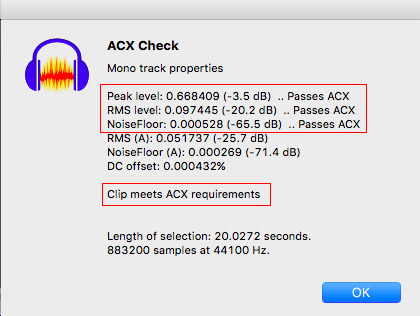
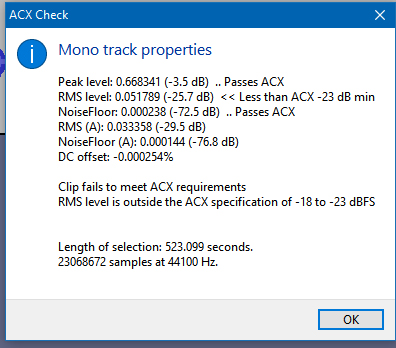
ACX Check tells you stuff.
The third reading, Noise Floor needs to be quieter than -60dB. To be safe, the performance should be about -65dB or -66dB (illustration). That leaves room for mistakes and performance variations. When I mastered #9 clip, it came in at -59.5dB. It’s louder than -60, so it would fail. Just announcing slightly louder would work, but isn’t wise. It’s too close.
That’s why I put the Noise Reduction step in there. 6dB less noise (the first of the three 6’s) allows you to clear each chapter comfortably even if you do make a mistake here and there. The second and third 6’s are settings so ACX Human Quality Control can’t tell you did anything. They hate sound processing.
The middle number in the illustration, RMS, is overall loudness and you have to hit it between a quiet value (-23dB) and a loud value( -18dB).
And yes, you can do that with the setting in the RMS Normalize tool.
You will always need to make adjustments to get from what you announced to what you submit. Nobody can read straight into audiobook standards. Audiobook Mastering is the fewest simple tools I could find to adjust what you recorded to what ACX wants.
When you Master a recording, see where the noise number is. If you can get it down to -62dB or -63dB, then that may be enough. Now that you can hear, turn the volume up and you should hear gentle rain in the trees sound. Shshshshshshsh. That’s nice, well behaved noise and it’s easy to ignore in the background of a reading.
I am admittedly one of the 80% of Americans who need hearing correction but have never done anything about it because it is so exorbitantly expensive. That will all change in August of this year when over-the-counter aids will be legal. Prices will drop. It will become so common for people to be using devices that won’t look any different than Bluetooth headsets that the stigma will disappear. There will be no further need to be gallant.
I thought the clip after “mastering” with the four filter passes did sound processed. I decided to experiment with increasing the volume of my delivery (how loud I’m speaking). One problem is that I can’t read my script and keep an eye on the Zoom H2N display at the same time. I installed a free sound meter on the Notebook I’m using to view my script. I eyeballed it to calibrate roughly with the Zoom H2N. With both the script and the meter visible on the same screen, I was able to keep my volume up higher than before. I recorded another sample and this time I only needed one filter, the limiter, to get it to pass the ACX. It does sound more normal and unprocessed to me. Here it is:
The noise floor is all the way down to -.67.5, and I didn’t touch it. The filter to clip it at -3.5 dB peak took out plenty visibly on the waveform, but I can’t hear anything to sound the worse for it. What do you think?
80% of Americans who need hearing correction but have never done anything about it
WHAT??
I thought the clip after “mastering” with the four filter passes did sound processed.
The two audible tools are the rumble filter (Low Rolloff) at the beginning and Noise Reduction at the end. If you read loud enough, you won’t need Noise Reduction and if you have a well-behaved recording system, you don’t need the rumble filter.
However. The middle number, RMS, is a range, -18dB to -23dB. Please note your loudness is -22.2dB Thiiiiiis close to falling off the edge. I would use RMS Normalize and Limiter and ignore the other two tools.
I went through the review process with Audible. At first, he found a few mouse clicks to be edited out. I gave it another pass, taking those out, and took out more breath noises as well. He then said he found no editing issues. There was never any mention of defects with noise floor or any of that. So we’re good, and I’m ready to go ‘performing’ my piece. I’ll try and take some pix today of my set up and post them here.
Another piece of exciting news. Several professors (Serbian) at the University of Montenegro (in the Balkans) found my book (paperback version) on Amazon, like it a lot and are talking about writing an academic paper about it! How’s that for a shot in the arm?
I’ve started recording. I have sound acoustic panels I bought on Amazon that I’ve set up behind my mic. I’m getting slightly different readings than before. I would think they are better.
I’m still working on my understanding of sound levels. I believe my noise floor is the lowest ever. Is the RMS level I’m getting saying that the noise floor is too low? Is that possible? What’s the least intrusive thing I can do to pass this test? The recording sounds really good, you hear no static in the background, the voice level is just right. So, it seems passing this test is a technicality that is essentially adding no real value. Is that right?
I’ve fiddled with normalizing and RMS normalization but not hitting it right, and as I said, I’m loathe to add any processing to something that sounds good in its natural state.
Does a lower minus sign value - mean something is quieter? All these negative values are still confusing me. If the peak value is -3.5, it means on the other side of the scale it’s also a +3.5. Why are we using the -, negative value? At this point, it’s just seeming to me like an effort to make things harder to understand and mess with our heads a bit.
I’m loathe to add any processing to something that sounds good in its natural state.
“Sounds Good” is the second ACX test. Human Quality Control. But to get there you have the pass automated testing (The Robot) and that’s where most home readers fall over. That’s why it’s automated. It’s a quick Go/NoGo. That’s why we designed ACX Check. It mirrors the first thing ACX is going to do when they get your submission.
“Zero” in sound-speak is maximum volume. If any part of your voice tries to get louder than that, it can become permanently damaged and sound terrible. The rest of the numbers go negative from there. -3dB is quieter than that. -20dB is quieter yet and -60dB is so quiet you almost can’t hear it. Those are the three cardinal ACX sound levels.
I’ve fiddled with normalizing and RMS normalization
If you apply the three ACX Mastering tools in the right order, it guarantees the first two numbers and if you record in a quiet room, the third number—Noise—should pass. Mastering was designed to pass and still have little or no affect on your sound quality.
Nobody can read directly into ACX sound levels. Or at least you might hit it here and there by accident, but you can’t read a book like that.
We get people published with the mastering suite of tools.
are talking about writing an academic paper about it! How’s that for a shot in the arm?
So we might be talking about the non-home option. Record in a professional studio and let them worry about sound levels or have someone with a known good track record read it for you.
Several forum posters have published books through professional studios and arrived on the forum after they tried to home-read the second or third book.
In any case, if it passes the ACX, I’m good to go, right? Mostly I’m just being curious, trying to grasp what all these factors mean. I have gotten much better at hearing what y’all are talking about. It was all Greek to me on page one of this thread, but I am now hearing lip smacks and SSSSSybillances and mouse clicks and all that good stuff. I’m curious to see if I can figure out how to record in a way that will require no correction. I bet doing both the reading and the recording can help you be better at recording and vice versa.
The track I was talking about above turned out to need just a bit of amplification and then a little limiter run to pass ACX. Which means I need to speak up a little louder, or get a little closer. When I’m going through editing I will spot amplify or de-amplify to improve the reading. I guess that should limit how much limiter I’ll need in the end. I think my Audible book is going to be an easy listen.
My hearing aid adventure has turned out really well. I got a free hearing test at Sam’s and sent that into an online company, Audicus. I’ve got a really nice correction for $700. Beats $2K. It’s just certain frequencies, typical of my age, the higher end of the human voice, that starts to fade out. It results in your losing the ability to discern certain consonants sometimes, which can mean losing the meaning of a sentence. Enough of that and you start to tune out. I AM feeling more engaged in a group setting. Amazing what a difference a few consonants here and there can make. It’s not just influencing how you’re hearing, but who you are in the world. Younger.
I’d never try to be that much of a perfectionist. But I’d like to know what the goal is, what I need to shoot for, then use the filters to fix. The less processing the better, right?
ACX wants all the tracks to match. Does that mean they all have to have exactly the same levels: peak, RMS and noise floor?
Does that mean they all have to have exactly the same levels: peak, RMS and noise floor?
No, but they’re very clear they do not want distractions. If your background noise changes between two chapters, that will take the listener out of the story. If your voice timber changes chapter by chapter because you changed tone correction, that’s a problem.
A favorite for home readers is the need for Noise Reduction. In general, if you do it once, you have to do it through the book whether you need it in one particular chapter or not.
The less processing the better, right?
Nice try. Audiobook Mastering was designed so if the tools aren’t needed, they don’t do anything. There’s no bookkeeping. You apply the same tools for every chapter.
Try doing it with no corrections. People do manage to read that way, but you have to be really careful about monitoring the work as you go. As I said, don’t post back at your first chapter, post back after your second or third successful chapter.