This is the most recent version that I’ve managed to find:
https://forum.audacityteam.org/download/file.php?id=36065
I found it in this thread:
This is the most recent version that I’ve managed to find:
https://forum.audacityteam.org/download/file.php?id=36065
I found it in this thread:
Ding!
That’s the one.
I didn’t know about that process discussion. Even better.
Koz
I don’t think it’s possible to improve on that.
It is possible to use Audacity 2 & Audacity 3 on the same computer,
BUT you need to keep them separate, and should not have them open at the same time.
One or both should be run as portable versions, otherwise they will both share (& modify) the contents of the hidden audacity folder. That can result in disaster.

Sorry Trebor, I’m a little bit lost here.
I did read the information from the link that you provided (portable versions), and I don’t quite understand what to do. I then read another thread…
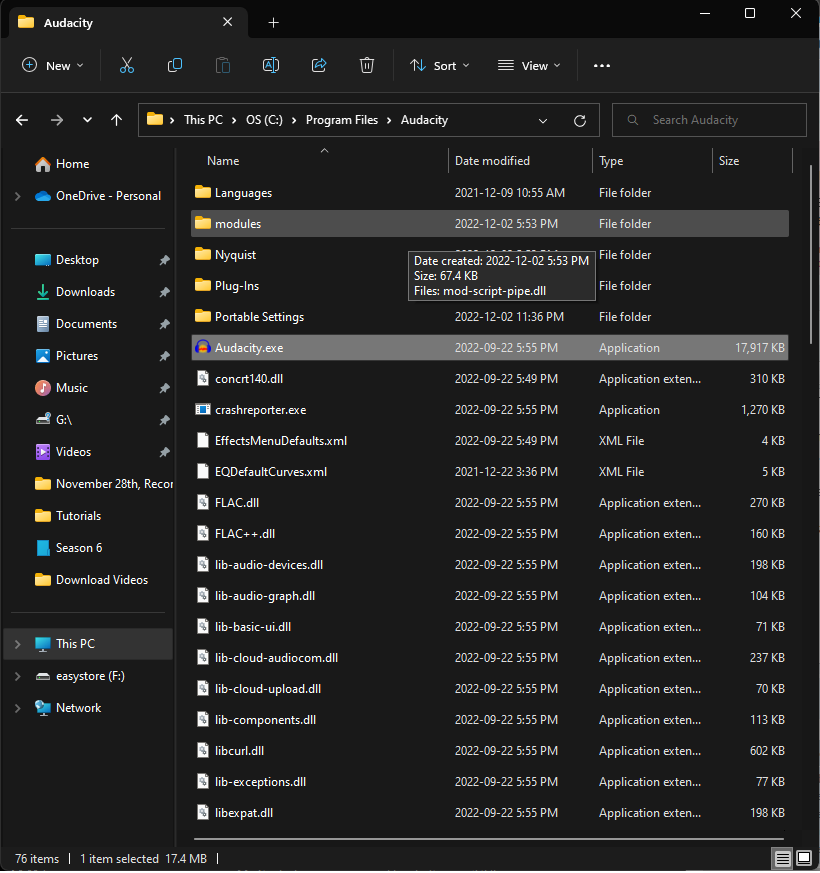
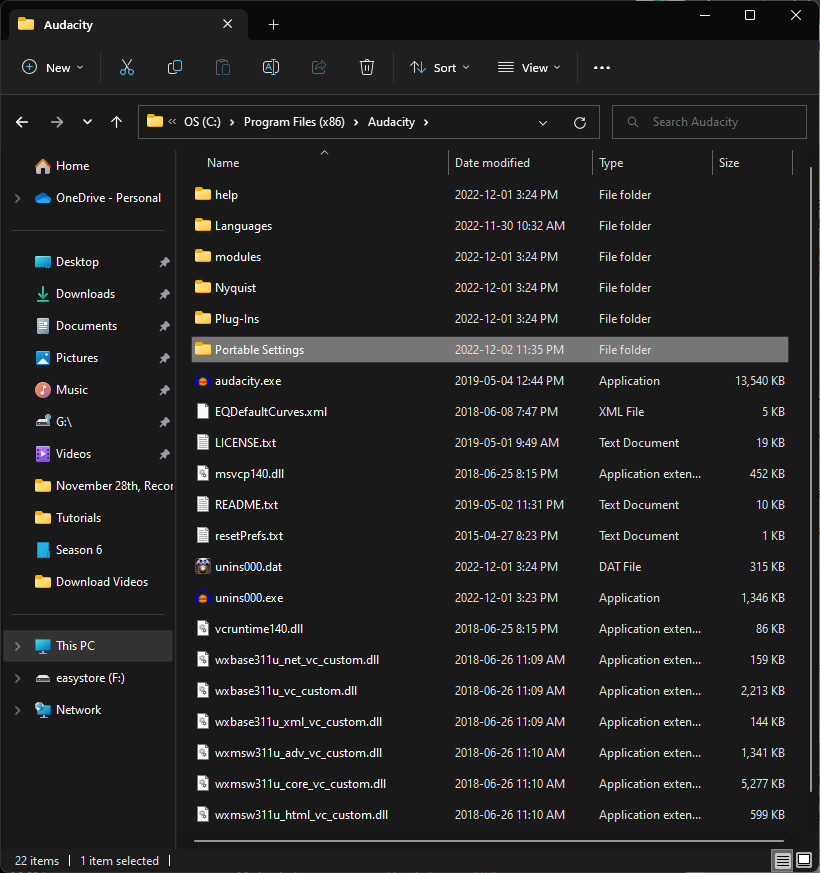
… and my takeaway was to create a “Portable Settings” folder (I have version 3.2.0 in my c:/Program Files/Audacity folder).
I’ll show you what I did (which is wrong but…).
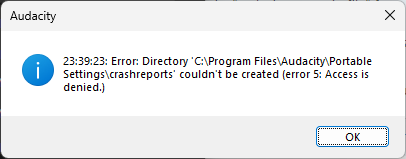
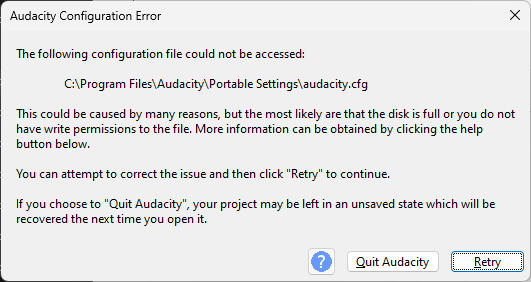
FFmpeg was configured in Preferences and successfully loaded before, but this time Audacity failed to load it at startup.
You may want to go back to Preferences > Libraries and re-configure it.
It is possible to use Audacity 2 & Audacity 3 on the same computer,
BUT you need to keep them separate, and should not have them open at the same time.
Going by this, is it possible that since they’ve been extracted in separate folders…
… and provided that I don’t run both at the same time, that they’ll independent one of another? That everything should be okay anyway?
Also, if I forgot to mention it, I made a “Portable Settings” folder in Program Files and Program Files (x86), perhaps that’s a mistake? Should I only make one “Portable Settings” folder, and if so, under Program Files which stores v.3.2.0 or under Program Files (x86) which stores v.2.3.2.?
Everything in “Program Files” has been installed, rather than just extracted.
Audacity is available as “.zip” files, (e.g. “audacity-win-3.2.1-64bit.zip”),
which can be extracted into its own folder, which you create.
Such extracted Audacity versions are independent from each other,
whereas installed versions will share the hidden audacity file, with disastrous results.
Re: https://youtu.be/yHx3ErLE9x4.
Transcoding by YouTube can increase sibilance.
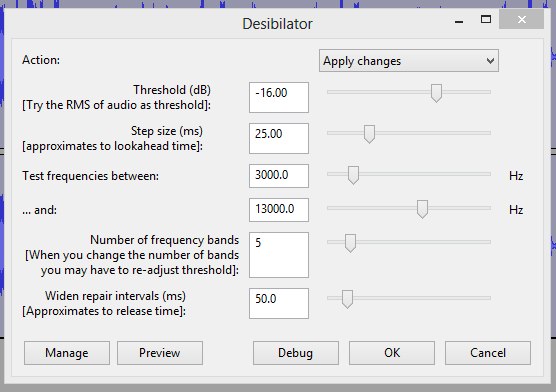
If you want to preemptively reduce it, the free desibilator plugin does a good job
If your audience is the same vintage as John Travolta they may benefit from leaving sibilance it as is:
high-frequency hearing will have noticeably diminished by that age.
Okay, now I understand. I wasn’t quite getting what you had meant in a previous post, and I was confused by the .gif; not now mind you. What I did this time is:
And if I’m essentially always using the .zip versions going forward, should I just delete the other .exe versions that I already have installed onto my computer while I’m at it?
I would certainly love to hear what it sounds like, because I think it would help.
I read up on transcoding; thank you for that. It’s also worth noting, that I’ve been doing recordings in Mono, and that YouTube recommends stereo channels; not to mention that Filmora11 (where I do video editing and upload files to YouTube), AFAIK, converts the Mono into Stereo anyway; at least that’s how I understand it. Even if I exported a file as a 32-bit Float, I’m pretty sure it’s converted (for lack of a better word) to 16-bit (either through Filmora 11 or YouTube) by the time it’s uploaded and ready for viewing.
As a chain, would I now go: EQ (Benson2) → Desibilator → FinalLoud3 → Couture?
Also, should I apply the same settings for the Desibilator, that you had in the .jpg?
Gee, I wonder why you thought of John Travolta of all people. 
Today, I learned:

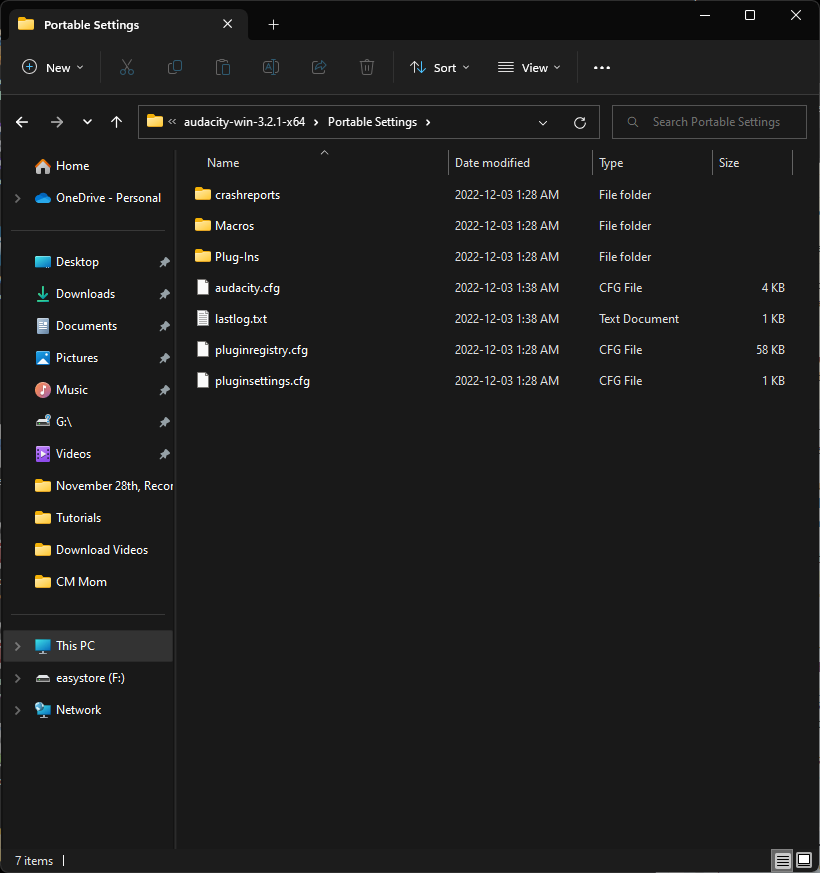
An example of what’s in the new “Portable Settings” folder, after launching the Auacity.exe via audacity-win-3.2.1-x64 folder. So, it seems to be working.
If there is already a “Portable Settings” folder after extraction you don’t need to create another one.
Only having one version installed is not a problem. More that one installed creates conflict.
Hold-off on deleting the “.exe versions” until you are happy working with the “.zip versions”.
De-essing like desibiliator should go after the limiter, i.e. after FinalLoud3.
That’s the desibilator settings I used on the YouTube audio …
YouTube broadcast level is not necessarily the same as your upload,
the only desibilator setting to experiment with is threshold, if you use too much de-essing it will sound lispy.
He’s one of the few on your YouTube channel who is currently “staying alive”.
Just making sure that we were talking about the same thing, and that I wasn’t seeing things, as I have a “Saturday Night Fever” at the moment.
Here’s the most recent version uploaded onto YouTube with the chain as follows:
Benson2 → EQ → FinalLoud3 → Disibilator → Couture (and I added a few seconds to the beginning and end before applying Couture, then I cut those two added audio clips immediately after)
The content loudness got further away from the target, but -1.1dB is still really good.
You’ve went with private rather than unlisted, so YouTube v=-omN8SMxlhw is not visible to me.
Sorry, fixed. 
Thank you for all of the help Trebor. This is infinitely better than where I was before (weeks back).
I’ve read conflicting approaches to editing. Trebor, would you recommend a person edit their audio before/after applying effects/audio chain?
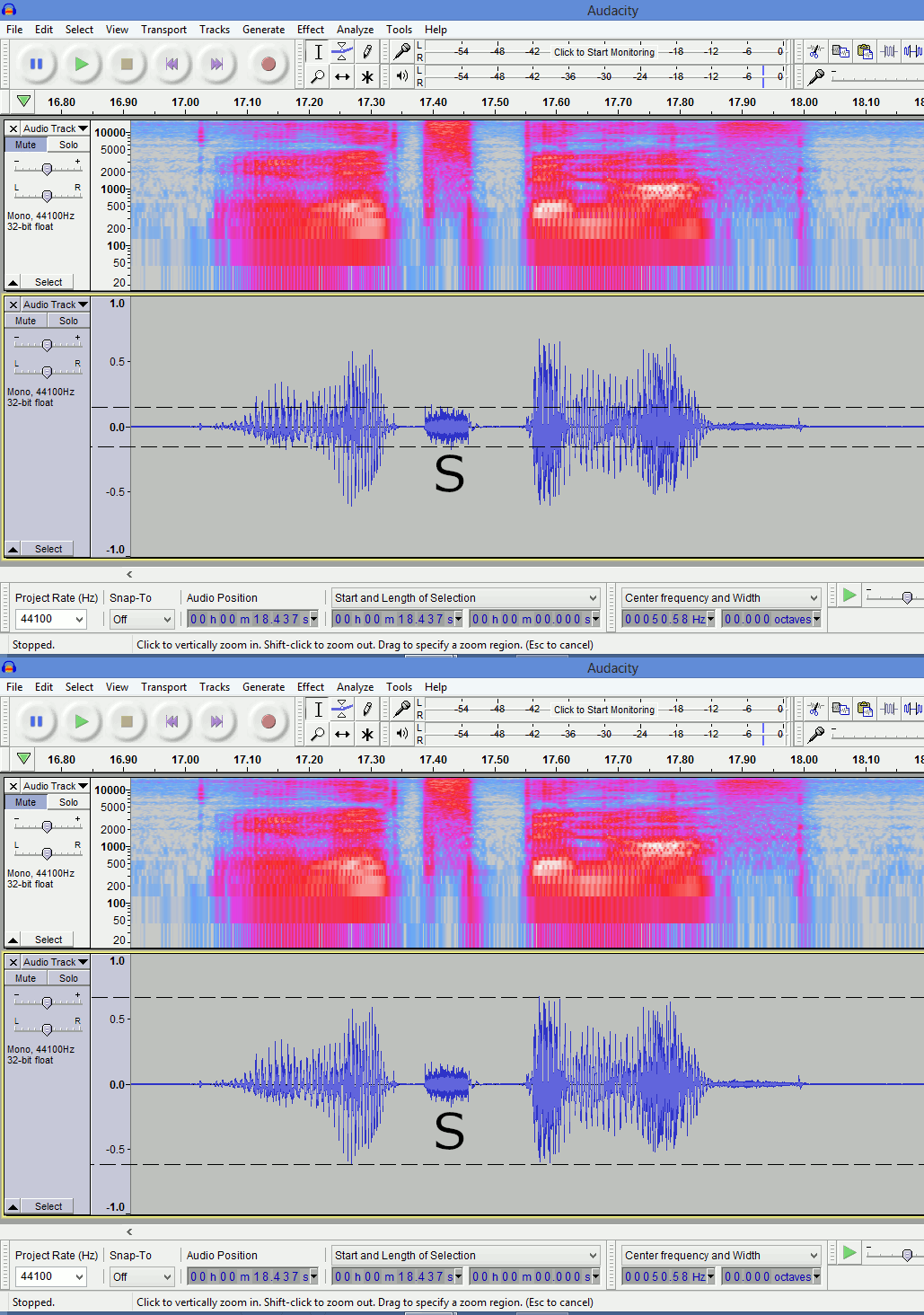
“v=-omN8SMxlhw” would be my choice for sibilance. It’s possible to tell visually if the esses are excessive :
the peak-to-peak distance of the “S” should only be about a quarter of the height of the peak-to-peak of neighbouring audio, ( ~1:4 ratio)
IMO dynamic-range-compression should not be applied until after editing,
if you compressed then edited, the volume could change abruptly at the edit.
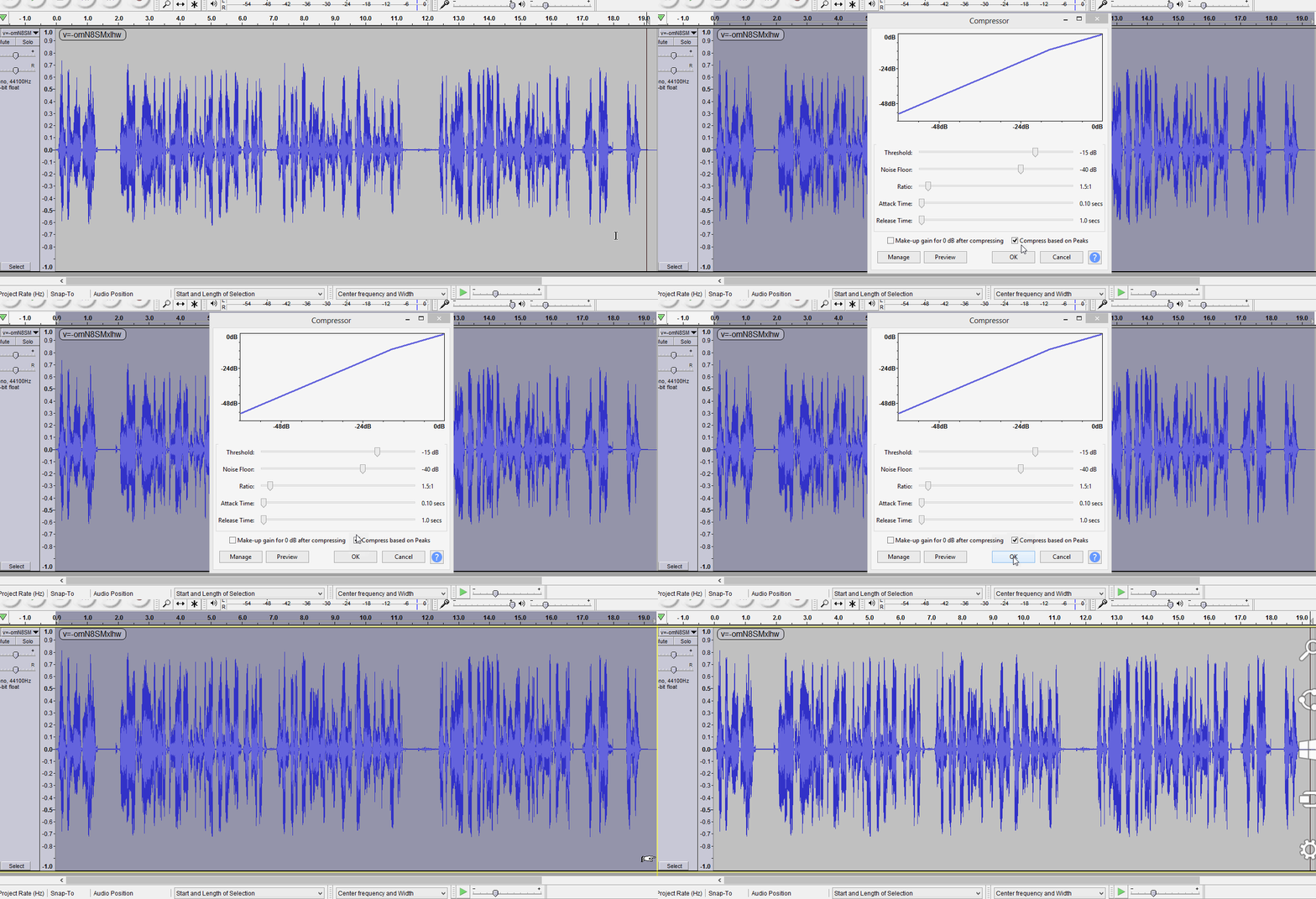
I understand all of your settings in the compressor, I can just copy what you did there. What is ““v=-omN8SMxlhw””?
Here’s the most recent version, with the audio chain being:
Benson2 → Equalization → Compressor → FinalLoud3 → Desibilator → Couture
YouTube videos have a unique ID code in the URL, “v= …”
IMO that’s just about as good as we are going to get.
maybe change the threshold on desibilator to -13 (was -14),
[ because the addition of compression has raised the levels,
-14 is now removing a tiny-bit too much sibilance].
“v=eQyIlF8ZWZs” being broadcast by YouTube at -15LUFS integrated.
If you want to hit the -14LUFS, add amplify by +1dB to the end of your chain.
[ an academic point: +1dB is not going to be noticeable ].
After +1dB amplification you should still have 1.9dB headroom,
minimum headroom recommeded for YouTube is 1.0dB, so you’ll have 0.9dB to spare.
Just a heads up, whenever I “Export” from Filmora 11, specifically for Audio, it’s locked in at:
There are drop down menus for each category, but for these samples (for whatever reason), you’re forced to go by those rates, and Stereo. Just from my perspective, I find that confusing, because the original audio file was recording as Mono, and I exported the post-produced WAV file as Mono 16-bit PCM. I’m just wondering if much is lost, when they automatically convert it to Stereo (Filmora 11 or YouTube).
BTW, I had the Desibilitator threshold at -16dB; not at -14dB. I did go to -13dB on the most recent export to YouTube.
This is the most recent export to YouTube (via Filmora 11).
The audio chain for this was:
Benson2 → Equalization → Compressor → FinalLoud3 → Desibilitator (-13 Threshold) → Couture → Amplify (+1dB)
*With also adding a several seconds to the beginning and end of the audio track before applying “Couture”, then removing the beginning and end before export the final track as a WAV file.
It also hits YouTube’s content loudness meter perfectly, at -0.1dB.
YouTube “v=5ZqL0f-aWu4” is currently a private video, (so not visible to me).
 Sorry, it should work this time; I swore I’d already set it to ‘Unlisted’.