It sounds good, better than most on YouTube,
but it could be very good, if the boxiness was removed,
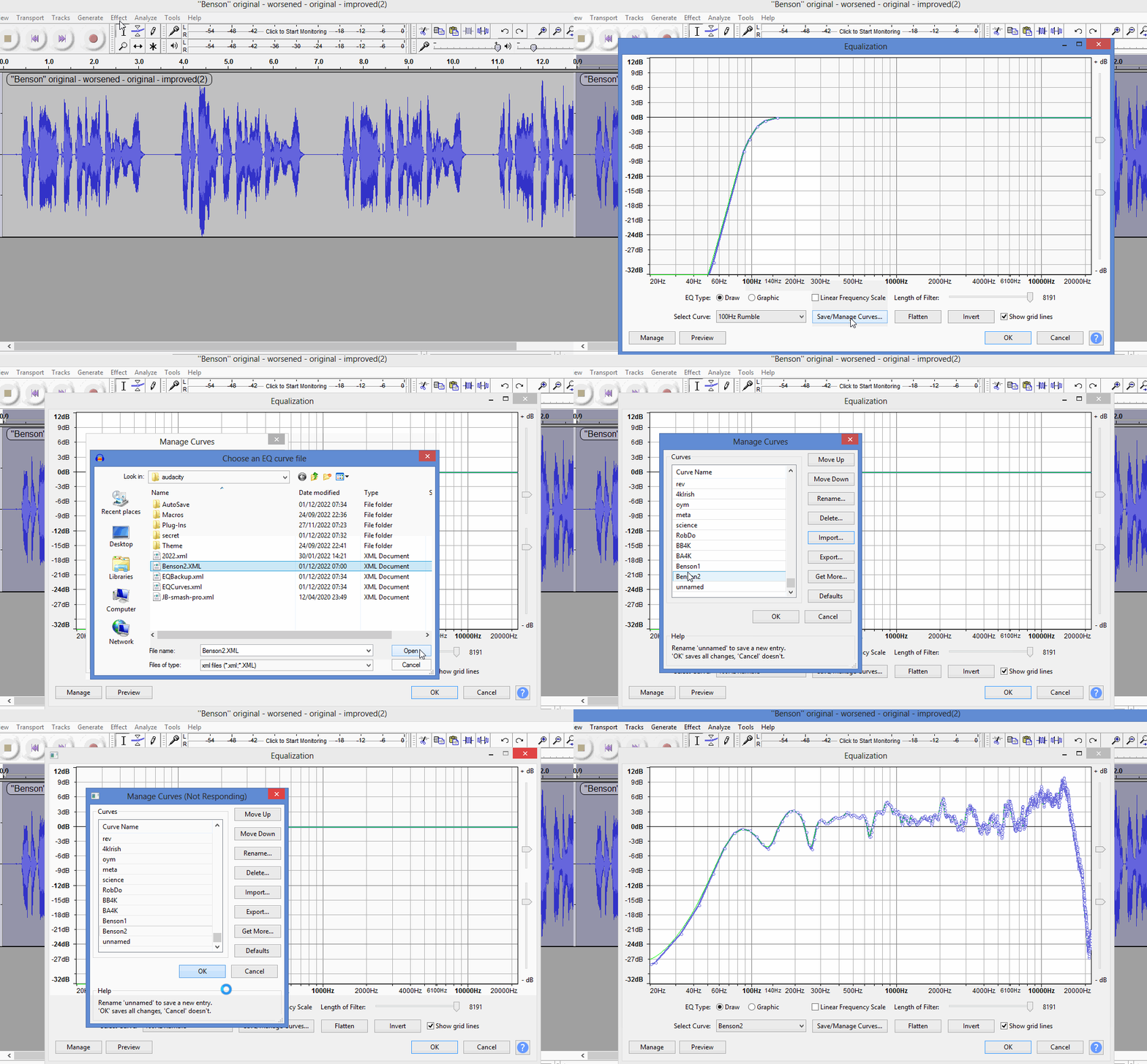
which it can be done with the equalization above.
If you invert that custom equalization curve it worsens the problem,
making it more obvious what I’m on about, see …
Thick quilt will do a lot reduce room reverb, but bass frequencies can make it through a brick wall.
Some surface about 125 cm from the microphone is responsible for the 130Hz peak,
it could be ceiling/wall/floor if it’s 125cm from the mic.
Thankfully the 130/260/650Hz resonance peaks can be cured by equalization, rather than by having to reposition* the booth, or adding more acoustic treatment to the room.
[ * In the middle of the room is ideal, away from the walls ].
I can definitely hear it being a lot lighter (for lack of a better word) in the last take; while not being too bright. Also, knowing YouTube, that crispness will come out more. I do find that there’s a bit of dulling in the audio, once videos are uploaded.
When you tell that you think that it can be “very” good, that’s very exciting.
[ * In the middle of the room is ideal, away from the walls ].
That’s going to be hard to do; short on room in the house. Two of the sides are next to walls, would you suggest/recommend that I be facing opposite of those two walls (my direction of speaking)?
That equalization curve is specific to your Benson recording set up, and I think it solves the boxy resonance problem, so I would not change the position of anything in your set-up.
If it’s too bright for your taste, you could use Audacity’s bass & treble, (a real-time effect in Audacity 2.3.2), to cut-back the treble, but the key point is the custom-equalization-curve has removed the bassy resonance.
I was using the 64-bit VST2 version of Voxessor in Audacity 2.3.2 where VST2’s work in real-time.
The restricted “preview” style effects will not be able to do the “match ideal” auto-EQ where you have to capture the profile, (i.e. “analyse your voice”).
Btw, just an update. I couldn’t open up the plugins once I had reverted down to Audacity 2.3.2, but I got some of them to work now. I was able to copy/paste the following plugins:
Auburn Sounds Couture.dll
FinalLoud3.dll
TDR Nova.dll
Voxessor.dll
… all into both c:/Program Files (x86) VSTPlugins and c:/Program Files (x86) Audacity Plug-Ins folders, and all of them work, but not Voxessor.dll for whatever reason.
“x86” means 32-bit plugins, which will only work in 32-bit Audacity.
I must have been using be a 32-bit version of Voxessor* in Audacity 2.3.2., rather than 64-bit
The custom equalization curve makes Voxessor (and TDR Nova) unnecessary,
still need Couture though, and some limiter and/or compressor, (native Audacity ones may suffice).
[ * IMO Voxessor is not a reliable plugin: it seems to have a mind of its own ].
Those quilts/blankets work best when they have some spacing between them and a hard wall.
Your voice leaves you and slowly dies in the air on the way to the blankets. The blankets reduce the volume. Then the sound slowly dies on the way to the wall. The wall isn’t perfect, but if you have a hard plaster wall, most of it will bounce. Then it slowly dies again back to the blanket. The blanket reduces the volume again. Then it slowly dies in the air on the way to the microphone. The microphone is directional and should have a good job reducing the volume of anything that doesn’t arrive from the front.
You may be able to get better echo suppression by reversing the microphone. Point the back of the mic toward the walls.
I think there is still something a little full-moon magic about the installation. Remember the newspaper?
This is a straight, simple analysis of the “fake white noise” newspaper crinkle. Yes it gets louder to the left as the pitch goes down, but most of that is thunder and earthquakes. Now run the custom Audiobook Rumble Filter.
And boop. All that stuff goes away, including, by the way, the peaks at 130, 260, and 650. The gentle tilts in the response are barely audible, and if you insist, should respond well to gentle Bass and Treble tone control.
So where did that voice distortion come from?
That snaps us back to RobDo actually sounding like that in real life. So one reason this process has been so painful is that the goal is wrong. We’re not making the system clean so it sounds like RobDo. We’re intentionally distorting it so it sounds more like a professional announcer.
Audacity 2.3.2, won’t allow me to ‘Enable’ various Built-In Effects, both Select All → Enable → OK or (click plugin) → Enable → OK. I’ve tried a number of times, closed and re-opened the program; doesn’t matter. When I say “won’t allow me to Enable”, I should clarify, that I’d DOES allow me to ‘Enable’ those effects, but they don’t appear under the Effect tab (listings) once I scroll down. And when I go back into Add/Remove Plugins, even though I just enabled something, it’s back to being disabled.
I’ve searched the forum (and via Google re-directed back to this forum/older threads), found two in particular, neither one fixes the problem.
Also, while I can access ‘Equalization’, but after going into ‘Manage’ I can’t import (greyed-out) Benson2.xml.
BTW, I apologize (Trebor) for incorrectly reading about Benson2.xml, and not needing Voxessor and TDR Nova. I have a tendency to read things incorrectly (especially anything that’s technical), and I have to write things out, slowly process what it is that’s in front of me, and hopefully come to a clearer understanding of what was said or presented to me. I took the better part of Monday writing out everything, just to make sense of what had been written throughout the thread. Some things come to me easily, other things, not-so-much.
Voxessor is one of the worst purchases I’ve ever made, and the lesson learned is that you don’t throw money at a problem.
There’s a hidden Audacity folder which allows information to persist from one installation to the next,
C:\Users\YourNameHere\AppData\Roaming\audacity
If you rename that hidden folder to, say, “audacity-2022”, a new folder will be created allowing you to start Audacity afresh, (the folder contains plug-in information which may now be incompatible as you’ve gone back in time from Audacity 3 to Audacity 2).
After you start Audacity 2-3-2 afresh (see above) “Benson2.xml” will take about 10 seconds to install, after you click on “OK”, as it contains a lot of points.
The booth boxiness issue is a real-thing, rather than my imagination:
here a recording made in >$3K booth needs some EQ to remove boxiness … https://youtu.be/T9g7bpOJ4l4?t=1212 [headphones recommended to appreciate the difference ].
When you tell that you think that it can be “very” good, that’s very exciting.
Remember my note that you’re having way too much fun with this?
You are playing three people: Voice Artist, Recording Engineer, and Producer. This is where the Producer picks a date. “If we haven’t resolved this at such and so date, we’re going with what we have and start cranking out content.”
It sounds good, better than most on YouTube, but it could be very good
It can also be a very good retirement project.
Ian is a voice artist living in Hollywood (just off La Brea if you’re counting). We got Ian up to producing consistent high quality voice work and it only took us just over a year. He has the forum record.
Well, I’m satisfied with where I’m at today. I’ve been using up far too much time over the past 12 months, and I’m VERY happy with what I was able to learn over the past several days; I wish I would have attacked/addressed these specific issues over the past 5 months; even stretching back to November 2021 to be honest.
Just to add, I tested out both chains (Koz and Trebor), and loaded both audio samples onto YouTube (set to private but I have samples of the audio below).
Tools → Apply Macro → YouTube-14LUFS-Mastering-Macro uploaded onto YouTube (via Stats for Nerds [right-click on the screen]), Volume/Normalize is at 57% and hits content loudness at -3.0dB.
Effect → Equalization → Benson2.xml → Couture (I didn’t add any Noise-Reduction) uploaded onto YouTube, Volume/Normalize is at 57% and hits content loudness at -9.9dB.
The -3.0dB came out better (on YouTube), but then I went back into Audacity and added FinalLoud3 (effect/plugin) onto both tracks, targetting -14.0 LUFS and -1.0 dBTP, only one pass for both, and I was able to get:
YouTube-14LUFS-Mastering-Macro up to -0.5dB
Benson2.xml up to -0.2dB
Here are the audio samples (after adding FinalLoud3) that took me as close to the -0.1 content loudness target that I was aiming for:
Both excellent. I also compared both of these versions to older audio recordings of mine (older videos), and it’s night and day.
I thank you both immensely, and I’ll get out of your hair (unless you have any questions or need me to do something). I appreciate your patience, and willingness to help me out.
I changed my mind, if you wanted to hear what it sounds like on YouTube - because to me it always does a bit different - they’re each set as unlisted videos; though I’ll be taking them down over the next several days.
toggling between them it’s clear to me “Benson2 - FinalLoud3” is the better of the two.
The resonance difference is obvious using earphones which can reproduce bass.
Even on laptop speakers, which have no bass, there is still a difference,
as “Benson - Macro FinalLoud3 v.2” lacks treble, so seems slightly lispy in comparison.
Nitpicking alert:
at times the sibilance on “Benson2 - FinalLoud3” is slightly too much, IMO.
[applying a limiter with make-up gain, like FinalLoud3, will inevitably increase sibilance].
And there is a very slight hiss, (you haven’t used Couture).
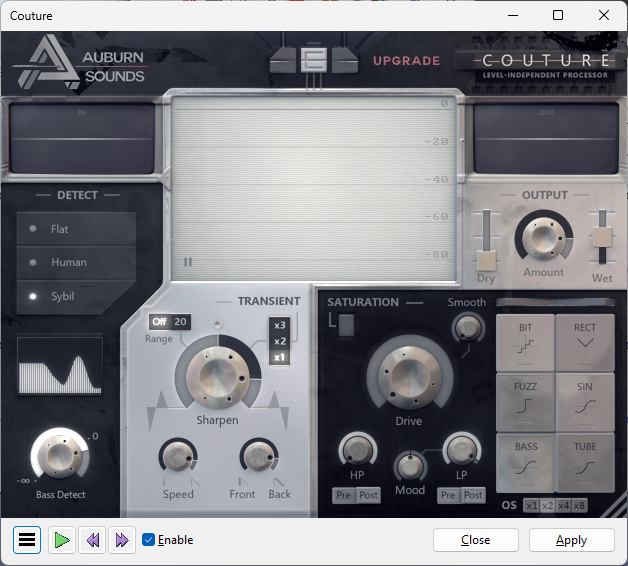
You can Can kill 2 birds with 1 stone: apply Couture with these settings at the end of your effects chain, (must be applied after the limiter),
NB: when applied, Couture can sometimes take ~3 seconds to settle-down and behave properly,
a workaround is to duplicate ~5 seconds of audio at the start, which Couture may ruin, which you can chop-off later.
For the record, I did apply Couture (on that previous copy); but I hit Apply on the default settings.
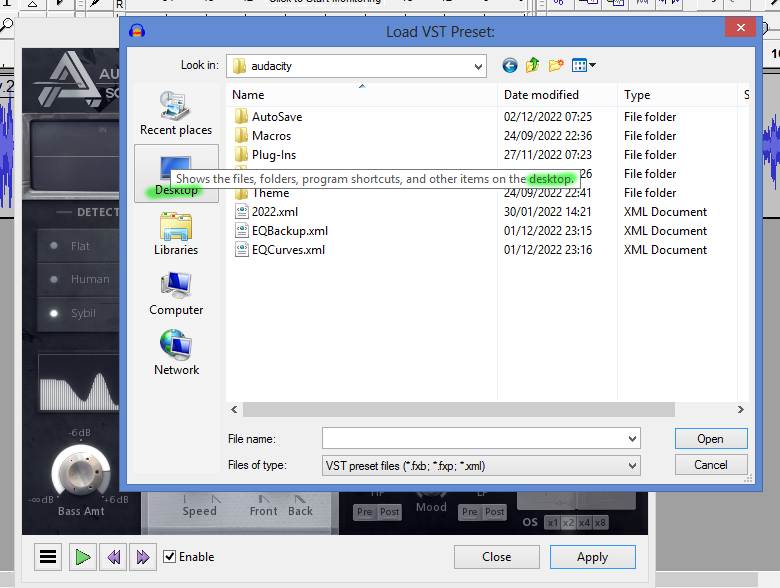
I downloaded 2birds1stone.xml preset, but either I’m placing it in the wrong folder, or it’s just not saving it for whatever reason. The Import button isn’t greyed-out, so it seems like I can import it… Any ideas there? I press Import, and it takes me to the Roaming → audacity (folder); so I assumed that I was to copy/paste there.
The pic (above) is my trying to replicate what you were able to do in your pic.
For Limiter, would I be setting it to ‘Soft Limit’ and how much on the “Limit to (dB)”?
I understand what you’re talking about the Couture workaround, I remember compress.ny having a similar workaround (at the beginning and end).
So, it’s EQ (Benson2) → Limiter → Couture
I have to add though, that I would still be adding FinalLoud3 at the end of that chain; unless you have a better idea. If I don’t apply it, it will (likely) still be coming in too quiet on YouTube. While bigger channels somehow get away with having their content loudness well below -0.1dB (some are at -20dB and still fine!), I know that for myself, it has to be within -2.0dB to -0.1dB (I’m relatively happy with -1.5dB).
You can do: EQ (Benson2) → Couture → FinalLoud3, if you want,
but the level of de-essing & expansion (noise reduction) done by Couture will be undone to some degree following it with FinalLoud3.
I’ve uploaded Benson2 w/EQ+FinalLoud3+Couture. Mind you, I only added 2 extra seconds at the beggining/ends, and forgot to cut them off. I’ll be sure to add 5 seconds instead (next time), and then cut them off after applying Couture.
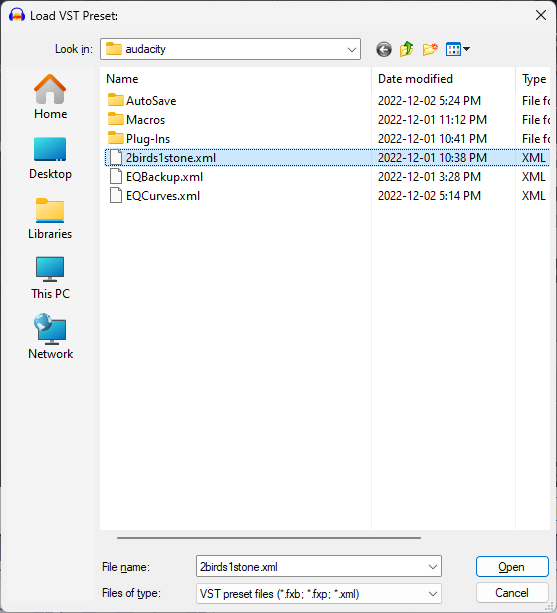
I still have 2 issues. When I import the preset “2birds1stone.xml” and press “Open”, it’s still not loading onto the Couture plugin. Just to make sure, I select default, then import the preset again (just like in the pic below), and it’s not loading (the default settings are still intact).
In the uploaded audio clip to YouTube, I just went with the version I was able to replicate; I had already saved it just in case.
Also, a big problem going forward, is having to revert to and from version 2.3.2 (or perhaps it’s easier than I think). My approach is to apply the audio chain, save it as a WAV, then load it up to a newer version of Audacity to do the actual cutting/editing.
Would you suggest an easy way that I can go from one version to the other, relatively seamlessly. AFAIK, I can’t have two versions (old and newer 3.2.1) of Audacity on my desktop. If you know of an workaround for that, I’d love to know about it. There are so many editing options in version 2.3.2 that aren’t not there, that one can take for granted.
Update: I have versions 2.3.2 in my Program Files (x86) folder, and version 3.2.0 in my Program Files folder.
I hadn’t realized that I can have more than one version; I assumed that the newest version would automatically override (and update) the older version. So, they can work independently.
Also, I thought that before I had updated to version 3.2.0, that there was a slightly older version that didn’t have the “Effects” in the pic below.
Basically, what’s the oldest version you can think of, prior to that Effects button appearing? I could just be misremembering, and it’s been there over the past few years.