I bet those were fun times, despite not know what the future will bring; especially being part of a team.
Couture alone could be sufficient to keep your noise down.
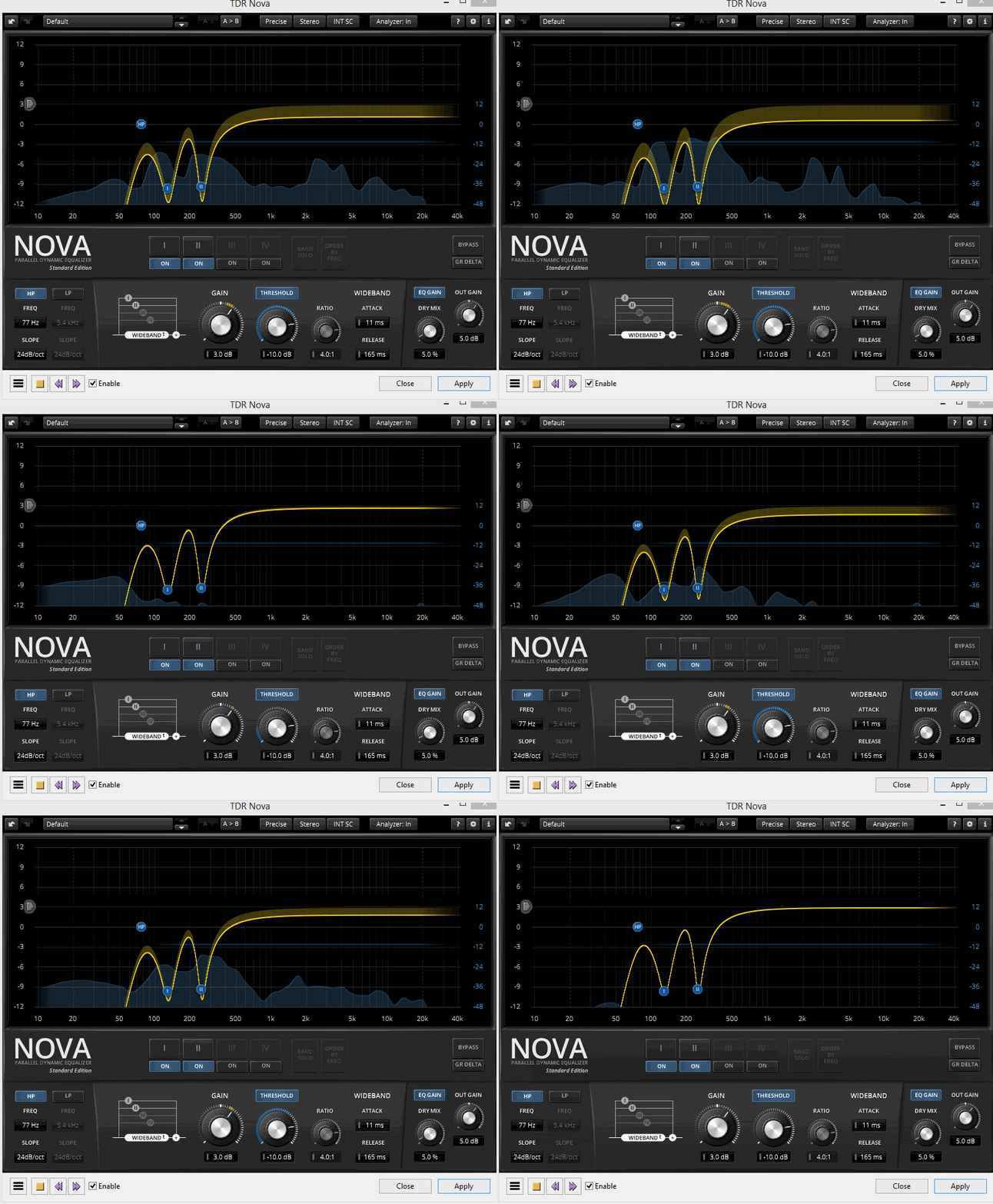
You can compress in TDR Nova, (while treating the boxiness at the same time ), to achieve the -14LUFS target …
RobDo#3.xml (39.8 KB)
Thank you Trebor, for all your help. I’ll be doing a lot of recording over the next days, and look forward to putting all of this information into practice.
I got the Macro working.
I’ll show you how to install it at the end.
Select the work. Tools > Apply Macro > YouTube-14LUFS-Mastering-Macro
That it. There is no OK. It just applied all three tools automatically. I compared your presentation doing it manually and doing it with the Macro and they’re identical.
YouTube-14LUFS-Mastering-Macro.txt (478 Bytes)
You can see the programming by opening it in a text editor (Do Not save anything). If you stretch it out really long you can see the individual steps. Comment, Filter Curve, Loudness, and Limiter. Can you read the following picture? Computers don’t need paragraphs, fonts, and line breaks so sometimes it’s a little rough to read.

— Install —
Tools > Macros… > Import > YouTube-14LUFS-Mastering-Macro.txt > Open.
It should appear in the Macro list. Close everything, open a sample reading and try it.
I don’t believe I remember how to do that. It’s just like riding a lawnmower.
There is a caution. This Macro guarantees what we perceive to be YouTube loudness and peak, but only if you use it last.
Koz
not know what the future will bring; especially being part of a team.
Most of us had day jobs, so his wasn’t quite the wild, wild west as it seems. Also, team effort lags a bit when there’s eight time zones between me and most of the team. Systems Administration? That’s four time zones that way (pointing east).
The new owners? They’re in Russia.
You get used to converting in your head.
Koz
Yes it was a lot of fun. Hard work, but loads of “job satisfaction”.
I had a go with that, its “match ideal” feature is auto-EQ.
It’s useful for finessing the equalization after removing the boxiness with TDR Nova.
(Theoretically auto-EQ should be able to detect and remove boxy resonance,
but apparently Voxessor is only making subtle, but noticeable, changes to the EQ).
The main problem I noticed is if you adjust the gender-dial, you have to “analyse your voice” again.
[also you have to switch the “analyse” button off for the “match ideal” correction to be applied].
I would not recommend anyone buys Voxessor, (there are cheaper Auto-EQ plugins),
but since you have bought it, the “match ideal” Auto-EQ is a useful feature …
neutral-voxessor.xml (512 Bytes)
Sorry, I’ve been taking notes on this entire thread - and organizing those notes to study and use for future references (just in case) - not to mention processing whatever it is that I didn’t understand. I did write down a few follow-up questions, but I’ll start with some of the work that I did in the meantime.
I did increase the gain knob (Air feature turned off) for my more recent recordings - it’s resting at a smidge under full capacity - and it’s hovering between GREEN, while occasionally hitting YELLOW, but not hitting RED. To be clear, if I go to full capacity, and raise my voice, then it’s hitting red/clipping. So, thank you for the advice.
If you were louder, you may not even need the noise reduction. The sample as posted is too quiet. As you perform, the Audacity blue waves should, on occasion, reach about half-way. The bouncing sound meter should occasionally reach -9dB or -6dB.
Just to clear, we’re talking about the Playback Level here? The blue line seemed to be resting almost exclusively at the -6dB mark, while the green line - which toggles more - was generally hitting ~-9dB to -10dB; though this is what I could see over the course of the full 20 minute track.
“You might also crumple up an actual newspaper in front of the microphone as a test recording. Make sure not to overload anything. That sound is remarkably flat and well-behaved and can be used to reveal problems.”
Here’s a sample of a crumpled up newspaper; sorry that I didn’t submit an example before (my mistake).
Here’s also, two recordings, the original sample with nothing added/changed:
Here’s the 2nd version, with the Macro added.
I’m very pleased with these newer recordings, and I thank you immensely with all of the suggested/recommended adjustments that I needed to make.
BTW, I was a bit surprised to see the Macro version, change the “Benson” audio clip to 32-bit float in Audacity.
All 3 WAV files shown here were exported at 16-bit.
For future reference, I’m going to be doing all of my recordings in mono, and export as Signed 16-bit PCM, WAV. Would it be correct that whenever I make an original recording, that I should keep the format at 16-bit PCM and at 44100Hz? The editing (video) software that I use, Filmora11, AFAIK, converts audio to 16-bit anyway; I had to ask them directly to find this out.
Thank you Trebor. I’m going to be working on this tonight/tomorrow, and hopefully, I’ll show you that I can execute (correctly) on everything that you’ve said.
I thought we lost you there. I was going to post that there is one tiny down side to the forum work and advice. If you do find something successful that you’re happy with, you should post how you did it. A forum is users helping each other, it’s not a Help Desk.
I just dropped in to the forum after a busy day, so I need to go back and read your postings.
I do have a legacy caution. You should probably avoid running the recording volume all the way up. Volume controls can run out of manufacturing accuracy at the two ends. In some cases they can create instability and some noise. So almost all the way up is probably best.
I saw this as I blasted through. The blue waves half-way up and the bouncing sound meter at -9dB to -6dB happens on the record side during the performance. Very much louder and you can accidentally cause overload distortion, popping, and cracking. Much quieter and you start competing with background electronic noise (fffffff). This is why it’s a poor idea to hide the computer screen during recording. Loudness does not take care of itself and you can’t set the record volume control in a magic place and walk away.
I got stuck with an outdoors news production where my headphones failed, but everything else seemed to work OK. I finished the show carefully watching my sound meters and instruments. No audible sound for me.
Blasts from the past.
Koz
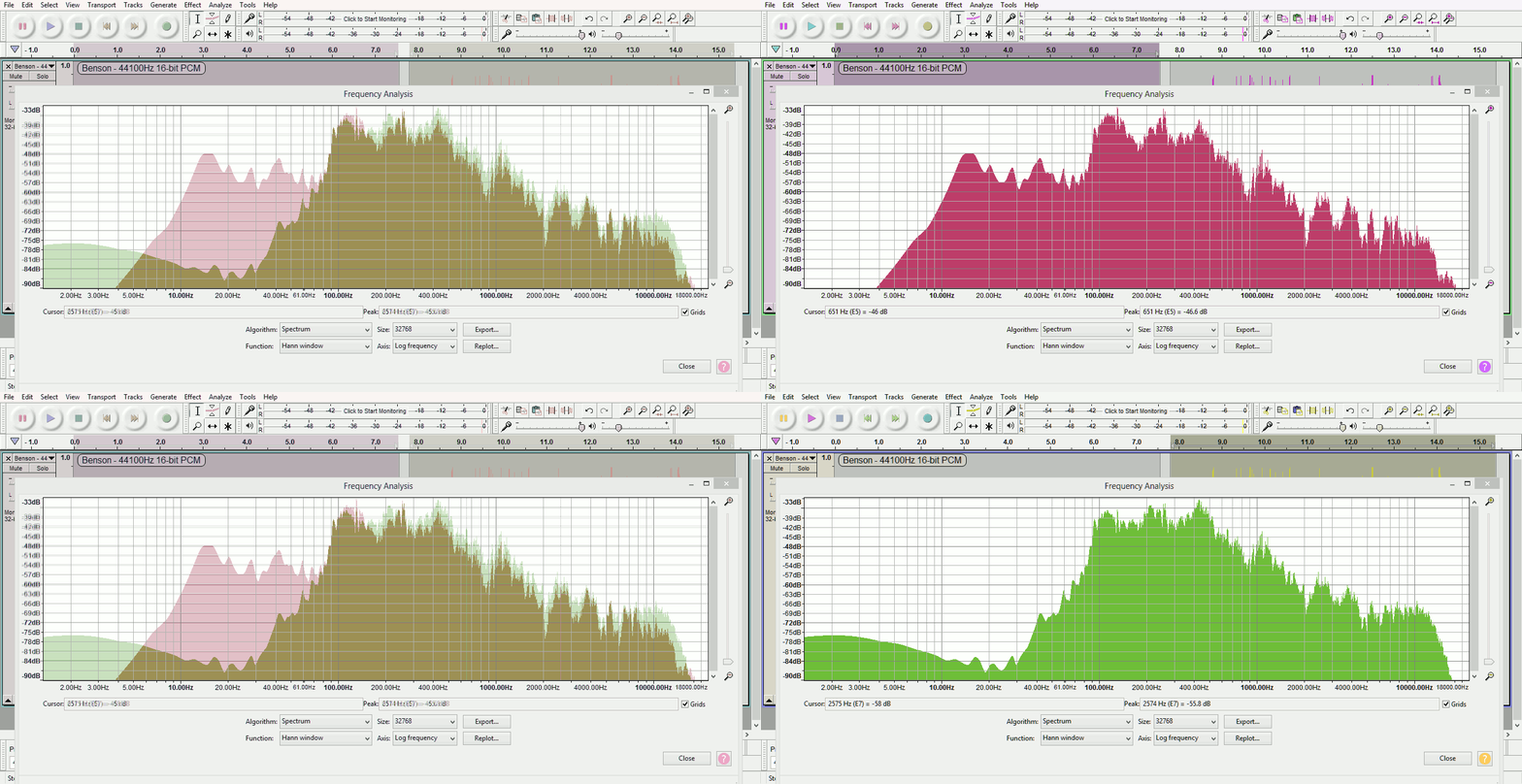
That’s a good recording, but still has the resonance at 130Hz & 260Hz which gives it the “i’m-in-a-box” quality.
Just cutting the bass with Audacity’s bass & treble will help , (-3dB Bass, -3dB treble), as the main offenders , 130Hz & 260Hz, are in the bass.
But for a complete cure of “i’m-in-a-box” resonance you need a tailor-made equalization to neutralize it,
which is possible to do with a combination of TDR Nova & Voxessor’s “Match Ideal” (auto EQ) …
I thought we lost you there. I was going to post that there is one tiny down side to the forum work and advice. If you do find something successful that you’re happy with, you should post how you did it. A forum is users helping each other, it’s not a Help Desk.
Do you mean like a summary? Would that be in a separate thread, or at the conclusion of this one? I looked at the FAQ, to find out what you mean by this, though I’m not finding anything. I certainly am willing to help out, though I’m sure you know that I’m pretty limited in terms of knowledge on Audacity and such. Could you give me an example of what you mean Koz? I want to have good rapport with this forum, especially with all of the help that you and Trebor have been giving me.
I did run into a problem. Up until a few months ago, Audacity was allowing me to use the plugins while playing the audio file simultaneously; as it should. Specifically with the Voxessor Plugin (and I’ve updated today to the 2.0 version), I can open it, I can upload your preset to it (neutral-voxessor.xml), but I can’t play the audio track/file; this goes for all of the effects (plugins) that don’t come with Audacity. I can only “preview the audio”, as well as “apply”.
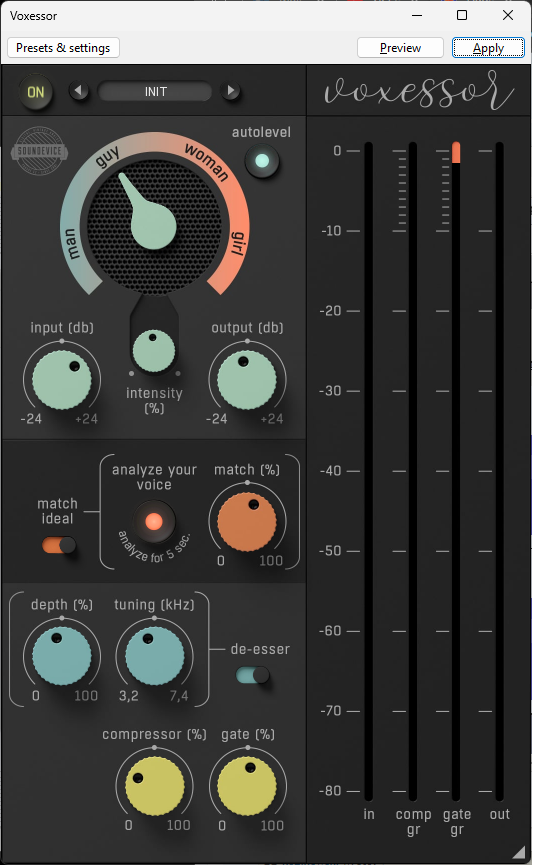
When I use your new “Effects” feature (on the left side under “Mute” and “Solo”), the “preview” and “audio” buttons disappear, the already saved preset (neutral-voxessor.xml) no longer appears under the “User Preset”, and I can’t import it because it’s not showing in the folder where I’m saving it (the .xml preset). But, the audio track will allow me to play it.
Both photos have similar settings, only because I tried to replicate the settings that you made in your neutral-voxessor.xml preset.
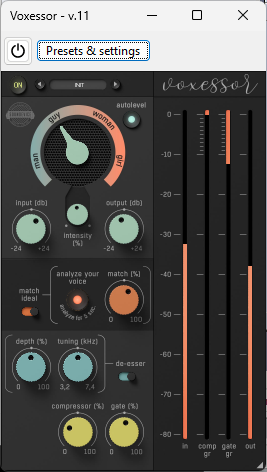
I browsed through the forum, and have checked off-site to see if this problem has come up. I couldn’t find anything unfortunately.
You can compress in TDR Nova, (while treating the boxiness at the same time ), to achieve the -14LUFS target …
Trebor, how are you able to measure that it’s hitting -14LUFS? Would that be by using Steve’s LoudnessMeasurement.ny, or by some other tool?
I was using the 64-bit VST2 version of Voxessor in Audacity 2.3.2 where VST2’s work in real-time.
The restricted “preview” style effects will not be able to do the “match ideal” auto-EQ where you have to capture the profile, (i.e. “analyse your voice”).
I’ve just tried the VST3 version of Voxessor in Audacity 3.2.1, for the first time.
Frustratingly you can hear the effect “Realtime”, but there is there is no way to apply the desired effect to the audio. 
[ IMO Audacity’s recent introduction of VST3 is a disaster: not fit for public release. Sacrificed VST2 real-time to provide us with VST3 which don’t work properly, and/or crash Audacity  ].
].
If you revert to Audacity 2.3.2 you can import this EQ curve which is what TDR Nova + Voxessor was doing to the equalization in the Benson example.
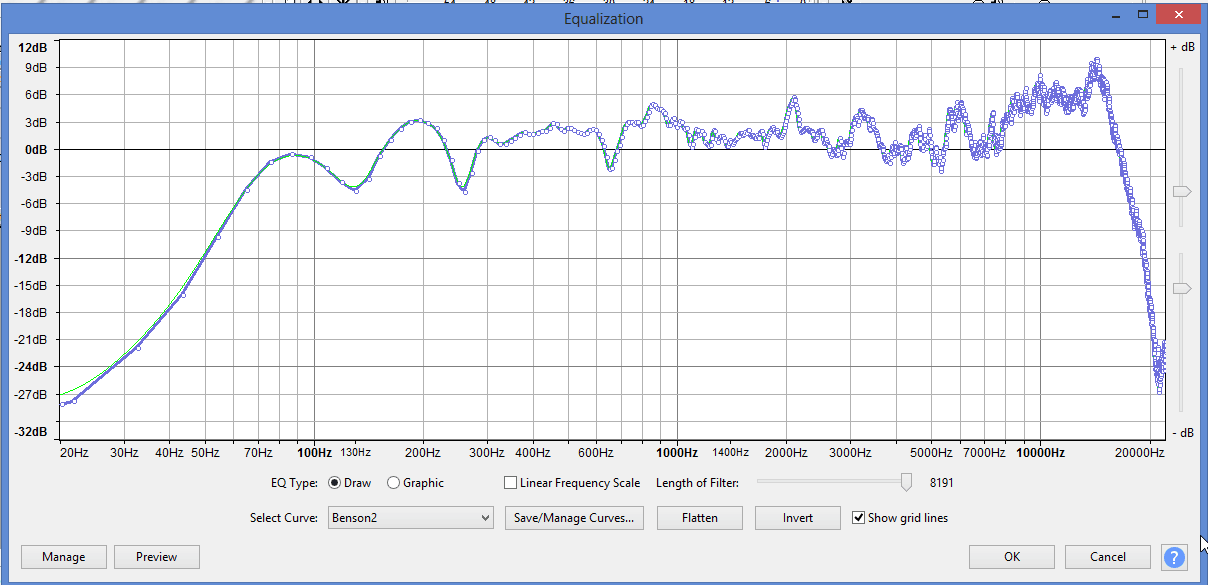
Benson2.xml (70.5 KB)
This EQ preset cannot be imported in Audacity 3.x.x : that only permits 32 points, (this curve has >4000).
I used the free version of YouLean, the “integrated” value measured over, say 10 seconds, or longer.
Trebor, how are you able to measure that it’s hitting -14LUFS? Would that be by using Steve’s LoudnessMeasurement.ny
I wondered about that. I haven’t tried it yet, but that’s next. I can fake measuring the peak “tips” value and I know that’s been coming out OK. Measuring LUFS has been a mystery.
That’s a good recording, but still has the resonance at 130Hz & 260Hz which gives it the “i’m-in-a-box” quality.
Are you actually hearing that, or are you just watching your spectrum analysis? What’s the possibility that RobDo actually sounds like that? My natural voice sounds like there’s something wrong with it. I’m comforted by a popular YouTube performer with the same voice.
The last studio recording adjustment has the blue waves coming out nearly perfect and the background noise passing muster.
I think you should call it good and start production.
Koz
I can hear it clearly with earbud headphones, which have a good bass-response.
It’s not really bad resonance, but it is audible, makes the voice a little less intelligible,
and would be annoying to listen to for long periods. (Like playing a piano with one key louder any any other).
It gives away the size of room they’re in, ideally one should not be able to tell.
No person is big enough to have resonance at 130Hz, (and integer-multiples thereof, e.g. 260Hz, 650Hz).
The wavelength of 130Hz is about 2.5 meters, i.e. a surface about 1.25 meters away from the mic is responsible, (ceiling ?).
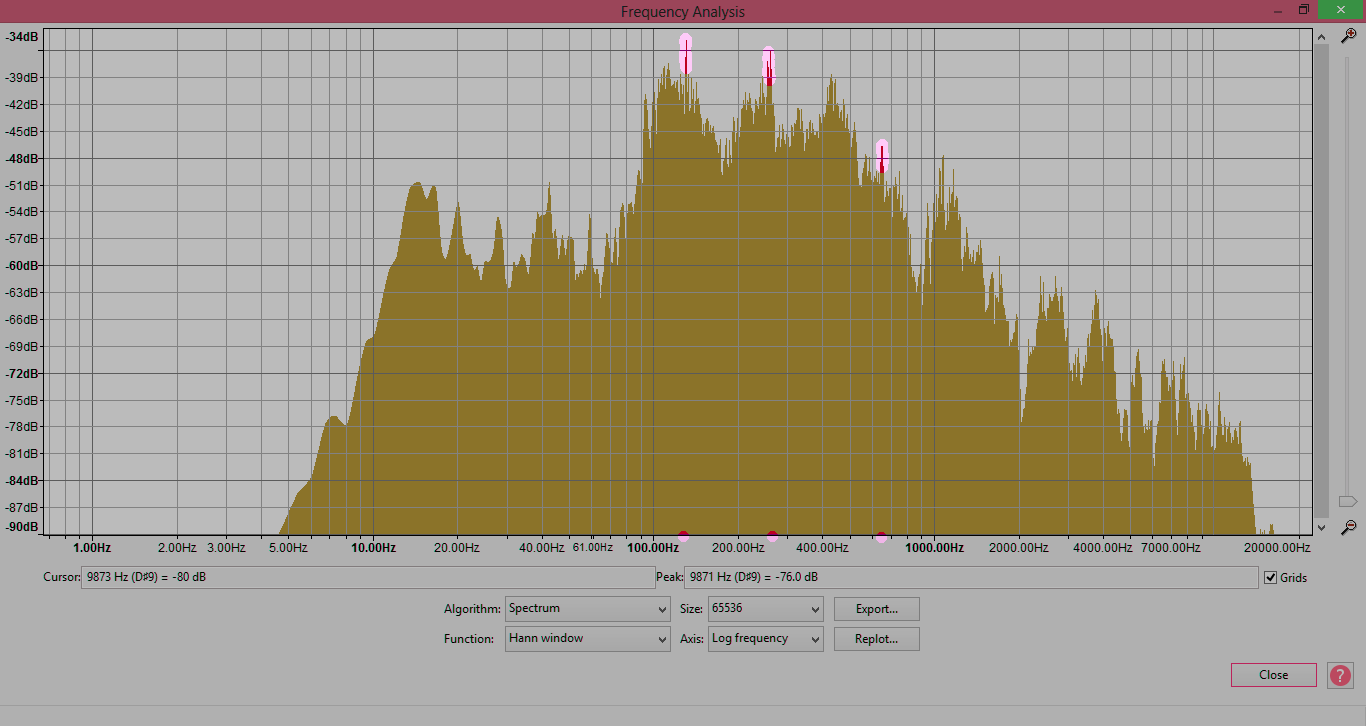
If you revert to Audacity 2.3.2 you can import this EQ curve which is what TDR Nova + Voxessor was doing to the equalization in the Benson example.
I reverted to version 2.3.2 (Windows Installer), and I can’t get any of my plugins to work (even after checking if they’re enabled). I also re-did the the Voxessor_2_0_ setup, to make sure that the 64-bit VST2 was installed.
This message keeps popping up…
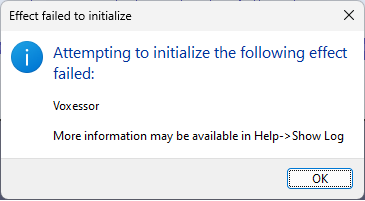
Any thoughts on how to fix this? I’ve looked at the Show Log, but it might as well be hieroglyphics to me.
BTW, am I correct, in that this 2.3.2 version would have (likely) been the one I was using a few/several months ago? When was the 3.x.x version rolled-out?
I think you should call it good and start production.
I was close to doing this.
It’s not really bad resonance, but it is audible, makes the voice a little less intelligible,
and would be annoying to listen to for long periods.
That’s a bit of a problem then, because I set out to make some videos that will be closer to ~20 minutes in length. I do think that some music here and there can help break some of that up (with the less than desirable resonance over a length of time).
I’m quite ecstatic about the way
turned out - and it’s practical to do because it’s all set up - but you’re right that it’s only a small sample of just 20 seconds; I’m just trying to recognize both sides of this. I do have a voice, that can make a person’s ear bleed (especially with all of that bass); at least that’s how I feel about previous recordings and doing editing on those recordings over many hours. Though, I’ve always been critical of my own voice any way.
No person is big enough to have resonance at 130Hz, (and integer-multiples thereof, e.g. 260Hz, 650Hz).
The wavelength of 130Hz is about 2.5 meters, i.e. a surface about 1.25 meters away from the mic is responsible, (ceiling ?).
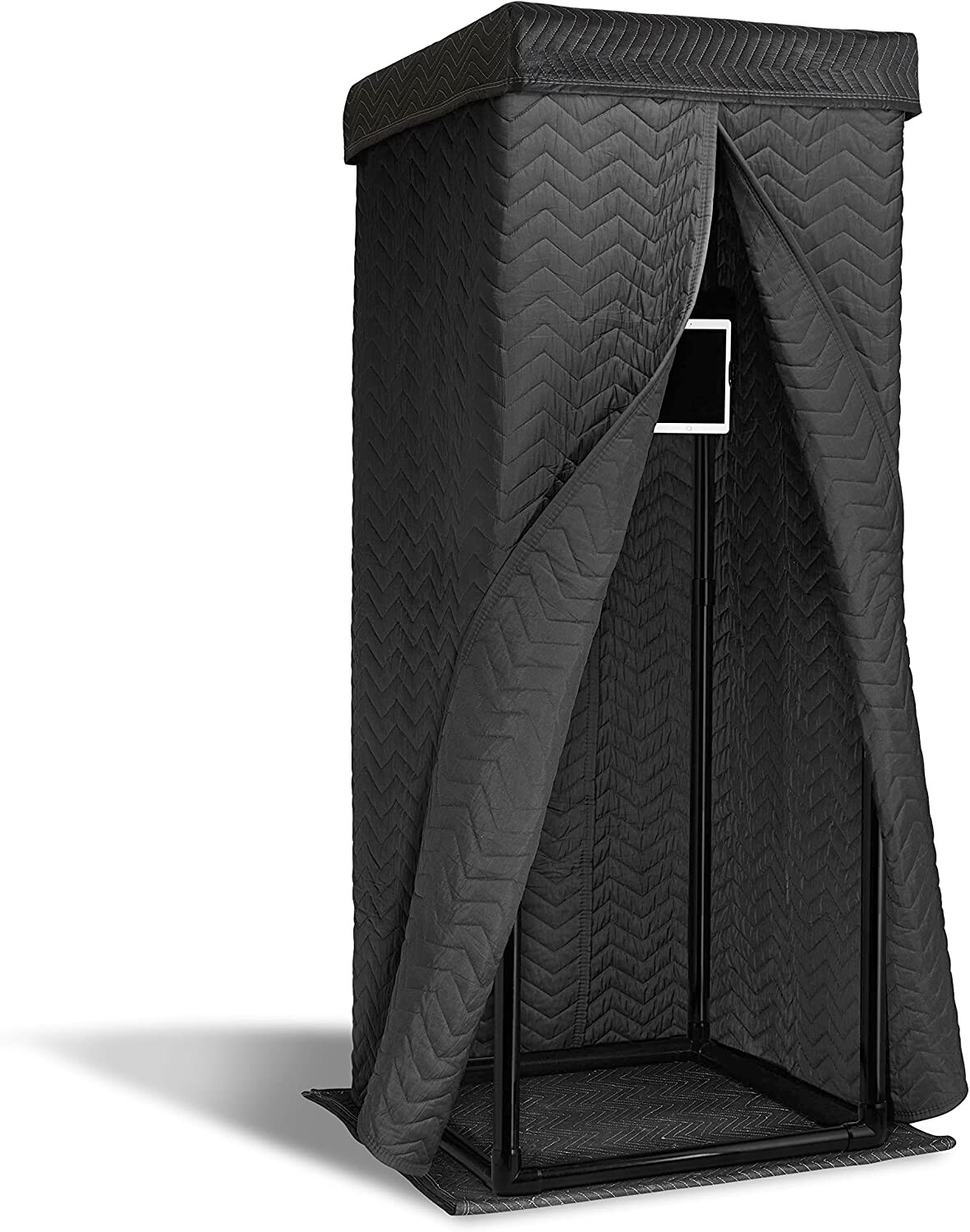
I’m using one of these, in case the photo of my current studio wasn’t clear (I have dimmed lighting in the basement). There is a cover to the booth, not to mention that the recording booth just comes in below the height of the ceiling; though I might also misunderstand what you’re saying here. It’s definitely on the boxier side, but far better than my other setup.