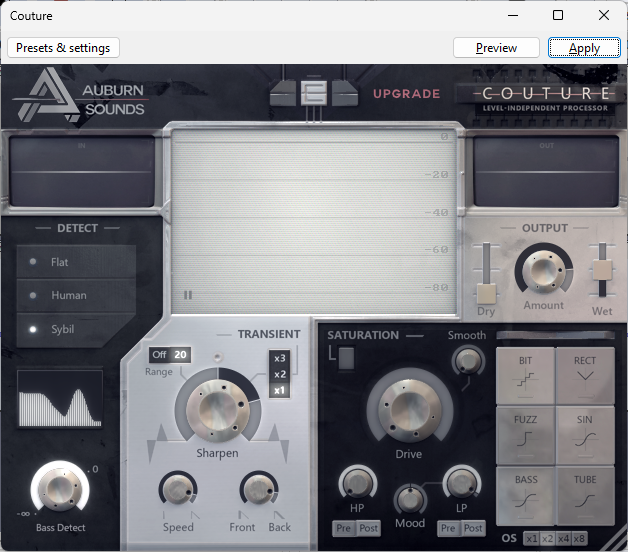
That’s it: old Couture = new Couture with “Dry” slider on -∞ (minus infinity).

The red line is the output level, here being pushed down by 6/7/8dB between words & sentences.
Couture will reduce the noise-floor, including room reverb*****, when you are not speaking.
IMO about 9db is the most you can get away with without it sounding choppy/gated.
[***** With your “Needle Park” setup I don’t think you need a DeReverb plugin, just TDR Nova with RobDo-2 settings to reduce the boxiness, and optionally Couture to reduce noise & any slight reverb].
While I think that audio sample sounds great (ACX Check), I’m not making audio for an audiobook.
No, but it’s been my experience that if you can reach audiobook specifications, you can go from there to almost anywhere else.
I’m supposed to target LUFS for YouTube, and not RMS.
And this is where you publish the target or goal. YouTube must have posted it somewhere. I bet once we establish that, it should be possible to massage the Audacity tools to achieve it.
Koz
I’ve re-read what you said here, multiple times. Maybe one day I’ll be able to decipher what it is that you said.
Maybe one day I’ll be able to decipher what it is that you said.
Ummmmmmm. OK.
RMS and LUFS are two different methods of measuring loudness. They both take a number indicating how loud something is. Like you wouldn’t tell someone to get in the car and drive “miles per hour.” We need to know how many miles per hour.
RMS is older and can measure any electrical work from the stuff that comes out of the power socket on the wall, to sound energy. It’s been around for a very long time. Audiobook loudness (for one example) is expected to come in between -18dB RMS (louder) and -23dB RMS (quieter).
LUFS is more modern and it knows how a human ear works. It knows if sound pitch is really high (only dogs) or really low (earthquakes/thunder) humans may have trouble hearing it, so it gives those sounds a “bad rating”.
The latest versions of the Audacity tools can work with either one.
My initial goal was to avoid two (or more) different specifications. But since you have no goal, I’m going to see if I can discover the YouTube instruction list.
Unless someone on the forum already knows.
As we go.
Koz
Can we assume you got your computer to recognize the 2i2 and microphone?
Koz
… target or goal. YouTube must have posted it somewhere.
Or not.
I found about a million different user opinions of what the sound should be, but no firm list and worse, nothing from YouTube. I’m not kidding. It’s like they were very careful not to publish instructions and just let everybody make it up as they went.
I found a posting from YouTube Help called: Encoding specifications for music videos. I got all excited. That’s a good start, right? Not once does it mention recommended volume or loudness.
If you got someone to mention LUFS to you or any numbers at all, who?
Koz
Yes.
Yes.
Do you remember what was wrong? This is a forum with users helping each other, not a Help Desk.
Koz
Examples of where I got the idea that you should target LUFS:
There’s a recommendations table, when you scroll down a bit, specifically for YouTube.
I use FinalLoud3 (plugin), here’s a screenshot:
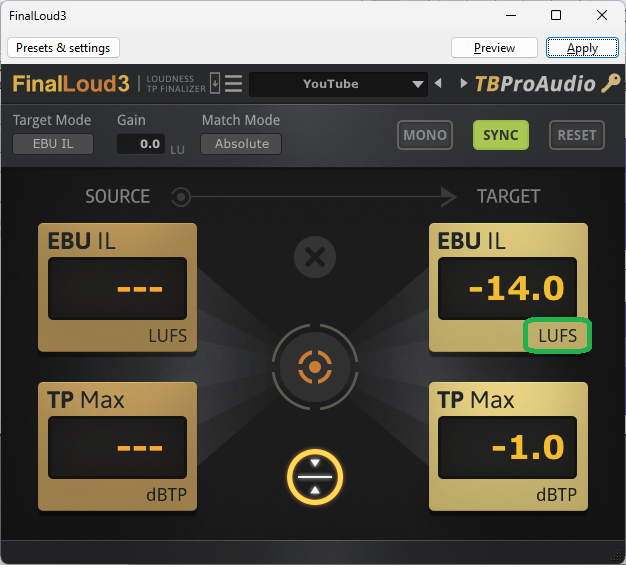
They generally suggest to target -14.0 LUFS; or roughly between -13.0 to -15.0.
I know that YouTube Help doesn’t say anything AFAIK about LUFS (via Google search).
I could very well be wrong - I’m the polar opposite of an audio engineer - but I haven’t come across anything that says you should target RMS over LUFS; though I initial targetted RMS following Josh Meyer’s course on EQ and such.
This is precisely how I feel about an audio chain. There should be at least a recommended baseline to start with, and from that, the user should deviate from that starting point IF the audio requires it; but at the very least the novice user should know what’s a solid starting point.
I find that I’m left to guess what makes up a proper audio chain, from YouTuber’s tutorials, to various websites/articles, when they all have different hot takes on what to do.
It’s a mystery.
I think the only thing I’m actually missing is the test. This is -14dB LUFS with -1dB gentle peak limit. Only a few places needed the peak limit which is probably why it came out so well.
I don’t know of any existing tools to measure what I did. That’s flying blind. Do you like that sound? It seems to be OK. This is a variation on Audiobook Mastering. You two have similar goals with different tool settings.
– Rumble Filter to get rid of any low pitch trash. Some home microphone systems generate “wind noise” even if there’s no wind. I’m not making that up.
– Loudness Normalization to -14dB LUFS.
– and then Very Gentle Soft Limiter set to -1dB. Hard Limiter can create cracking and ticking while it works. This one doesn’t do that.
If you like that, I can post actual steps and values.
Koz
I see your point, and my apologies about that.
Going forward, if I have a new question, I’ll try to isolate it to a singular problem.
I agree that I’m scattered on what I’m trying to get right/correct/fix, and I certainly could have (initially) organized what my goals were and the beginning of this thread. My main concerns going into reaching out to this forum, were to:
-
make sure that everything is lining up correctly, AT2020 ↔ Scarlett 2i2 ↔ PC ↔ Audacity (done)
-
show a previous recording (YouTube video) and illustrated (via pics) what my previous setup was like (and have bad it was), when I did that particular recording (done)
-
make sure that my newer setup was fine (again, pics detailing my new setup), and that I try to get the mic position right; and where I should be aiming while speaking (done)
-
try and get a simplified audio chain (fail)
-
I was able to also get a better understanding of how to clean up my audio on an older video; which was great!
-
I was able to get feedback, on two different audio samples, and ways of improving it/cleaning it up.
-
I was able to know that I had more room to increase the volume on my Scarlett 2i2; which will certainly help!
-
I get overwhelmed by audio (and I still do), but I’m glad I’ve pushed on with trying to sort out all of my issues because they’re always going to be there unless I tackle/address them.
I was intimidated to post on this forum last year, and I still am to a degree. This is not “fun” for me, but I really want to have a successful channel, and would like to make things less complicated than they are at the moment. Some of the terminology is lost on me, I don’t mean that in an insulting way; to be clear.
I thank you (Koz) and Trebor for all of your patience, and help.
I would appreciate that Koz, thank you.
Can anyone, point me to a specific video/tutorial/article, that properly illustrates, what a good and simple audio chain looks like?
I’ve searched high and low, and I’m looking for something that keeps things basic, and that makes sense. I just need a solid starting point.
The correct order (if there is a correct order) for when to apply:
- noise reduction (and at what settings)
- compressor (and at what settings)
- EQ filter curve
- normalization (and at what settings)
- amplification (and at what settings)
- DeClicker/DeEsser; specifically when to apply them in the audio chain - beginning/end
Should I stick with the defaults for the settings?
I know that you have to trust your ear and make adjustments, but I’d LOVE to know what’s a great starting point to build off of.
We should know that unless they changed it, all you have to do is use a tool once and the settings and adjustments “stick.” So the first time you need to be critical as to settings, from that point on, assuming you don’t change anything, it’s just Effect> Tool > OK.
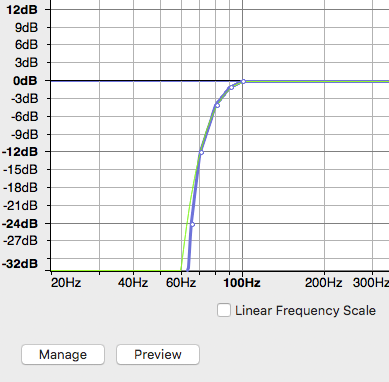
I think I asked you way up the message thread if you had Effect > Filter Curve EQ > Manage > Factory Presets > Low Rolloff For Speech. That’s the custom rumble filter.
If you do, then the first time, it’s Select the work. Effect > Filter Curve EQ > Manage > Factory Presets > Low Rolloff For Speech > OK.
But the second time, it’s Select the work. Effect > Filter Curve EQ > OK. Take a quick peek and make sure you have that swooping down to the left curve.
Similarly, the first time it’s Select the work > Effect > Loudness Normalization > Normalize > Perceived Loudness > to -14dB LUFS. Treat Mono as Dual Mono> OK.
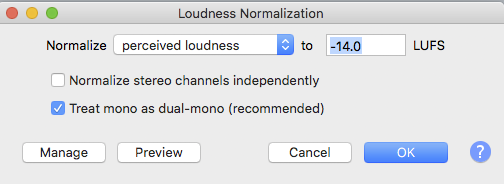
The second pass, it’s Select the work. Effect > Loudness Normalization > OK.
Select the work. Effect > Limiter, > Type Soft > Limit -1.5dB > Hold 10 msec. Make Up Gain, No > OK
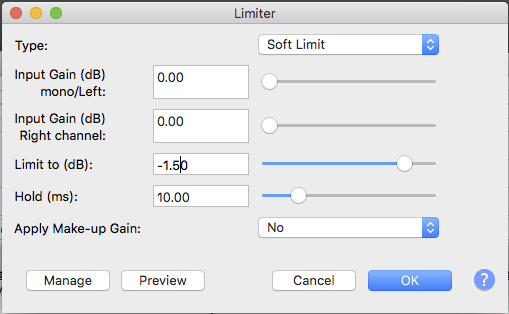
And the second time it’s Select the work > Effect > Limiter > OK.
Please note that the limiter has been set for 1.5 rather than 1.0. I do that with other limiters to avoid creeping errors. You can have tiny errors when you post the work on-line. Your 1.0 setting can turn into 0.999 by accident which can trigger alarms. The 1.5 setting is not audible and also not likely to fail.
Post back if you get lost.
The work usually stays selected as you go, so it’s:
Select the work.
Effect > Filter Curve EQ > OK
Effect > Loudness Normalization > OK
Effect > Limiter > OK
\
Questions
-
noise reduction (and at what settings)
No noise reduction if you can keep the current voice volume and quiet background. -
compressor (and at what settings)
No compressor. The Soft Limiter does some compression. -
EQ filter curve
See above description. -
normalization (and at what settings)
See above description. -
amplification (and at what settings)
No amplification. Loudness Normalization does that. -
DeClicker/DeEsser; specifically when to apply them in the audio chain - beginning/end
That one’s messy. If you need it, I’d probably do that at the beginning if the work is loud enough to hear it. I don’t hear enough sound damage in your test to need those tools.
There is a problem with doing it later. It doesn’t go through mastering, processing, and limiting.
And one last item. Always keep a WAV backup of the original, raw reading. There’s just nothing like having Audacity go into the can in the middle of editing and taking the only copy of your reading with it. Avoid that.
Koz
Many thanks Koz!
You have no idea how much that helps me out. 
If there’s a way to contribute (donate) to the site, please let me know.
This folds back to: “Did you like my sample? If you did, that’s how I got there.”
Once you solve all the room, noise, echo, distortions, and other recording problems, all those patch and rescue tools vanish.
If you like the process and the sound of the result, I can design a Macro which can run all three of those tools, one after the other, automatically in one go.
Koz
If there’s a way to contribute (donate) to the site, please let me know.
There used to be back when we were a rag-tag collection of programmers living in a camper. Now we’re part of a much lager corporation with no provision, that I know of, for contributions. Someone will post back when the sun comes up in Europe.
Koz