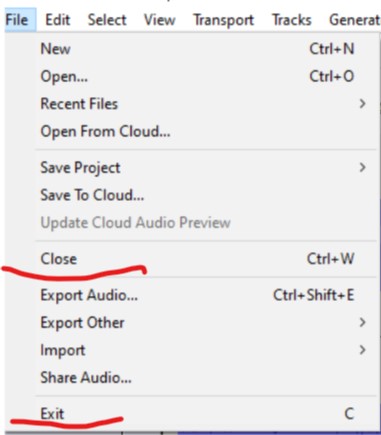
To my mind, the same window Yes-No-Cancel appears. Maybe, Exit means close all windows? But I noticed, that after clicking Exit-Save only one window was closed, another stayed still open.
a) Close will just close the current project and leave all the others open
b) Exit/Quit Audacity will close all the open projects
BTW you are using an older version of Audacity in the latest versions these menu items have been made clearer in their intent - see this page in the current Audacity Manual:
You open the first picture in Paint, make the changes, save it, then close the image. Paint is still running, so you can open the second picture, make changes, then save it too.
Close will allow you to do subsequent editing of other files without having to restart the program.
I associated musical files with Audacity, for subsequent editing it’s easier just to click a file, than to import it with program menu. In my opinion it’d better to design something like this: 1. Close only current window 2. Close all windows.
And no empty windows left.
Can you persuade the respected developers to return the design with good old light-grey-navy blue theme and narrow 3 cm left column? I get used to it and can’t move to new versions later than audacity 3.5.1 and have to stay at the version 3.5.1. The disaster!
You may not quite understand. That old design was perfect for…manual (with the effect Repair) click removal, each click is removed separately, rather than built-in Click removal. The new design is good, I have nothing against, but it’s…completely unsuitable for manual click removal. I must say, I work with old plates (records), this effect is the most important.
I’ll try to explain. To remove click manually you have to zoom it in (horizontally) near max. With the old design there was no problem, because the background color was soft (light-grey). But with the new design the color became bright, you eyes get tired. Please, consider on the merits!