Today I purchased some new cables and will give them a try.
Tried it with the new cables and didn’t find any difference. My wife just came home, after a week of helping her mother. She got in there and started “playing with things.” We never did get the AVG light to flash. But here’s a sample of a recording she managed to do. It is louder than before.
Sorry I can’t give much detail. She was moving too fast. I do believe that the change came about when she changed some microphone properties on Audacity.
Do you hear that loud frying bacon between the words? That means she took the bad, noisy sound from the mixer and boosted it.
Tried it with the new cables and didn’t find any difference.
That’s not what I said. I said to get the lights to flash with no cables except the microphone and the power cable. You can do this without the performer, the cables, the UCA202, the computer or Audacity.
The mixer is telling us that there’s something very wrong before the sound goes anywhere else.
What happens when you plug your headphones into the mixer? You should be able to easily hear yourself speaking with no noise and without pushing the volume control all the way up.
Remember me saying at the beginning that I didn’t like it that the mixer didn’t have enough lights to do good diagnostics if something went wrong? This is why.
Koz
Well, I tried speaking into the microphone with only plugged in. No lights came on. When I shouted into the mike no lights blinked. I plugged in the head phones, via the UCA202, which I in turn plugged into the laptop. I could hear nothing when I spoke.
Only the power cord and the microphone cable. Disconnect the UCA202 and all other cables. Clear the decks.
When you connect the headphones, connect to the mixer directly.
I think you’re beyond what we can do. If the knobs on the mixer are as I listed in the thread, you plug the microphone in and you can’t get the sound level lights to come on, then you are a candidate for electronic maintenance. Until you fix the analog part of the system (microphone, cable, mixer), Audacity will always produce bad, noisy sound.
Koz
Okay, thanks Koz. I’m going to look things over one last time today. Also, we have a recording device which we purchased for another project, and I’m hoping to give it a try to see about its quality. My wife and I have a lot (maybe too many) of irons on the fire. The other recording device was recommended for outdoor recording, to go along with videos we plan on producing for an educational website. We have to dig it up and look at the specs. I may drop back in here when I have something new to look at. I really do appreciate all of your time and effort on our behalf.
George
This is a test clip of a recording we made using a USB microphone and skipping our mixer. The mike is a MXL ProCon Series 1 AC-404. What do you think?
George
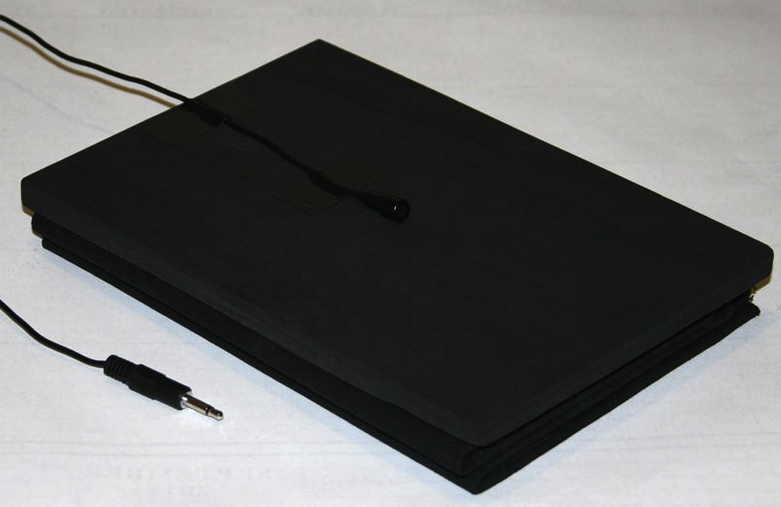
That seems to work. It will take some juggling between the tools and filters, but it seems OK. You picked a conferencing microphone because you happened to have it right? This microphone has a specification not found in “normal” microphones. Since it’s a boundary type, you have to have a boundary.
The perfect boundary is a 30 inch board or plate.

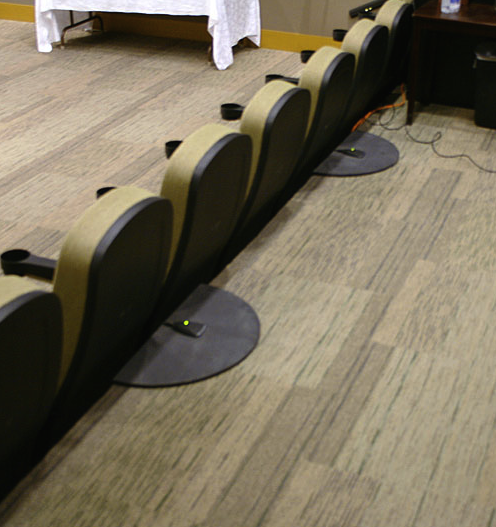
But I have done theaters with smaller ones. I think these are 12" or 14" circles. Recognize those (attach)?
Those happen to be sitting on a concrete floor, but if you put one on a table, you have to put a towel or something underneath the plate to keep the microphone from picking up every little pen drop and elbow movement.
Attach 2. That’s black felt (Duvetyne) under the board.
Koz
Okay, thanks. I am also waiting on a USB adapter for our other mike. It should come any time now and I’ll test it out too. The conference mike is loaned to me, with almost no time limit. But, if I can make our own mike work, I will do that. At least I know we’re looking in a viable direction.
George
I purchased a USB adaptor which connects our analog mike (the first one) to the USB port in the laptop. I ran this on my wife’s Windows 8.1 laptop and this is what we got. I feel we are still not there with volume. But it worked much better with her Windows laptop than when I tried it on my Linux Mint laptop.
George
This test is close, but will still need work. I need to step out for a while, but on first pass, the silent stretch has a noise level of about -60, but before you congratulate yourself, the peak sound values are -5.4, not -3, and when I fix that, the noise floor is going to go up past specification. Then I’m going to fix that which is going to reduce clarity of the voice, etc. etc. etc.
After I fix those, it still has to pass loudness or RMS.
Later.
Koz
I got the clip to pass all three specifications as long as you don’t measure beyond “OK Folks.” All the dialog past that is too low. The performer’s voice fades into the sunset. Open the clip in Audacity. See how the blue waves get smaller and smaller toward the right? You can’t do that.
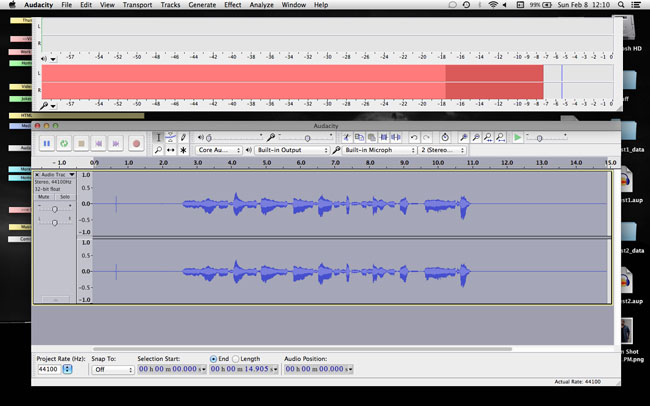
Attached is the setup for live recording in Audacity. Undock the meters and make them enormously bigger. Use the control strip on the left edge and the control corner in the lower right-hand. Make sure the meters are set for about 60 on the left. I think it will actually read -57 or so. That’s the right range.
Change that in Audacity > Edit > Preferences > Interface: Meter dB range.
Then, while you’re performing, make sure your bouncing red sound meter regularly peaks around -6 and never goes all the way up to 0. Note my blue waves are generally the same size and don’t wander up and down by very much? Yes, you do have to watch the meters and read the copy at the same time. The board operator on the other side of the glass in a real studio is adjusting levels and watching the meters. Now you have to do that. You get used to not being theatrical while you read. This isn’t a cellphone. You have to meet show standards.
Your sound clip is right on the edge. If you start wandering off announcing volume, you will not be able to make conformance.
Koz
Thank you–this post showed me a lot. It is going to be really strange reading and watching, but I’ll have to do it.
Is there a way of cleaning it up if one or two bounce above -6?
Matt
Minor variations will die in post production processing. -6 is a desirable goal, not a law. You should not spend a lot of time way below or way too high. Too low can be a problem, but high enough to max the meters out at 0 is very serious sound damage.
Koz
Thanks Koz. We’ll be working on it!
George
I’m just curious now because I am also very inexperienced and working on audio book–Koz has been helping me on another TOPIC–did you ever get past ACX with all of your fixes?
Matt
As a test and so I’m not blathering in a vacuum, I shot a voice sound test in my third bedroom. With very simple and gentle post production corrections, I got a clip to pass all ACX specifications and still sound like me (attached).
It’s possible to fall off the cliff by having a noisy room or too low quality equipment. You may be able to force a file into ACX compliance, but it may not sound much like you when you’re done. And remember, you’ll have to do that corrections dance to every show you produce.
If you really offended the computer gods, your USB system won’t support a good quality USB microphone. And then there are “magic” or “moon-phase” problems. There is one poster who tried all combinations of all equipment and changed everything and it still doesn’t work. One of these days I’m going to go into the attic and find the Giant Hum Generator Monster who lives up there.
So there are posters who may never make it with the environment they have.
The forum can’t always rescue everybody.
Koz
Koz, forgive me for being so slow to get back. I had hit a wall with the problem of the microphone and… kidding season hit. We have been delivering kids and, worse yet, we lost two after quite a struggle to save them. On top of that, I crashed my personal laptop and had to do quite a bit of fixing.
Anyway, a friend of mine helped me over a period of days, often having to wait on me. Today we finally got a dedicated computer set up with a USB microphone and a driver which gives more volume on the recording. Here’s a sample of what I got my wife to record, tonight, using this new set up. This is raw. I haven’t applied anything to it yet. But as an experiment I did try noise removal. I thought it was pretty good.
George
We’re all doing this between bouts of actually living life.
That clip is right on the edge of being too noisy. The problem with noise removal is that it leaves the noise during the words. It only removes that whine and hiss between words and in broad blank times. I was able to get rid of most of the trash with custom tone filters and careful sound management, but it’s borderline quality and she sounds like she’s leaking air every time she speaks. I’m sure that’s not going to pass ACX quality control.
That and where is she reading? She sounds like an echoey hallway. There is no reliable filter for echoes. Once you record in a hard room, you’re in trouble.
Koz
She’s recording in my old study, a bedroom with bookshelves in it. She has some foam and blankets hanging on the walls to try to cut down on echo.
Do you think the hum comes from the laptop? That’s the only thing I can think of.
George