I have an old Windows 7 computer which I use for my recording. It’s been disconnected from the Internet since 2014. I moved it from my bedroom, where the router/modem is, into my studio on the other side of the house, where a cable doesn’t reach. That said, I don’t WANT it connected to the Internet, and therein lies my problem.
I have terrible luck with computers - I’ve been through about seven since 2014, all of which have crashed repeatedly and become unusable as I have updated them - so I am trying to keep that one completely disconnected as it works perfectly for what I needed to do (recording instruments and converting files with Audacity).
Recently, though, I wanted to install the newer version of Audacity on it. Unlike Windows, I like the Audacity updates. As I mentioned earlier, nothing on that computer has been updated since the late spring or early summer of 2014. I probably downloaded Audacity sometime between November of 2013 and February of 2014.
To update, I uninstalled that version (and thus I can’t know what it was) and copied the installer of the most recent version onto a flash drive. I installed it, went to open it, and got the “Your computer is missing api-ms-win-crt-runtime-l1-1-0.dll” message.
I did some research, and copied that file from my System32 on my laptop, brought it over to that computer… nope! I now get a message saying that an error prevented Audacity from opening.
After researching more, it seems the api-ms-win-crt-runtime-l1-1-0.dll file comes with a Windows update from 2015 - which that computer would not have. Per my research, that update was either called or had a feature called Microsoft Visual C++ Redistributable for Visual Studio 2015.
I REALLY don’t want to update that computer. It is still working perfectly fine after eight years of service. Most of my computers would be lucky to be running at half of their original performance after eight MONTHS.
So, I guess I have two questions:
1. Is it possible to install a newer version of Audacity for a computer that does not have the update that brought about api-ms-win-crt-runtime-l1-1-0.dll? If so, what would that entail?
2. If not, does there exist an official Audacity “repository”, so to speak, of old versions complete with installers and all that, so I can reinstall a version from late 2013/early 2014 that will not require that update I don’t have? I don’t trust the “old versions of installers” websites out there.
Failing that, do any USERS still have installers from that period, so I can copy it to my flash drive and try reloading it that way? That old 2013/2014 version of Audacity worked fine; I don’t like it as much as the newer version, but for recording instrument tracks and converting files between WAV and FLAC (which is all I need to use it for) it will work fine. (The computer has an awful sound card, so I do mixing and all that on my myriad of other computers.)
I hope I’ve made sense, and I appreciate any help you can give! I really hope I didn’t permanently remove the program from the only computer I’ve ever owned that can properly handle it. Thank you in advance.
PS. I tried doing a search, but I couldn’t find any results, and I suspect I’m one of the only people using a computer THIS outdated, so I didn’t want to spend a lot of time searching. If a thread with a solution already exists, please direct me there.
Thank you very much!
 ,
,

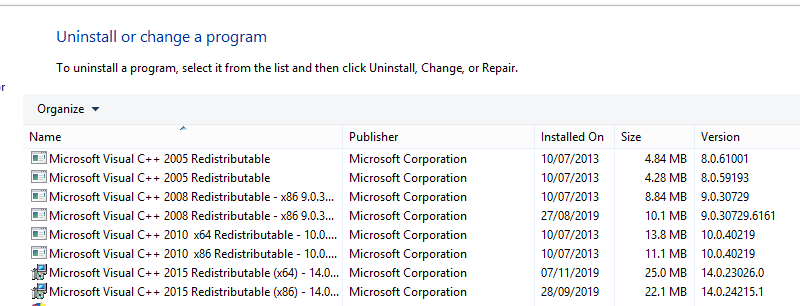
 don’t mess with the contents of Windows System folders: it’s brain surgery.
 , no thanks.