This stupid fucking program doesn’t warn you in ANY way or say ANYWHERE that it only fucking exports unmuted tracks. Four fucking hours of lost progress because it assumes you know random bullshit. I wish there was another decent option. Fuck audacity
Yes, I love you too…
1 Like
What you hear by previewing with playback prior to export is what you will get in the Exported audio file.
- When using Export Audacity will only export tracks that are not grayed-out by use of the Mute or Solo buttons in the tracks’ Track Control Panels
I have raised this Enhancement Request on Muse’s GitHub issue tracker:
Interestingly, Audition will export muted tracks as files, but they will be silent. The process for exporting seems a bit more complex and also doesn’t seem to warn about muted tracks:
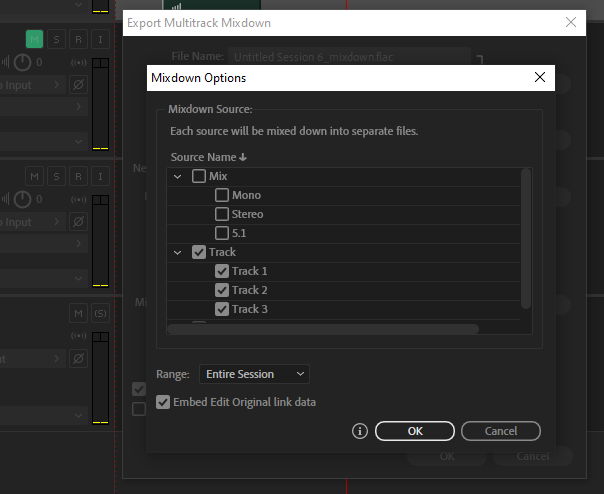
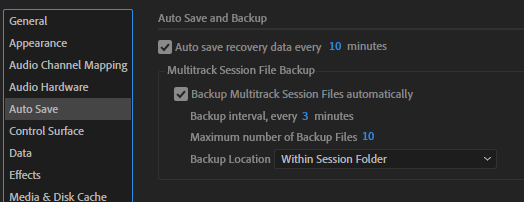
Audition has the “advantage” that it forces you to create a project (file) before you can start working, so saving comes more natural (“I already am wasting storage and am forced to have one more file on my drive, might as well hit ctrl+s”). But more importantly, it has autosave.
I very much appreciate being able to just get going in Audacity (makes it feel ‘light’). You get the same feel in Shotcut while Premiere forces you to create a project before you can start.
Maybe one might consider adding autosave and enable it by default to support workflows like this. But I’m guessing this would require a folder/files structure like back in Audacity 2 to be used for WIP projects as opposed to monolithic aup3 files.
Audition has a whole autosave settings section:
The files on drive look like this:
