Sound Finder / Silence Finder improvements

Hello Steve,

I really like the GUI on the sound finder and the new features will be quite helpful. You’ve got a great talent and quite a knack for relating to the end-user on these plug-ins.

As I mentioned earlier, my primary concern was with finding a way to place label markers in the silent ranges between spoken words at about every minute or so on audiobooks, sermons, lectures, etc.

Interestingly, I was filing through this rather copious forum board and found a thread (I think it was posted by you) from May 16, 2010 that has a link to download an alternative version of “Silence Finder” with the very functionality - that is, requiring a minimum length of time between markers - that we’ve been talking about. I downloaded it and put it in the Plug-Ins folder and it seems to be quite useful. There are a few glitches with the placement of the first marker. For some reason, it will sometimes skip the first minute entirely and sometimes will place it anywhere within the first minute, but other than that it seems to be OK. The placement of the labels seem to be spot on in the middle of the silence range.

Here is the link to that forum thread:
http://forum.audacityteam.org/viewtopic.php?f=16&t=15531&start=10

You called the dowload “SilenceMarker-ML” , presumably to avoid overwriting the original Silence Finder.

Is there a reason you abandoned this as a viable part of Audacity? Or is there a reason why this is not readily available as a plug-in currently?

Thanks for your help on this.
Thanks for that audiobookfan, I’d forgotten all about that.

Interestingly, the start of that topic (Nov 02, 2009) predates the inclusion of SoundFinder in Audacity (29 Dec 2009 http://code.google.com/p/audacity/source/detail?r=10017&path=/sf-cvs/trunk/audacity-src/plug-ins/SoundFinder.ny )

It was suggested, and agreed, way back in May 2010 that the “Add a label at track end” was superfluous, (Minimum length mod for Silence Marker and Sound Finder - Nyquist - Audacity Forum) but I notice that we still have that (superfluous) control. I don’t know why this change has never been made - I’m not able to make any changes to what is or is not included in Audacity, only those with write access to the Audacity source code can do that.

There was never final agreement about whether the “minimum label spacing” should start counting from the start of the track, or the end of the track. As you will see in that thread, there are arguments both ways, but no totally satisfactory solution.

Essentially the problem was “what to do with short sounds”. Silence Marker ML had no way to explicitly deal with short sounds, so there had to be a choice of whether short sounds got “tagged on” to the beginning of long sounds, or tagged onto the end of long sounds. One method would tend to include applause after the music, while the other method would tend to include the applause before the music.

I think that in most cases one would want:
—|-Music–Applause-|-Music–Applause-|-Music–Applause----
rather than:
-----Music-|-Applause–Music-|-Applause–Music-|-Applause----
(“|” represent labels, “-” represents silence)

However, when splitting an audio book, this approach causes the weirdness of the first label (as you observed).

I think that the new approach of being able to explicitly decide what to do with short sounds enables us to overcome this problem.

If we choose point labels relative to the start of the sound, and ignore short sounds (the applause is likely to be shorter than the music, then we can get:
—|-Music–Applause-|-Music–Applause-|-Music–Applause----
but without getting the weirdness of first label placement when splitting audio books.

Also, if we ignore short sounds (the applause) and use region labels we can get:
—|-Music-|-Applause-|-Music-|-Applause-|-Music-|-Applause----
which may also be useful.

Have you tried the new (testing only) version? http://forum.audacityteam.org/download/file.php?id=4787
Currently it only has a few features, but I’m hoping to get some feedback about the basic algorithm. There’s no point in me adding bells and whistles if the basic algorithm is not what people want.

I probably assumed a reworked version would be available in the not too distant future, so it could be done then. Is it important this is done for 2.0?

We are choosing the point and region labels in the above examples in Sound Finder, I take it, assuming the Sound Finder GUI is implemented?

I was quite keen on adding Minimum Label Length to Silence Finder, but there is a case for keeping that plug-in simple if we can do all we want in Sound Finder (or at least, any Silence Finder additions are just for label customisation).

I don’t have any long audiobook content, but I tried it on some speech tracks and Minimum Label Length seemed to work well, though having the minimum length in minutes was awkward. Is it possible to have a [minutes seconds] text box instead as in Click Track?

I found if a fractional value below 1 was entered for minutes (for example, 0.2) then although the value appeared as 0 when you run the effect again, the 0.2 persists unless you type 0.0. I see your GUI version allows fractional min length, but decimal fractions of minutes may not be easy for everyone.

I also noticed the last label produced may be less than the min length. That seems OK but just needs a mention in help.

I notice that in “track.png”:

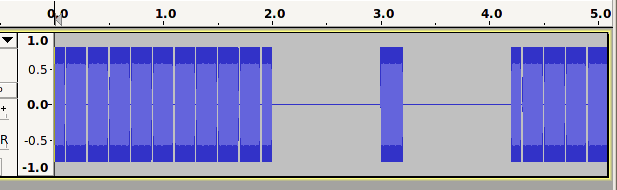
“allow silence less than” = 2, “ignore sounds less than” = 0.5, we get the whole 4.2 s as one “sound”. So even if no one else wants it I would still like an option not to treat ignored sounds as silence.

I agree handling of crackle between wanted sounds seems to work well with the new control “ignore sounds less than”. Though “shorter than” is I think more grammatical for lengths than “less than” .


Thanks,


Gale

I don’t think that it is hugely important for 2.0, but hopefully we can have a new version soon after, so there’s probably not much point in updating now and then again soon after 2.0. Thanks for the comments Gale, I’ll have a proper read through them tomorrow. My initial impression is that we may be best to have some modest changes to Silence finder (keeping it as simple as we can) and the majority of changes to be in Sound Finder. I think that we may struggle to have all of the features that we want in just one effect.

Related feature requests: https://forum.audacityteam.org/t/batch-editor-for-silence-labels/22435/1
I expect this link will go dead once the work here is complete as I think that the new version(s) will fully satisfy these feature requests.

Yes, I agree. Good idea.

Copied here as a reminder.

Yes that is what should happen.

The controls operate in the order of their appearance in the interface, so we have:

  1. Allow Silence shorter than:
  2. Ignore sounds shorter than:
  3. Minimum label length:

“Allow silence” happens first, so we are “allowing” the silence from 1.0 to 2.0 and the silence from 2.2 to 3.2, so the entire track from 0.0 to 4.2 is treated as one sound.
If we set “allow silence” to less than 1 second then 0.0 to 1.0 and 3.2 to 4.2 will be labelled individually.

If we want the sound from 2.0 to 2.2 to be labelled, then “ignore sounds shorter than” must be less than 0.2 seconds. (The sound is not ignored).

If we do not want the sound from 2.0 to 2.2 to be labelled, then “ignore sounds shorter than” must be greater than 0.2 seconds. (The sound is ignored).

In this example we are not treating the 0.2 second sound “as silence”. We are “ignoring it”.

If we were treating that 0.2 seconds “as silence”, then we would have silence from 1.0 to 3.2 seconds, which is a total of 2.2 seconds. That would be greater than our “allowed silence” so the silence would be recognised and the sounds 0.0 to 1.0 and 3.2 to 4.2 would be labelled individually. That is not what happens.

. . . . . . . . . . . . . . . .

I’m not sure about the wording for “Minimum label length:”
It’s fine while we are using region labels, but it does not really make sense if we switch to point labels. Any ideas?

OK; I’ll just rephrase my request to what it has always been in that example: label the first sound from 0.0 to 2.0 and the second sound from 2.2 to 4.2. I want to allow the clearly visible “silences” from 1.0 to 2.0 and 2.2 to 3.2 in my labelled sound (because those silences are less than my setting of 2.0). I want to ignore the sound from 2.0 to 2.2 because it is shorter than my setting of 0.5.

It’s a reasonable interpretation of the labels for those controls I think, so an option for treatment of “ignore” should be considered that allows that. If I have crackle, I can turn the option off or deal with the crackle.

I’m not sure “join labels” is quite right either, as that implies the long label will still contain individual labels.

I see it as “Minimum length to be marked” or “Don’t label less than” or maybe “Minimum labelled length”. I think I like the third best, but the first is clearest.


Gale

Thanks, I like that best too.
Such a small difference, but I think it makes a big difference. I’ll go with that for now (we can change it later if we think we need to).

I don’t think that I can do that. Not because I don’t want to but because I don’t think that I can.
The problem is that if I do that, many “valid” (long) sounds don’t get marked when they should.

I’ll try to give a clear example of the problem:
fullwindow000.png
Even without the noticeable “gaps” in this example, there will still be momentary “zero crossing point” regions that are below the silence threshold, and the duration of sounds between these tiny (allowed) silences will also be very small (ignored).

Perhaps we can change the wording so that it is not interpreted that way.

I’m not dabbling with this code, merely following this discussion. Would “Merge labels” be suitable?

Thanks PGA. Yes that’s a better description.

Let’s leave zero crossing points aside for a moment. In your image above, If the sound from 0.0 to 2.0 was (apparently) continuous, user following my line of argument will want a sound labelled from 0.0 to 3.0. If the sound actually appeared as in your image above, I think they accept that no sounds get labelled. If 0.0 to 3.0 in that image actually was music rather than chair scraping, it’s broken anyway.

Now put zero crossing points back into the equation. I presume you have something coded to allow for zero crossing points, such that “Allow silence less than” isn’t small enough to label every one of those sounds between zero crossings, even if user types in 0.00001 for that control in the plug-in. Can you do something similar in this case, that stops sounds short enough to be between zero crossings being ignored?

Kind of hard. It’s having combined settings that is the problem. At best it would have to be explained in the help.


Gale

I’m not sure we want to add anything about “merging” if we have “Minimum Labelled Length”. I still find “merging” confusing because there will be “silences” between the labels.

And I suppose it ought to be “Minimum Labeled Length” as in American usage"?


Gale

Yes there is a safeguard. The minimum “allowed silence” is about 0.01 seconds.

I think what you are asking for is a “second level” of “allow silences” so that we then have:

  1. allow tiny silences so that we don’t fragment all sounds
  2. ignore short sounds
  3. allow longer silences up to … seconds.
  4. Minimum Labeled Length

I think that this could work, but it is getting horribly complicated.

I understand the purpose of 1, 2 and 4,

  1. Don’t fragment the sound
  2. Don’t add labels for very short sounds that occur in the silences
  3. Group the detected sounds into longer periods

From what you’ve said previously, the main purpose of (3) is so that some silence is included at the beginning and end of the detected sound. I think you gave the example of allowing some of the “silence” before and after a piece of classical music. I can clearly see the benefit of that, but I think that a better way to provide that functionality is to use “Label starting point (seconds before sound starts)” and “Label ending point (seconds after the sound ends)”.

Gale,

I have no desire to hijack this topic into a debate about linguistics. In reply to a post of mine in a different topic you indicated that the language standard for Audacity was American English; so, yes, you ought to ensure that all spellings are American English. (And I’ll continue to cringe every time I see one! :smiley: :smiley: )

As I replied before, I don’t think that’s a complete answer. An awkward customer might say that this is less intuitive, requires more settings and doesn’t give you the length of silence that actually occurred.

I don’t intend a user setting for “(1) allow tiny silences so that we don’t fragment all sounds”. It’s just a safeguard that’s built-in in order to enable (3).


Gale

That’s the “allow silence” control in the current version of Sound Finder. Are you wanting me to make that a fixed duration? If so, how long?

I’m not sure if I’m fully understanding you again, but no, I would be using the existing (3) “Allow silence” setting (for longer silences) in the track.png example, so I would not want that set to a fixed duration. I understood that (1) was a separate step from (3).

Are you saying you need to explicitly make the control for (3) a range?


Gale

What I’m saying is that I can add two new features to Sound Finder.

So we start with Sound Finder, as it currently exists in its “shipped with Audacity” form.
This plug-in has 5 controls:

  1. “Treat audio below this level as silence [ -dB]”
  2. “Minimum duration of silence between sounds [seconds]”
  3. “Label starting point [seconds before sound starts]”
  4. “Label ending point [seconds after sound ends]”
  5. “Add a label at the end of the track? [No=0, Yes=1]”

I intend to make control number 1 show a negative number as previously agreed.
I intend to remove control number 5 as previously agreed.
The other 3 controls will remain and will work in exactly the same way as they do now.
In particular, the “Minimum duration of silence between sounds [seconds]” will work in exactly the same way in the new version as it does in the current release version. I am proposing no changes to the functionality of this tried and tested feature.

I then intend to add two new features that have been requested.

New Feature #1

The first of these new features is the ability to ignore short sounds that occur within periods of recognised silence.
This will achieve the functionality requested by the person that was recording animal sounds.
It may also be useful in other situations.

Here is an example of how it will work.
First, this is what happens with the current Sound Finder with the following settings:

  1. “Treat audio below this level as silence [ -dB]: 6
  2. “Minimum duration of silence between sounds [seconds]: 0.5
  3. “Label starting point [seconds before sound starts]: 0.0
  4. “Label ending point [seconds after sound ends]: 0.0
  5. “Add a label at the end of the track? [No=0, Yes=1]: 0

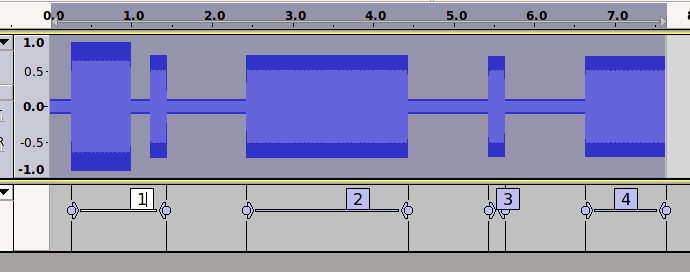
old-soundfinder.png
The silence from 1.0 to 1.2 seconds is “allowed”, so we end up with 4 “sounds” detected as shown.

Now with the new feature.
One of the detected sounds is very short. Label number 3 marks a sound that is only 0.2 seconds duration.
We can “ignore” the sound marked by label number 3 by setting the new control a little greater than 0.2 seconds, for example, setting the new control to 0.3 seconds.
That sound is the only detected sound that is less than 0.3 seconds.

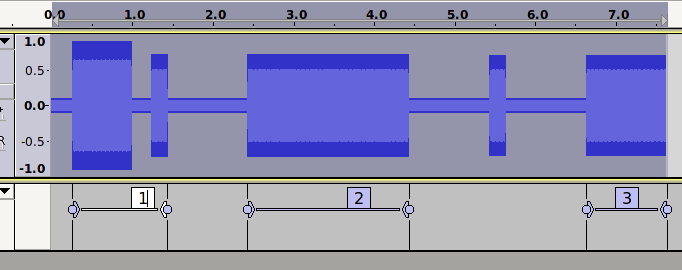
Here is what happens if we set the new control to 0.3 seconds.
new-soundfinder.png
Question: Should the sound from 1.2 to 1.4 seconds be “ignored”?
Answer: No. That sound should not be ignored because as far as Sound Finder is concerned, that is part of the sound marked by label 1.

Question: Why is the sound from 1.2 to 1.4 “part of sound 1”?
Answer: Because we have allowed the short silence from 1.0 to 1.2, so “sound 1” starts at 0.2 seconds and ends at 1.4 seconds.

I do understand that this algorithm is open to misinterpretation and that some users may find it confusing, but this is the least confusing and most predictable algorithm that I can come up with.

What was the second one?

I understand what you’re saying. Unfortunately, I have not heard from the original requester of this feature but I asked a couple of users of the existing Sound Finder and they both thought, good feature, yes the sound from 1.2 to 1.4 should be ignored. I thought so until I thought a bit harder.

We’ve been round many ways of describing the problem and a solution, one of which was to allow “ignore short sounds” to take “precedence” over “allowed silence” where they conflict (on the basis someone setting “ignore” quite possibly wants that). I think the case in the image above for doing what can’t be done is as strong as in “track.png”. At the moment the naive user would assume that “allow” is taking precedence over “ignore”.

A few posts ago you seemed to be proposing a possible but “horribly complicated” solution

  1. allow tiny silences so that we don’t fragment all sounds
  2. ignore short sounds
  3. allow longer silences up to … seconds.
  4. Minimum Labeled Length

is 1) the “solution” but you can see no way to make that work by keeping (3) as a control? What I don’t follow is what the problem with 1) is if we are already doing that to avoid sounds between zero crossings being labelled.


Gale

Gale,

I’ve been trying to follow this discussion, not always successfully, I admit!

It seems to me as, I hope, an intelligent layman, that you are actually talking about two different philosophies of sound/silence finding. I’ll call them “Ignore” and “Allow”. If that really is the case, perhaps there should be two different sound/silence finding effects. Perhaps the root cause of the problems that you and Steve are struggling with is trying to make this new plug-in a “jack-of-all-trades”? Perhaps you have created a “master-of-none”? Would you be better off with: PluginA working one way (ignore) and PluginB working the other (allow)? Such an approach might mean that, in some situations, to achieve the desired outcome it might then require the plugins to be used one after the other - and the order of use might then be important.

Sometimes those trying to solve a problem end up too close to it. An outsider coming to that same problem doesn’t carry the mental baggage that has accumulated during the problem solving process. Just a thought for the pair of you to consider.

regards,
Peter