Try running the effect with the “Debug” button instead of the “OK” button.
If the plug-in succeeds, the an empty debug window will open after the effect is applied.
If the plug-in fails, there should be some information in the debug window - copy and paste that information into your reply.
Yes there is an error :
error: unbound function - NOTCH2
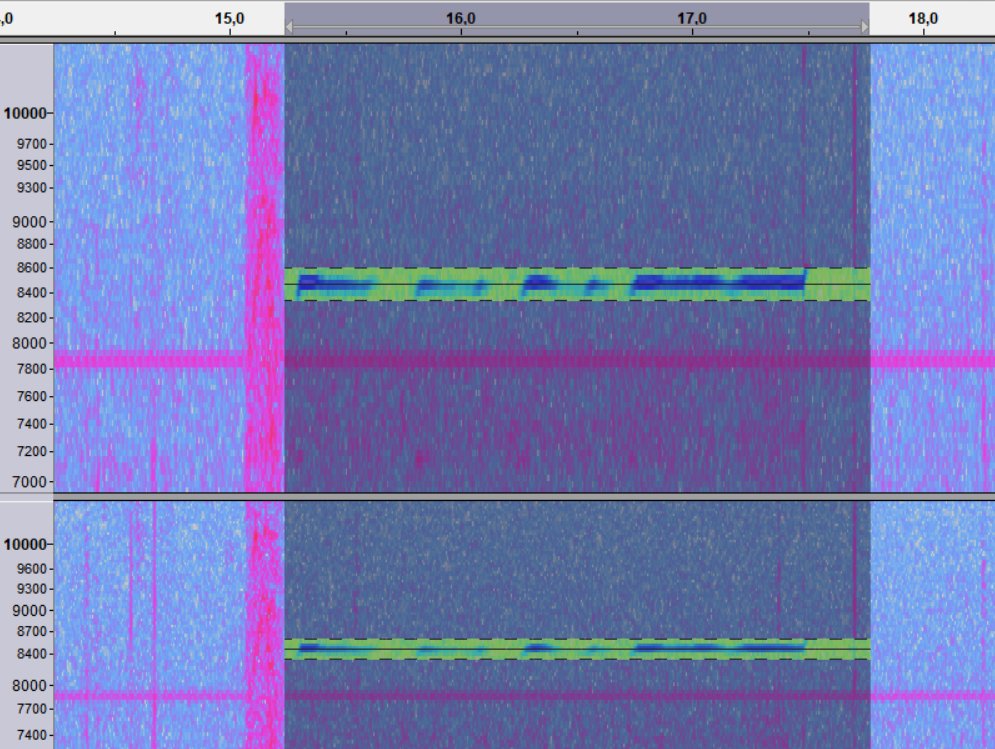
The default notch filter does not have a debug function…
Bet regards
iBenny
Do any of your Nyquist plug-ins work?
Look that they don’t !
Brief history :
On the first failure to perform the notch filter, I updated audacity to the latest version to location #1 below. I think I was already on 2.4.2 but still, I did it anyway. No improvement. I then checked my plugins list and found there were plugins in two locations :
1- [path]/audacity/plugins
2- [path]/audacity 2.4/plugins
I said there must have been a conflicting plugin settings and the audacity upgrade must have failed to put the directories in order so I deleted the #2 audacity 2.4 folder to keep only the first one, uninstalled audacity and reinstalled it… to no avail since the plugin manager still listed the #2 path in the plugin list. I haven’t fiddle with the plugin manager further.
Best regards
iBenny
Does your computer have other problems that have not yet been mentioned in this discussion?
Not realy… IMO !
I have a DELL T5500 workstation with a Xeon X5650 6/12 cores/threads CPU + 24G RAM …
NB: if you want we can do a Teamviewer like session with AnyDesk if you want to inspect my system…
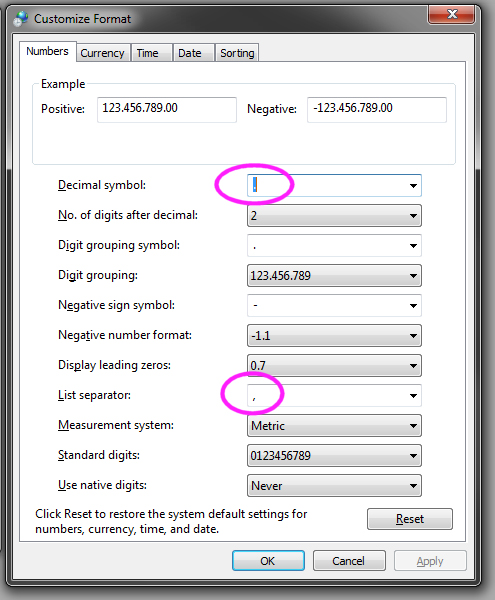
What was it set to previously?
Which exact setting are you referring to?
As Trebor indicates, the “Numbers format” should match the language settings so that a dot is used for languages that normally use a dot, and a comma is used for languages that normally use a comma.
I think that indicates a separate problem of Audacity not being installed correctly.
I suggest that you do the following:
- Check that the Number format and the System Language setting match. For example, Language = US English and Decimal separator = dot.
- Uninstall Audacity completely.
- If you already have any versions of the Audacity installer (such as in your Downloads folder), delete them.
- Download a fresh version of Audacity from the Audacity website: Audacity ® | Download for Windows
(While you are reading the Windows download page, there should be an automatic prompt to save the Audacity installer. Save the download somewhere convenient, such as your Download folder.) - When the download has completed, start the installation by double clicking on the downloaded installer.
- During the installation, look for the option to “Reset Preferences”, and ensure that option is selected (enabled).
- If you see any errors or warnings during the installation, make a careful an accurate note of them and let us know.
Hopefully after that you will be able to run Audacity and have it work correctly.
Hi Trebor,
These settings you show were always set as this despite my regional setting being Canada (french) and had to set back these settings afterward and… I HIGHLY doubt the problem lies there and agree with Steve that it should be an installation problem for two reasons :
1- IF it would be a decimal symbol issue, then audacity wouldn’t work properly (nyquist filters side at least) in France and ALL other country that uses comma as a decimal symbol and the issue would have been known and addressed decades ago;
2- When I uninstalled audacity, it was NOT listed in W10 the pc program list so it couldn’t uninstall it cleanly. When I reinstalled audacity I used “Uninstall Tool” so I can now uninstall it thoroughly.
Will follow Steve’s instructions and keep you informed.
Best regards
iBenny
Hi everybody !
1- uninstalled audacity
2- deleted leftovers in appdata/local and appdata/roaming
3- downloaded latest 3.0.2 version
4- installed that version
5- opened my .aup project file
6- selected the artifact
7- applied the notch filter
8- filter failed to clean the artifact !!!
9- did the same starting with the .wav source file to NO avail !!!
Regards
iBenny
Does “Generate menu > Pluck” work for you?
If I change the decimal symbol from dot to comma,
notch-filter fails either silently, or fails with the error-message is shown, (on Audacity 2.3.2)
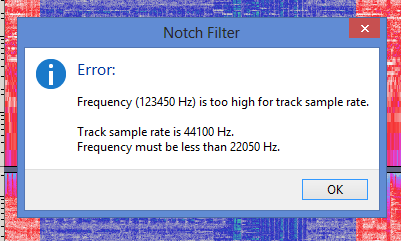
Revert back to dot then notch-filter works normally.
Well Trebor, you got me with that ! The moral of the story is… the nyquist filters are ill written : they should always accept both the comma and the period as decimal symbols. To whom it may concern, take heed of that and correct your plugins !
Steve,
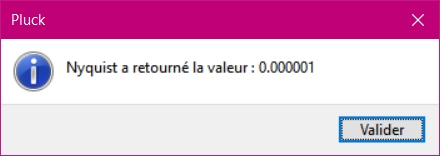
don’t know how to use the Pluck thing. What I did is create a new track (mono). positioned the marker at some arbitrary place and generated the nyquist Pluck thing keeping all the Pluck default setting as is. Nothing happened besides the generation of this window:
Best regards
iBenny
It has nothing to do with the plug-ins.
As with virtually all programming languages (C++, Java, JS, Rust, LISP, C#, Go, …) the Nyquist programming language (used to make these plug-ins, always uses a dot as the decimal separator. Handling user input with a comma as a decimal separator is handled at a higher level. In Audacity’s case, it is handled by the WxWidgets cross-platform toolkit. WxWidgets looks up the system symbol for the decimal separator from the underlying operating system, and attempts to “translate” the user input before passing the data to the application code. If the system settings are screwed up, then the translation fails and the code produces rubbish.
Here is the plug-in code for the notch filter:
(cond
  ((< frequency 0.1) (_ "Frequency must be at least 0.1 Hz."))
  ((>= frequency (/ *sound-srate* 2.0))
    (format nil (_ "Error:~%~%Frequency (~a Hz) is too high for track sample rate.~%~%~
                 Track sample rate is ~a Hz.~%~
                 Frequency must be less than ~a Hz.")
            frequency
            *sound-srate*
            (/ *sound-srate* 2.0)))
  (T  (notch2 *track* frequency q)))
Interesting !
I don’t know the nuts and bolts of WxWidgets but, remembering all my programming courses (fortran, cobol, assembler, C++…), when you pass an argument to a function (the nyquist code in this instance), the code must treat the argument through a “validation” procedure before using it, if it is warranted, and we learn here that it is highly warranted… If nyquist codes don’t do this basic procedure, this is what we get in return !
Best regards
iBenny
That’s a good point, but it becomes more complex when libraries, APIs and embedded languages are involved.
If you look at some of the early Nyquist plug-ins, you will see things like:
(setf frequency (sanitize frequency))
(setf bandwidth (sanitize bandwidth))
(setf q (santitize q))
This was because it was possible for a user to input numeric data outside of the valid range of a numeric input control.
In more modern Nyquist plug-ins, this type of code is not seen, because validation occurs higher up the chain. Numeric input widgets now have built-in validation. For example in a Nyquist plug-in you can define an integer input widget like this:
;control value "Enter a whole number between 0 and 10" int "" 5 0 10
The three numbers at the end are:
- Default value (5)
- Minimum value (0)
- Maximum value (10)
If a number outside of the range 0 to 10 is entered, it is NOT passed to Nyquist, it raises an error.
My point about the decimal separator NOT being a problem in the plug-in, is that it is NOT the plug-in’s job to validate that a floating point numeric input widget returns a floating point number. That task is handled higher up the chain, between WxWidgets and the underlying operating system. For the validation to work, both WxWidgets and the underlying operating system must be working correctly.
Hi Steve,
Granted !
(cond
((< frequency 0.1) (_ “Frequency must be at least 0.1 Hz.”))
((>= frequency (/ sound-srate 2.0))
(format nil (_ “Error:~%~%Frequency (~a Hz) is too high for track sample rate.~%~%~
Track sample rate is ~a Hz.~%~
Frequency must be less than ~a Hz.”)
frequency
sound-srate
(/ sound-srate 2.0)))
(T (notch2 track frequency q)))
This looks to me as a data validation procedure (VP) since it seams to return an error message if the data value (frequency) is invalid/out of range. In my case, the data (frequency passes the test since I do not have any error message like this one so… the problem lies elsewhere.
SO, the variable in litigation here is “frequency” that should be a variable defined as “single” as for data type.
‘Single’ = floating point digit of 4 bytes long
The input box of ‘frequency’ is :
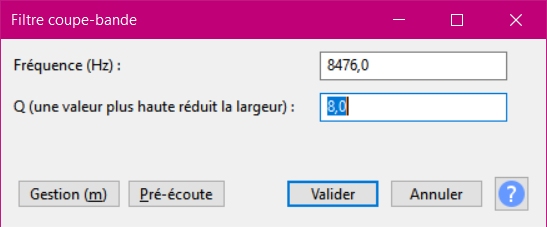
where the ‘frequency’ input field is the top one, obviously, and does a first validation act live as the user types in his figure. If the user type a decimal not corresponding to the one defined in the system, it is NOT accepted and, if none is typed, one is added by default. First step.
Second step; when the user click ‘Validate’, then a second set of validation procedures come into play in order for the variable be correctly treated by the remaining code. The validation code VP up above must be the first validation procedure performed in this regard… I presume/assume (!).
I note that in this VP, ‘frequency’ is compared with “0.1” where the decimal symbol is a period. I wonder if this can be a concern and cause a problem here and in the remaining of the nyquist code ? I am not quite sure for in my case, the ‘frequency’ variable is corrected with the comma as decimal symbol (DS) (despite my OS DS being configured as a period) and doesn’t seams to cause any problem in this VP so it appears so… if no problem “seams” to happen here for no error window pops, why should I worry for a problem in the remainder of the code ? No error window popping up does not mean no error happened in the comparison code, and I can’t see where there could be one…
Since I get this ‘info’ window message, I would like to see the code that makes it pop :

Anyway, regardless of all the validations and formatting of the ‘frequency’ variable performed at another higher level of the programming (that you seams not having control of) as you stated, it does NOT stop you from performing your OWN final validation/formatting procedure to force the ‘frequency’ variable to conform to the proper form it needs to be to be accepted and correctly processed in the remainder of the code treatment. BUT… I can’t think of any conflictual data interaction other than data types comparison mismatch (byte vs integer vs long vs single vs double). A debugger is in order here or… someone who knows thoroughly the code of the remainder of the nyquist treatment after having pressed the ‘Validation’ button to know where the bug/glitch lies.
But, I guess one of the main concern here is : why does my OS generates a comma as DS despite the fact it being defined as a period ?
Don’t know the nuts and bolts of the programming language nyquist uses but… IF the comparison A >= B where A have a comma DS and B have a period DS generates a problem, then the VP comparison frequency < 0.1 should raise a concern and be addressed in some way like… maybe:
OSDS = OS decimal symbol
If OSDS = “.” then
B = 0.1
ElseIf OSDS = “,” then
B= 0,1
EndIf
then we should compare ‘frequency’ with B, not with 0.1, if this makes any sense…
You know where I’m getting to…
Best regards
iBenny
I just checked in my windows calculator program and… the period is the DS.
I also checked in one of my MS Word VBA form where values are treated and… the DS is a period !
SO… WHY does audacity transform my frequency data input DS into a comma ??? 
Regards
iBenny
Is that French?
Is your system language set to French? If so, then your number format should be set to comma as decimal separator.
I understand but… if you understand how Windows works, it can be configured to bypass the default settings to whatever you like so, even if the regional setting is French, the decimal symbol can be set to… the English one, period ! (pun intended).
Furthermore, I did revert to region English (US) as a test to no avail ! What gives ? This means that audacity (WxWidgets) does NOT query the system decimal symbol setting but some other language/regional settings and makes assumptions from this, i.e. in summary : VERY BAD programming in this instance…
So… I guess my only last resort will be to use… iZotope RX7 ?!
Best regards
iBenny