I do note that the noises in the first tracks are not only gentle spring rain in the trees. I can hear metal pump cabinet noises in there. That’s the kind of noise that may fail human testing even if it did make it past ACX-Check.
The second track has a noise shift and you turning something off at 6.4 seconds.
The first reading file is 14.919 sec and is booster fan noise.
The second reading file is 13.599 sec and is outside A/C noise.
The third reading file is 14.034 sec and is just room noise, no fans.
I appended the three files and processed to produce one final file, which is 42.552 sec long and 7.15 MB, too large to upload. So I split that file at 22.0 sec. That’s in the middle of the second reading, as I didn’t want to split the file at the append points.
The character of the noise definitely changes at 6.53 sec in “Spectral Gated Part 2 of 2”, at the append point. There’s also a noise character change at 14.81 sec in “Spectral Gated Part 1 of 2”, which is the other append point.
Since I’m now able to turn off the booster fans, that second append point that you heard might be representative of what I’ll get when narrating as the outside A/C unit cycles off – time will tell.
I think if ACX were to reject based on the the noise being too clean above 140Hz, I would tweak the process to leave some noise there. If they were to reject based on the change of noise character, at some point I’m left with (i) doing noise reduction to near zero and then mixing in my recorded room noise, or (ii) only narrating when the outside A/C unit is off – which probably means waiting about three months. Trying to narrate between cycles is incredibly frustrating. Not that ACX will be clear on the reason(s) for a rejection.
So maybe the spectral gating will be the ticket. I agree with you that ACX eliminating the short evaluation is just terrible.
Here is a short file containing the spectral gate processed noise:
2 sec booster fans
2 sec outside A/C
2 sec room noise
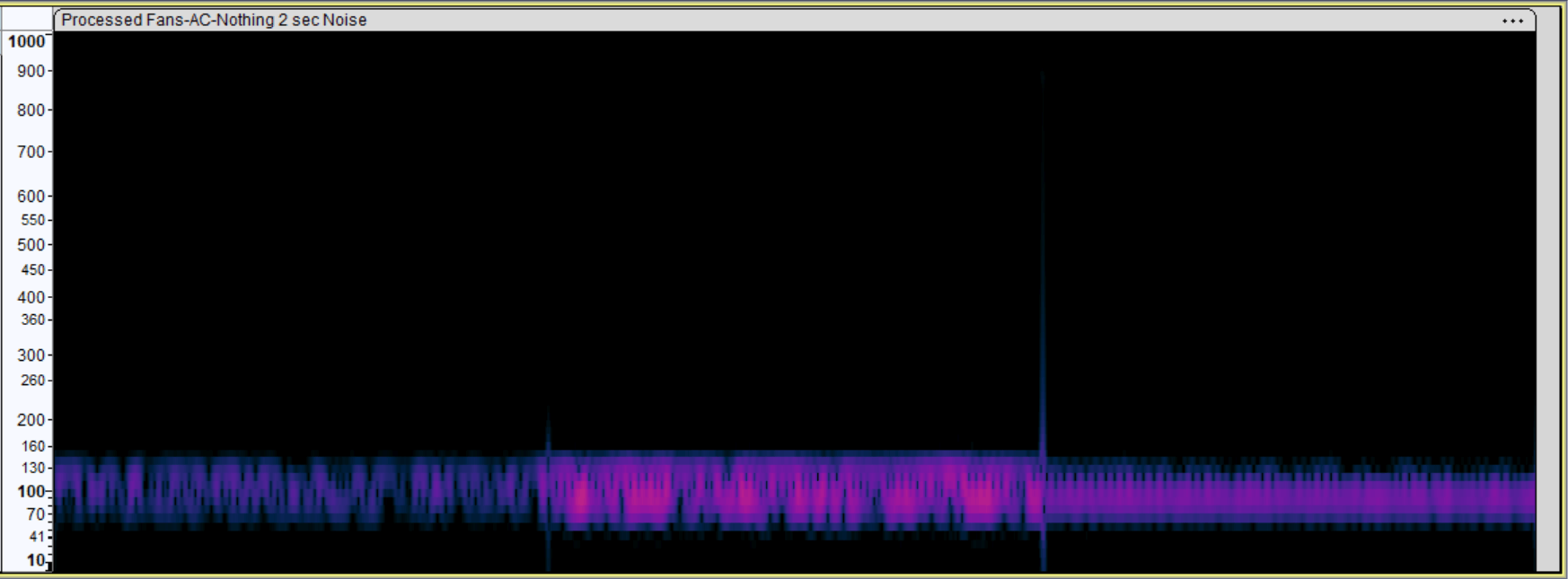
You can clearly hear the different noise characteristics. Of course, the noise floor is below -80dB, but still, the noise definitely changes.
You can also hear artifacts at 2 and especially 4 sec. These are not in the full processed file – they are introduced by the Ctrl-K Delete command. You can see the frequency damage in the spectrogram view.
I’m curious what in the command is causing these. Does the Delete command do some frequency matching at the cut points?
Edit: I forgot to mention that I’ve tried selecting just the artifact, hitting ‘Z’ to choose zero crossing points, and then deleting – but I usually still get another artifact. Crossfade Clips does help. Also, I think when a noise like the outside A/C cycles off during narration, it won’t cause a spike. But I am concerned about appending all my chapters together to process as one file. Maybe Crossfade Tracks is the way to go?