if that is where it’s going…
It is, yes.
You should have:
Effect > Limiter (near the bottom)
Effect > Equalization: Select Curve > LF rolloff for speech
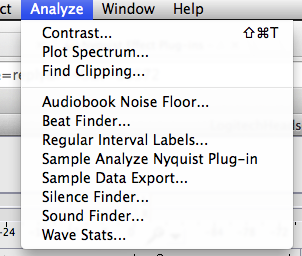
Analyze > Contrast…
Analyze > Audiobook Noise Floor…
Analyze > Wave Stats…
Koz
if that is where it’s going…
It is, yes.
You should have:
Effect > Limiter (near the bottom)
Effect > Equalization: Select Curve > LF rolloff for speech
Analyze > Contrast…
Analyze > Audiobook Noise Floor…
Analyze > Wave Stats…
Koz
I’m missing,
Effect > Limiter
Analyze > Audiobook Noise Floor
Analyze > Wave Stats
Download “Limiter (2)” from here: Missing features - Audacity Support
That one does not exist yet. However, you can select a section of “noise only” and use “Wave Stats”.
Download “stats.ny” from here: "Wave Stats" plug-in
Instructions for installing the plug-ins: Missing features - Audacity Support
Note that the current “Wave Stats” plug-in is limited to analyzing a maximum duration of 30 seconds. There will be a new version (when I have time to complete and upload it) without this limitation.
No wonder that I wasn’t able to find that one, although Koz has mentioned it several times.
And there’s an one hour version near the end of the mentioned topic that I use for all those measurements, “wavestats.ny”
That one does not exist yet.
The one I’m using is doing a dandy imitation of existing.
And there’s an one hour version near the end of the mentioned topic that I use for all those measurements, “wavestats.ny”
Did you change the name so we know which one we have? I wouldn’t mind a specific link to the software.
Et voilà.
A fine illustration of why this process is so darned entertaining.
Koz
What is the exact name of the plug-in?
Download and install AudioBook Noise Floor from here:
http://forum.audacityteam.org/download/file.php?id=9945
Koz
“Access denied”
I had no poblem getting it. Is it a forum access level thing? Maybe only “elves” and manual editors may access the file.
Quite so.
You are not authorised to download this attachment.
It’s an experimental plug-in. I was playing with some ideas for indicating problem areas in audiobook recordings. It’s not on the public forum as it was just an experiment - not yet intended for practical use.
sigh
I am not an elf, nor an admin of the forum, so I too do not have authorization of downloading this file.
And there’s an one hour version near the end of the mentioned topic that I use for all those measurements, “wavestats.ny”
Robert, where may this one be located at good sir?
Here: "Wave Stats" plug-in - #33 by Robert_J_H
It will be made publicly (and freely  ) available as soon as there is a complete and tested version.
Thank you steve, kind sir!
See: Just collecting the tools is a career move.
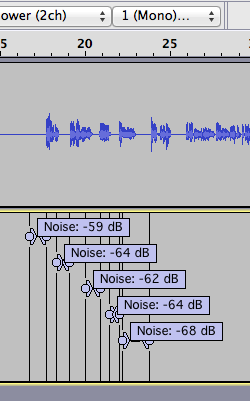
Wavestats isn’t nearly as handy as AudioBookNoiseFloor. ABNF goes looking for quiet places in the performance, assumes they’re “Room Tone” and measures them with a label (attached). Wavestats has to be lead by the hand and pointed to a Room Tone segment. I have only limited experience with wavestats, so we’re starting from something of a level field.
Please know there are two versions of wavestats.ny in the wild now, and the only way to tell the difference with no link information is open up the work in TextEdit or NotePad and look for these notes in the top of the program.
;; version 0.4
;; with some modifications by Robert J. Haenggi
;; Most of all, 30 s limitation removed
The early wavestats had a short (thirty second) selection of sound burned in. The Robert revised one seems to be a one hour limit although it doesn’t say so.
At least one of these conformance tools has a limit of only working on a mono sound track. Reducing your show to mono is right at the top of the instructions. This isn’t the serious limit it seems. Unless your client requires stereo delivery, most dialog or vocal performances are in mono. When you watch a 5.1 Dolby Surround, full theater emersion experience movie? Most if not all the dialog is in the middle.
As we go.
Koz
On topic but not specific to the current discussion.
I am trying to use the Analyze tool, but I am having a problem, apparently in selecting what to contrast.
I keep getting an error message: “Times are not reasonable! Please select reasonable times.” This leaves me with 2 questions. 1: what are reasonable times and 2. how do I select them. I have tried both highlighting sections and typing in numbers and neither has gotten me past this error msg. I have used big sizes and tiny sizes. Can anyone tell me what I’m doing wrong?
Probably better as a new topic in one of the Help forums
Which “Analyze tool”? Do you mean the “Contrast” tool?
What operating system are you using?
What is the exact version of Audacity you are using? (look in “Help > About Audacity”)
Thanks for the reply, but as often happens I fumble around and get things working. Yes I was looking for contrast.
For future reference, if you need help using Audacity, please post a new topic in the help forum appropriate to your operating system http://forum.audacityteam.org/viewforum.php?f=45 Thanks.
Greetings Zatana,
nice to meet a fellow fledgling and a female version of me no less! 
This group will really help and I hope my ridiculously long thread did too.
I no longer have outside noise to worry about as I moved into a large closet I have in the hall and set it all up with Auralex tiling (thank you birthday wish list!) and an Auralex Mudguard. I’d recommend those if and when you can. In the meantime, of course, blankets and the like can be used.
I’m only up to page 4 and must go to bed so perhaps you’ve already covered all that but I had to say hello so there you go. 
I’ll read more tomorrow and good luck!
Cheers.