Looking for advice on which version to downgrade to

Windows 7, 32-bit here. The newer Audacity versions for my operating system come with many changes that are not always for the better. I appreciate some, however, and since I haven’t kept my eye on which changes which versions have brought, I would like suggestions on the most acceptable version to downgrade to - something before the most odious innovations but preferably with some good ones already in.

Things I hate the most:

It is impossible to click in the beginning of a track. The mouse cursor simply won’t go there. One has to click somewhere early in the track and use the left cursor key to slide to the start.

Having to use Edit → Join audio to merge inserted track pieces.

Having to select a portion of the track or the entire track to apply Amplify, Bass and Treble and other effects. In some version, possibly quite an early one, the entire track was automatically selected in the absence of a custom selection. It would be good to roll back to that, if this would not leave me with some antediluvian version.

If possible, return automatic back-ups of previous namesake files. They were a bit of a hassle to delete afterwards, but sometimes very useful for going back to a better edit. But it’s possible that this remains an option somewhere.

Things I would like to keep:

The new Export Audio system that does not force one to open the target directory. Everything happens in one window here.

This is probably it. There are a few small conveniences here and there that I approve of, although they clutter the screen and are not necessary. Car doors could have buttons for “Lower screen down by half” and “Open window a chink,” but it’s not a good idea.
You almost told us which version you’re using now.

3.4.2 and 3.6.2 I believe are reasonably stable and they (as I remember) use the single .aup3 project file. Again, I believe, they will open the earlier Audacity Projects.

I used 2.4.2 for a long time with little or no trouble. The earlier Audacity versions used the single .aup file and associated _data folder with the music in it.

Quick note. Do Not install filenames ending in “0” or “1”. Those are test, experimental versions and can have serious problems.

If you do go back, you’ll need to move or delete the separate Audacity Preference, setting, and environment files. I don’t know how to do that in Windows.

It’s not the best idea to rush into The Very Latest Software Version. Let it mellow for a while and haunt the forum to see the problems others are having.

Koz

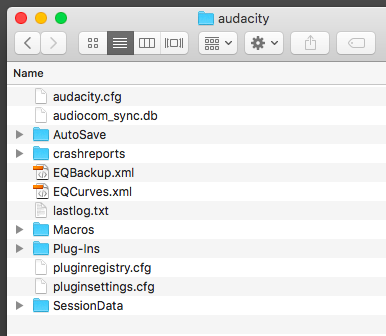
This is what preferences look like on a Mac.

These items are kept separate so you can upgrade Audacity without having to go through the whole program to put your environment and favorite tools back together.

Unfortunately, since it’s “sticky” it hangs around when you downgrade and can cause odd problems.

It’s strongly recommended that you move or delete this collection if you downgrade.

I’m looking for the Windows instructions.

Koz

Go down this link. It’s got some good info.

Koz

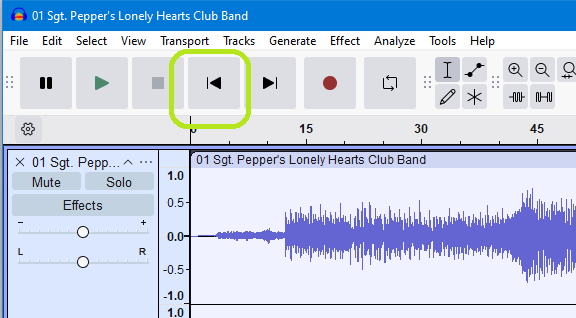
Use the “Skip to start” button in the Transport toolbar:

Or if you prefer keyboard use, just use the Home button.

Peter

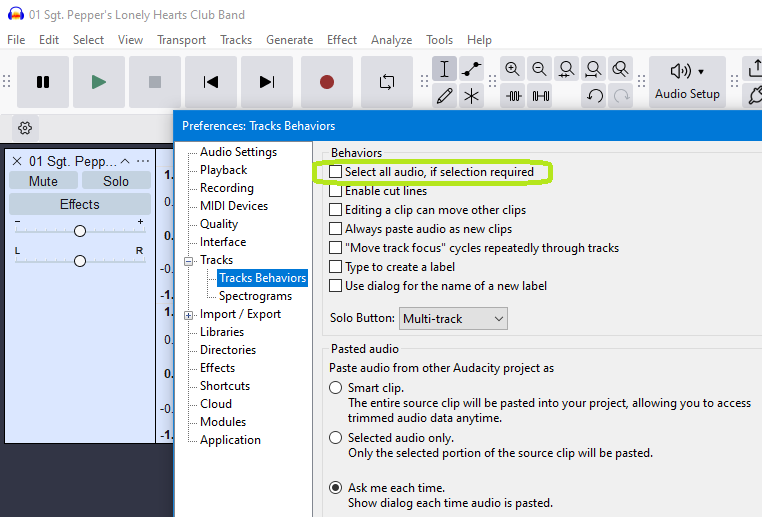
You can get that same behavior in the latest versions of Audacity by a simple preferences setting:

In Tracks Behaviors preferences set this to be on.

This is what the Audacity Manual says about that setting:

Peter

I don’t recall this ever being a feature in Audacity.

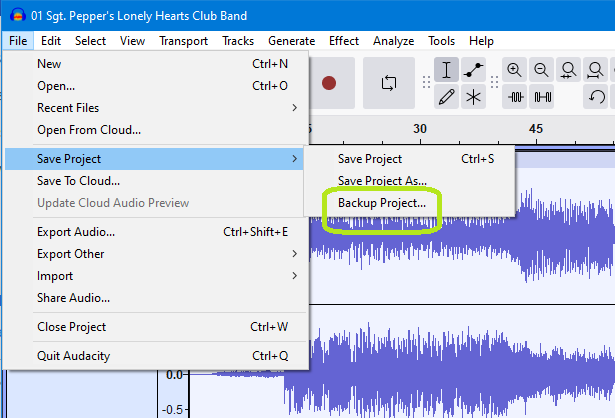
We did introduce a Backup command many releases ago:

Prior to that there was only “Save Project As” which created a new version of the project, but at the same time switched to that as the current version.

The advantage of “Backup Project” is that it creates the copy but leaves your current active project open and active.

Peter.

1 Like

Sorry no fix for that apart from going back to an earlier version that supports the simple click to join clips.

You can use the shortcut Ctrl+J (Cmd+J on Mac) to effect the join.

The advantage of the command or shortcut is that you can use it to mnake several joins at once by selecting all the audio clips that need to be joined.

Peter

Thank you for telling me there is an option to have the track automatically selected, but all the other changes are unwieldy. And I still don’t know which version was the last before them. That was my reason for asking here.

By auto-backup I mean that Audacity used to keep the previous version of the exported audio file (not a project file, I don’t use projects). It used to keep the older version renamed to name-1, I think.

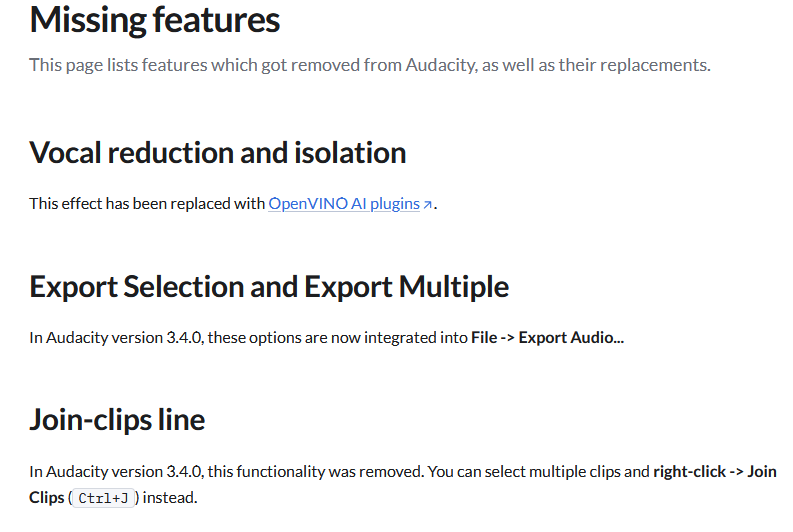
The Muse Support site has this to say on the subject:

So versions before 3.4.0 will still have the single click to join adjacent clips.

But they will also have the less elegant export dialogs rather than the newer integrated dialog which you say you prefer (and I do too).

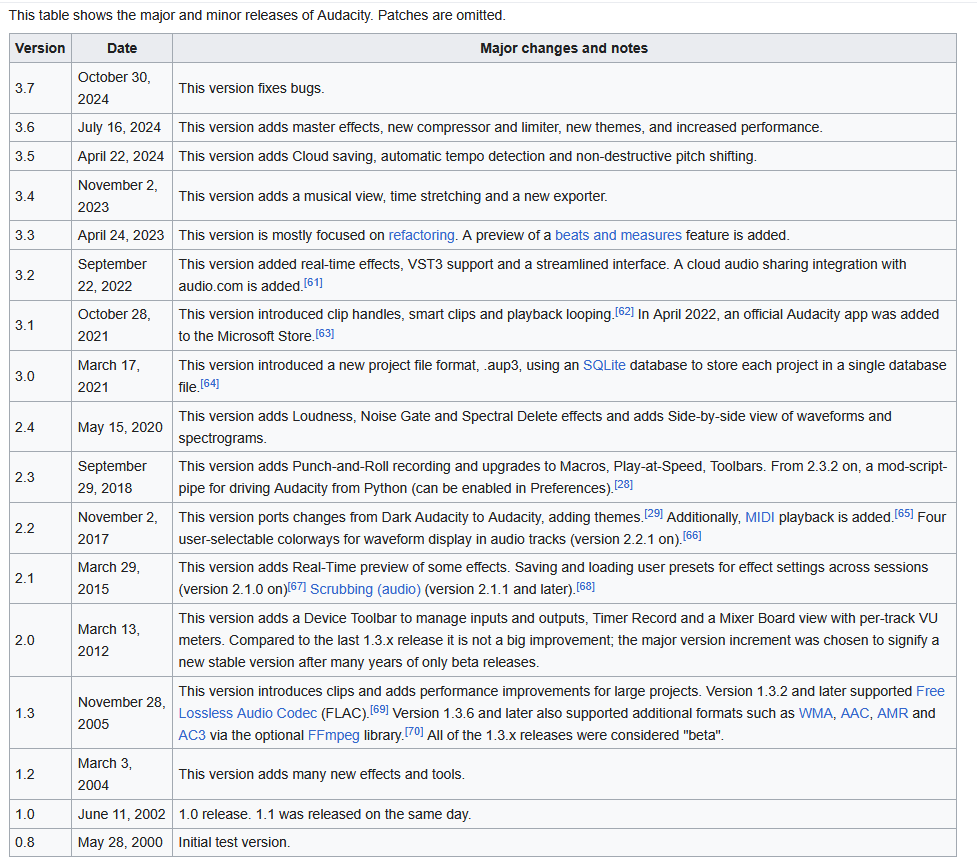
This Wikipedia page on Audacity has a concise table showing the version changes:

As Koz says 2.4.2 was a pretty good stable version of Audacity but did have the disadvantage of having the older more complex and fragile project file structure (not important if you are not saving projects as you say is your use case).

The 3.0.0/3.0.2 were the last releases made by the old Audacity Team before handover of the project to Muse. Many bug fixes were made for these releases prior to the handover.

For details of those releases see this page on the Muse Support site:

and

Peter.

I don’t particularly miss the click-to-join feature since I most often want to click at the start of a clip rather than join clips. I’d prefer the option for a modifier key to toggle between click-to-join and click-to-place-cursor, but I’m told that’s not in the cards.

While not perfect, the attached macro at least obviates the need to drag a selection across the join point. Import the macro and assign a short-cut to it. Click on the join line (the yellow guide line will help you hit the spot) then run the macro. If this works for you then you can keep the improved export dialog.

AutoJoin.txt (56 Bytes)

So I’m in the unlucky situation where a good change was in and a bad change was in with 3.4.0.

All right. Thanks. Since we have somebody from the developer team here, I want to repeat my suggestion for the interface from a few months ago: make the Effects drop-down menu a horizontal fold-out with a left and a right halves instead of a vertical menu. The way things are, moving between effects in the upper section, above the line, and the effects below takes a lot of time. For instance, I often use Low Pass Filter and Bass and Treble to dampen sounds somewhat and make them sound more remote. These options give similar results, but not quite the same. I may do a Low Pass first, then scroll uuuuuup with the mouse to Bass and Treble, then back dowwwwwwn, then uuuuuup to Amplify. That is several seconds bled out of me in every go. Just put all of the above-line effects on the left side of the fold-out and the below-line on the right. The window would cover the view of the track, but that’s not important when picking the effect, the user knows what he wants to do.

In addition to this add a small detachable panel with the two most recently used effects and an X to close it and make it parkable over other elements of the interface instead of the mozaic mode that takes up too much space. I don’t know if Audacity supports interface elements that go over other inteface elements currently, but that is definitely the way to go. Ideally all of the little added menus, buttons, checkboxes and toggles that have begun to clutter the interface should also be individually X-able, every one of them. Select and push Delete, drag outside of the program window or something else to disable the feature, enable in settings. Better yet, send them to a special holding buffer, a separate window that could be opened from the main menu, where each feature so disabled would be listed, called as it was on the panel (I imagine them in green ink). That way users would have a much simpler time remembering what they have put away and plugging those details back in than if they had to dig through settings and figure out by what names those functions are referred to there.

There are too many new additions to Audacity that may be useful to someone, sound professionals perhaps, but are only distracting in the context of common use. Audacity is trying to sit between the chair of a friendly editor for most ordinary options and a high-end program for specialists. To get out of this discomfort as much of the interface as possible should be customizable in detail. For me, I would gladly not see half of the menus and graphs that Audacity thrusts in my directions. I am never going to use them nor merge many different pieces of audio in one swoop, for which Join may be handy. How exotic is that? Inserting one piece from the buffer, something cut out of another file or a custom length of silence, is going to be far more needed, and that is better handled with a simple click on the line. I don’t see why the choice between these can’t be somewhere in settings, but if not in this particular case, then in many others the amount of technical detail and advanced options should be configurable.

I found out what I wanted with this topic and won’t be following it any longer.