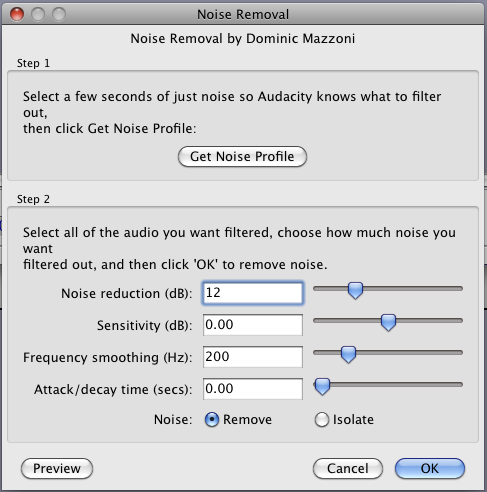
The raw presentation can stand up to just a bit more Noise Suppression to get you over the boost you’re going to get when you punch the voice volume to make the -3 peak specification. Attached is the Noise Removal settings I used. I used a segment between the first and second word as the Profile.
You got the studio well behaved enough that this isn’t difficult work any more.
I’ve got a thick, furry rug doubled up underneath the carpet so that should be absorbent. I managed to fix the squeaky floorboards (surprisingly) and I’ve heard I have another box of the tiles coming for my birthday on Thursday so I’ll be able to do the back wall and door. For now I have that curtain across from some organic absorption and to close across the computer box if necessary.
Yay! Thank you so much! I did do one noise removal, however so I’d rather not do a second. Hopefully I can figure out what it causing it and remove it. I can’t even hear it myself even though I got better headphones. I’ll have to listen harder.
I followed the steps outlined earlier in this thread:
Record in mono.
Normalize to 0.
High pass filter.
80 Hz
12 dB
Noise reduction.
Add a limiter but NOT a hard limiter. * (I’m trying George Yhong’s W1 Limiter but just need to know the best settings).
Amplify to -3 dB.
Export as WAV.
Export as MP3.
192 kbps CBR.
Ah, thank you. I shall include those settings.
I can’t emphasize enough just what it has meant to me, all the help and advice from you all. Sincere gratitude. I hope this thread manages to help many more too.
Probably do need better headphones The hum on the unprocessed recording is definitely audible. You can also see it if you select some “silence” and then select “Analyze > Plot Spectrum”
The thick spike at around 50 - 60 Hz is actually two spikes close together; one at 53 Hz and the other at 60 Hz. The latter looks like 59 Hz in “Plot Spectrum” but is actually 60 Hz. I don’t know what the 53 Hz spike is caused by but the 60 Hz spike is “mains hum” (Mains hum - Wikipedia).
The tall thin spike is at 120 Hz is the first harmonic of the mains hum. This is the most audible part of the hum, and the most problematic as your voice extends down this low.
The hum is not particularly bad and is quite effectively reduced to a reasonable level, as described in the last few posts, but I agree that it would be better if the source of the hum could be eliminated rather than having to deal with it in post.
Try making a recording of “silence” with everything electrical in the room turned off (apart from your computer / recording device of course).
If the hum goes away, then try turning things on one at a time to find what is causing the hum.
If the hum is still there with everything turned off, then a powered hub for the mic “may” help (or may not - no way of telling without trying it).
Hopefully the Rode / Presonus combination won’t have the issue, unless your room is located right next to a sub-station or something like that.
The headphones seem fine. Many different headphones can be made to work, but the question is can you wear them comfortably for long periods. Both the Koss Pro4AA and the Sony MDR-7506 are without question terrific headphones, but I personally can’t wear either of them long enough to do a show.
Hopefully the Rode / Presonus combination won’t have the issue, unless your room is located right next to a sub-station or something like that.
Not at La Brea and Olympic he’s not, unless it’s underground.
It does bother me that I can’t hear the hum that everybody’s talking about. Trust me I know what 120Hz “open shield” hum sounds like. I’m perfectly clear on the frying mosquito noises, white noise underneath data whine. That’s low enough down now to be easily removed without damaging the voice.
I’m slowly coming 'round to the idea that all USB microphones do this. It’s a combination of a nose-bleed high gain (60dB) to get the microphone to work at all and the ratty USB power supply from the computer. It’s a cousin to the problem of having a soundcard inside the computer — right next to the blast furnace noise generator video card.
~~
I lost the thread. Did you post a short, finished clip? I’m looking for two sentences in your full theatrical voice suitable for submission.
no, not yet, not until I track down and eradicate (if possible) this noise.
I’ve tried everything now. I thought perhaps it was the USB extender cable.
My last test was the laptop outside the room. I’ve uploaded the result here.
Does anybody still hear the same thing? There are a few background noises as there was a cleaner working ($19 on Amazon Local!) but the rest is just me holding my breath in the booth.
Cheers.
Edit - Oh and nobody ever told me which Limiter they use, only that I shouldn’t use a Hard Limiter. How is this one please?
Did someone say you needed a limiter? I think maybe you can carefully squeeze the top volume bits a little to even things out with Effects > Compressor and then Normalize or Amplify to -3. Or leave it the way it is.
Everything you do to the show will have to be done every show. A good amount of post-production is nothing. This is why you’re working in a studio instead of having to perform digital emergency open heart surgery at every show. Walk in, press record, and walk out with an almost perfect show a half-hour later.
I don’t think you want to do very much at all to this except push the background noise down a bit and stabilize the peaks so they don’t go over -3.
We’ll send it through our version of acceptance testing and see how it goes.
The 60Hz noise is now in the -60 range and all the other noises are down beyond -70 or better. 120Hz, the one you can hear, is down in the -78 range. 240Hz is -81. Sound level halves and doubles every 6. Easy to suppress with gentle Noise Removal.
If the 60 is troublesome, notch it out. Remember 80Hz to 100 Hz is the low limit for human speech, or apply Steve’s new High Pass Filter.
Back in the dark ages of color (colour) television, there was a standing joke. Many people could align a home TV set (Convergence, Purity, Beam Focus, etc) but only the Masters knew when to stop.
“I think I can get the blue just a little better in the upper left-hand corner…”
I’m just now paying strict attention to the Presonus microphone interface. There’s no provision to plug it into the wall. I wonder if it’s going to have tortured mosquito problems of its own.
Only eight more chapters and we can compete with bgravato for the longest thread on the forum. All he was doing was recording his acoustic guitar with one microphone.
So these are my current settings based on everybody’s advice here, especially yours and He Who Should Not Be Questioned (yeesh, HWSNBQ hereafter):
Record in mono.
Normalize to 0.
High pass filter.
80 Hz
12 dB
Noise reduction:
12
0.00
200
0.00
Add a limiter. *
Amplify to -3 dB.
For us simpletons, would you add / change any of the above?
So it WAS the laptop. Well that’s a relief. I mean, a bit of a pain to have it outside but better than tracking down the stealthy mosquitoes (and believe me, they ARE, I’ve already been bitten quite a few times this week in my home office and yes, I’ve ordered the essential oil mix to combat them, heh).
Crap, showing my age now but I vaguely remember when we went from a black & white telly to a colour one and yes, I think I knew a few people as you describe. Heh.
Cheers.
Edit - this fella seems a fan of compressors and limiters too in the mastering video.
Bring the Audio to to about -20 dB RMS (Analyse → Contrast)
if there are peaks over -3 dB, soft clip them with a Peak Limiter (Steve has written one).
if the narration fluctuates too much, use a compressor first or retake the “Show”.
I actually would use a highpass starting with something like 130 Hz.
You can also duplicate the track, invert it and apply a low pass with 130 Hz cut off. You can thus regulate the attenuation with the gain slider and furthermore listen to the Removed Audio in isolation (solo mode).
I’ve to control the latest samples first in order to give some reliable advice.
Thank you, Robert. I think. Still trying to decipher the last bit.
Incidentally, fellas, I have an old flame arriving from England tomorrow for a 10 day visit. We’ve not seen one another in almost 23 years (of course that means I quickly have to say we were both 5 at the time, hehe) then tis my birthday on Thursday so I’m not sure when I’ll get a proper recording up for you but I shall do my best.
On occasion I will forget that not everyone has access to all locations on the forum and send somebody to the wrong place. Send a note when I do that.
We need to keep right in front the goal of one-take, no effects. As a fuzzy concept, the ACX guidelines are expected to be met by someone presenting very well into a perfect microphone in a perfect room. If there are deviations that can’t be cleared physically, then we try to clear them in software, keeping in mind that the tools are all algorithmic approximations, not magic wands.
Your personal announcing style/environment may demand different adjustments than someone else. I think I encountered that peak limiter idea in another thread. This is the first time I’ve seen ACX recommend specific tools adjusted a specific way, but that was for another presenter. If they have a thin, reedy voice, it’s entirely possible that their robustness or energy level (RMS Value) might be lower than yours and not make the standard. It also could be that they have a profoundly non-symmetrical voice. I have a sample of a man and a woman presenter both in one show and I can pick each out from the blue waves, not from any volume variation, but her voice had a serious negative-going bias and his doesn’t. These differences may affect the measurement tools differently.
So if at all possible, I would like a raw WAV sample of as good as you can do with your physical studio so we can see how much extra work is needed (not much in my opinion) and more importantly test our own suite of measurements tools against the ACX guidelines. We’re doing multiple things with this project as you go.
If you want to prepare longer than five or six seconds, a good thing again in my opinion, email the show to me and I will post it on kozco.com, or use the internet file service of your choice. Please also include (as a general rule) a silent count of two or three of Room Tone so we get a good idea what the background noise is.
As you get closer to the hero presentation, setting vocal level is going to be more and more important. How are you watching your sound levels with the computer in the next room? The Snowball has no way to show you sound level.
A bit about limiters, since this has come up.
(apologies to MichloIW if I was the one that “left you dangling” - this thread is progressing so fast that I don’t like to interrupt )
Typically, a good, raw (unprocessed) voice recording will have a peak level of around -6 dB. (We recommend -6 dB as a target level for the original recording so that most of the available dynamic range is used (maximum signal to noise ratio), but so there is still a bit of “headroom”. Headroom is important so as to avoid clipping (distortion).
The “typical” raw recording will be a bit too quiet. Amplifying it up to 0 dB will usually bring it very close to the desired “loudness”, but at 0 dB there is no headroom left and ACX specify that they need 3 dB of headroom (peak level no more than -3 dB). The “loudness” is approximated as the “dB RMS” level. “RMS” is a kind of “average level” that gives a better idea of overall “loudness” than just measuring the highest/lowest peaks. ACX specify that the RMS level should “measure between -23dB and -18dB RMS”.
So let’s say that we now have a voice recording and we have amplified it up to 0 dB peak level, and the RMS level is around -20 dB. Our RMS level is spot on, but the peak level is too high. What we need to do is to “squash down” those peaks a little, but with minimal affect on the “average” (RMS) level.
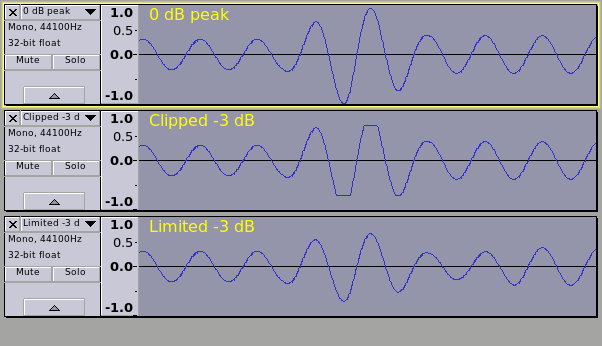
In the above picture, the first track shows a waveform with a peak at 0 dB. The peak is higher than we want, so we need to reduce it, but with minimal effect to the overall average level.
The second track shows that high peak “cut off” at -3 dB. Notice the flat top/bottom to the peak. This is known as “clipping”.
Clipping is undesirable because it often creates audible distortion that sounds bad.
The third track has been “limited” to -3 dB.
Basically what a Limiter does is to rapidly “turn down the volume” just before a high peak is encountered, then “turn the volume back up again” immediately after the peak has passed. This is very similar to how “dynamic compressors” work, except that compressors adjust the level much more gradually.
Note that in the third track, there is no obvious distortion to the waveform. The processed sound will remain very much like the original, but the peak level has been reduced.
Limiters are quite common effects, and there are many “Limiter” plug-ins to choose from.
What you don’t want is a “clipping” limiter (sometimes called a "hard limiter). These effects clip the top/bottom of the peaks, like in track 2 above, and we don’t want that.
I usually use the second one of those when only a small amount of limiting is required. I’ve not done extensive tests on speech recordings (I mostly work with music and sound effects) but I think the second one should work well for speech. For the above use case, “Apply make up gain” should be set to “No”, but otherwise the default settings should be suitable.
NOTE:
In the above “typical” case, there are lots of assumptions about levels. In real life recording “typical” probably does not exist
There are really few hard and fast rules about how to make a “good” recording, or how best to process a recording. There are “guidelines” that can help, and there are “general principles”, but beyond that much of it comes down to practice.
This is an extract from the first raw recording that you posted:
I amplified it to 0 dB (peak), then applied the “limiter (2)” as described above.
Both the peak level and the RMS level are spot on. -3.1 dB peak (was -3.0 dB before encoding to Ogg), RMS: -20.7 dBFS
I’ll get it to you as soon as I can, mate. As for the monitoring I just don’t know. I’d rather have the computer in the same room, of course because I have no way of monitoring the levels during otherwise. But if that really is causing the ambient mosquito buzz then I don’t know. It looks like the good compressor mic won’t be happening for a while. I do have another box of the Auralex that I got for my birthday so I’ll be putting that up on the back wall and door soon. I’m also hoping for the Mudguard (do you think that would shield it from the laptop noise? I’m hoping so) which is on my Wish List.
Why yes you did but who am I to question you? Koz says we can’t question you.
Thank you for all of that added information, it really did help. I can see how hard it must be to try a “one size” fits all for people using your wonderful software. The fact that you’re all helping like this and giving us these tools for free is just phenomenal. I really hope my journey is helping you too with the feedback.
 For now I have that curtain across from some organic absorption and to close across the computer box if necessary.
 I did do one noise removal, however so I’d rather not do a second. Hopefully I can figure out what it causing it and remove it. I can’t even hear it myself even though I got better headphones. I’ll have to listen harder.
  The hum on the unprocessed recording is definitely audible. You can also see it if you select some “silence” and then select “Analyze > Plot Spectrum”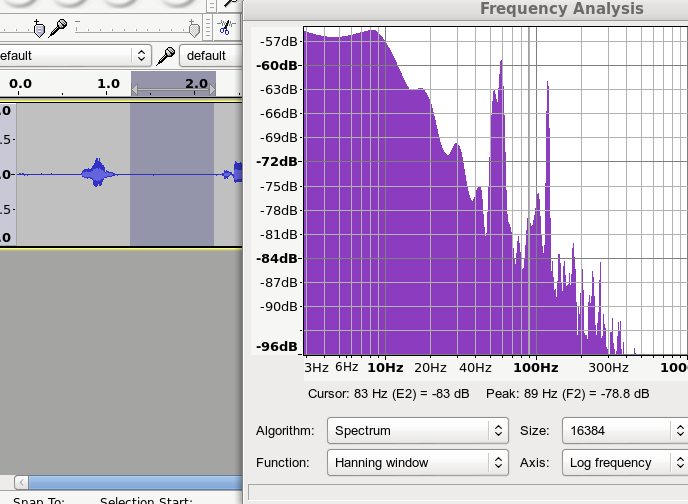
 D’oh.
D’oh. )
)