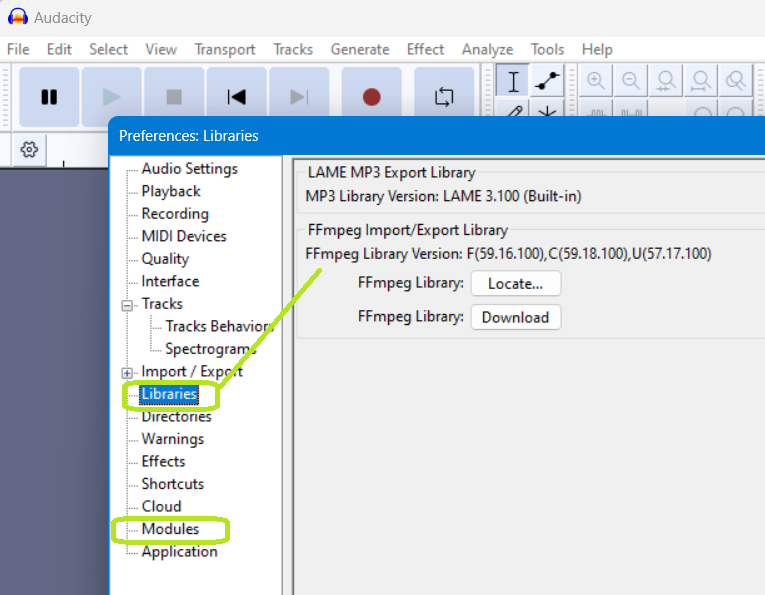
I used Audacity for at least 3 years, recently upgraded to 3.5.1 and it is an utter disaster. Straight from the build, the program will not accept MP3 or WAV files. Madness. I then go down the rabbit hole of fixing it, and am referred to downloading FFmpeg. I do that, but I can’t point audacity to this library because there is no “Libraries” control menu below preferences. A Sep 2023 youtube video talks about teaching where FFmpeg is - but again it casually refers to Libraries in Preferences.
I see some comments that MP3s aren’t MP3s but MP4s - doesn’t matter, because Audacity barfs all over WAVs also. Both files play fine in WMP.
Please include in your response why 3.5.1 is NOT showing Libraries under Preferences. If you want to talk about how 3.5.1 could be released without being able to import MP3s and WAVs, that’s fine too.
I have Windows 10 Pro, which is supposedly compatible with 3.5.1
Any ideas on mine is stripped of all functionality?
I’ve installed it twice (install, uninstall, new install download, install). No errors, no difference.
This is very good information: detailed, substantial, able to be quickly acted on.
Sadly, my “Modules” folder has that exact list. For the record, I have also “Reset Configuration” inside Audacity, to no effect. None of my other programs have a functionality problem/BlackHole.
3.4.2 is the last stable release before the Great Leap that is 3.5. I’ve been using 3.4.2 and I haven’t noticed any serious problems. 3.4.2 uses .aup3 Project files.
This might get your show on the road while problems with 3.5 are settled.
Thank you, thank you, and thank you.
Thanks for the simple answer. And for the link. I downloaded 3.4.2 and am going to get some lunch and then …
Also, since I also have a non-standard Windows download area, with this download I discovered my old 3.3.1 version … so I have two things to try. So thanks for that too. I will definitely give you an update on things.
Phase I – failure. Exact same behavior. No modules, no “Libraries” entry in preferences.
Phase II, made an install mod purely on instinct – Success! Modules found, Libraries in place, and the original action of inputing/reading a WAV file worked.
What was the fix? It appears Audacity WILL NOT work if you install it outside of "C:\ProgramFiles " . Exact same build, only difference is the location.
Thanks for your help. Will I try 3.5.1 in the (obviously somewhere) hardcoded location? Not in the near future. Wrestling with code as a mere user I find tiring. Thanks again.
Update: I hope you have access to the SPR database and can write this one up.
I took a user’s advice below and tried 3.4.2 . Had the exact same failure. No modules, no “Libraries”, no file input. I made an intuitive leap and uninstalled 3.4.2 – and then reinstalled it in “C:\Program Files” . All the tells and symptoms of failure that brought me here disappeared. Modules found. “Libraries” Preferences entry found. App able to input/read a WAV file. It seems somewhere in your 100 million lines of software, someone has hardcoded “C:\Program Files” into the startup sequence. (Also, when that startup sequence fails, somewhere in building the “Preferences” area, it gives no errors.)
I have partitioned my desktop disk to have a C: and a D: drive. “C:”, in my world, is strictly for Microsoft OS products. D: is for user additions. Every other program I have runs fine when redirected off the C: drive. Loading Audacity onto D: (via the installer option to do that) kills Audacity. Feel free to ask questions.
That’s odd, because I install all the alpha test build versions onto my desktop (to keep them away from live versions in Program Files- and for quick access) and they run absolutely fine there and with full functionality.
My disk was clean on the tailored install. Perhaps your alpha tests are getting “help” from installed modules. It’s really a bizarro problem because the install obviously doesn’t load properly, yet the program “runs” (or at least appears on screen in its own window), but has random items missing. The no “Libraries” inside Preferences is no easy trick to pull off.
Thanks for reporting. Feel free to wack your entire setup, reinstall a test build in a user defined area, and report “yeah, that works fine too.” Ha.
— oh yeah – are you Windows 10 or 11? I’m 10 … are you … ?
Unfortunately, things loaded just fine for us when Audacity is installed in D:\Audacity\ on both Windows 10 and 11. And given that Audacity is also distributed as a ZIP and somewhat frequently used on “toolbox USB sticks”, it’s not entirely clear to me why installing it into a non-standard path would cause it to fail.
I’ve also used a debugger to step through ModuleManager::FindModules, and could verify that it does set the modules path relative to the current executable (which in my case was C:\Users\mc\Documents\Github\Audacity\build\Debug\Audacity.exe), and that it never used the C:\Program Files\Audacity\ along that journey. The executable path is found via wxStandardPaths::Get().GetExecutablePath();.
What is the exact path and file system you’ve installed your Audacity to?