That would work.  I thought you might have done something similar before. I did some manual testing and I got significant wall clock time variations from run to run. Some runs seemed to take 3 times longer than others in my test so it seems something unexpected is going on here and it is difficult to make any conclusions.
I’ve been conversing online with Leland - he’s been reminding me how to run the Macro-Trace for logging timings.
So I’ve been having fun reviving the skills needed for this - I have already buit (and tested) a 12 x Amplify Macro with timings output.
Not sure whether or not Leland can still get (or remake) the old modified 2.4.2 with Macro-Trace - but anyway I’m off to the Alps at the weekend for a week’s skiing - so will be mostly very off-line/off-grid for a while.
But I can possibly run the tests on 3.2.5 and 3.3.0 alpha over the next couple of days - so stay tuned -in …
Peter.
P.S. It make me realize that I should find some time to document the Macro-Trace which right now is purely very much an easter-egg
Ok So I ran my 12 x Amplify Macro in 3.3.0 alpha on a project with a one-hour stereo track (a generated chirp). I hade to use the alpha build as there is a moonphase issue that sometimes stops the Mac-Trace data being sent to the lastlog.txt log file.
I observed no discernible increase in processing times in the later applications of the Amplify effect:
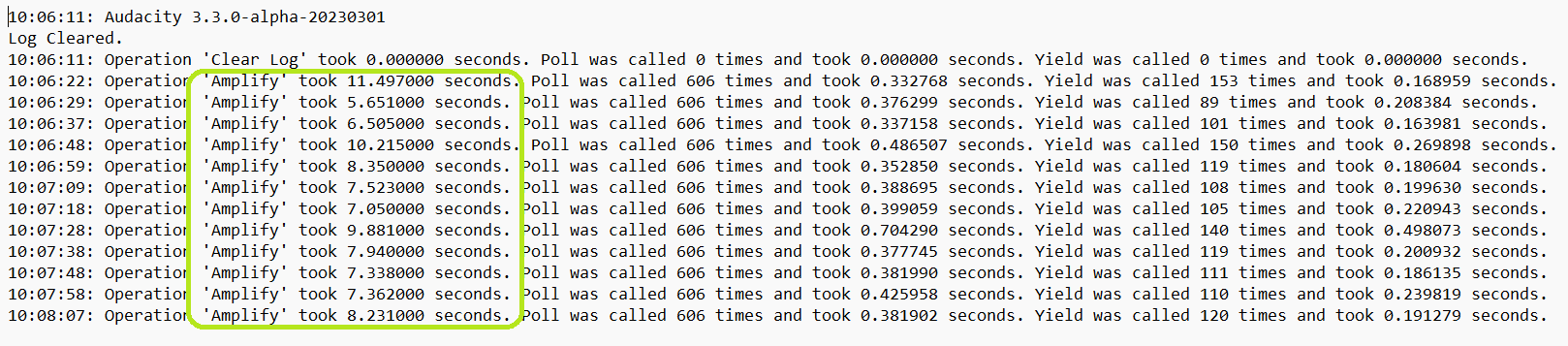
And before you ask, I have no idea whet the Poll and Yield figures are all about …
Peter.
I see you have a 5.65 second operation next to a 11.49 - double. Mine was more like 15 seconds next to a 45 second difference. And then it seemed to trail off. But the lag seems more noticeable when you are watching it. As does yours. But why is your trail so far away from the 2nd and 3rd runs (7.36 and 8.23 vs. 5.65 and 6.50) ? That is one of the things I was wondering about.
But nothing to go to the developers with…
Hi Jademan,
I decided it was time to document this “hidden” “easter egg” feature:
a) so that I could remember how to do this in the future,
b) so that you (and others) could use this tool for yourselves.
So here is the new page in the Manual:
https://alphamanual.audacityteam.org/man/Performance_testing_using_Macro_Trace
Linked to from:
https://alphamanual.audacityteam.org/man/Macros#uses
https://alphamanual.audacityteam.org/man/Macros_Examples
Peter.
I was lazy, for true test conditions you need to:
a) disconnect from t’interweb, bluetooth abd any other networking,
b) ensure no other apps are running (even inactive).
I didn’t bother with either of those …
Peter.
Thanks for taking the time to document that. 
Me, too. But here’s what I got for amplifying a 2-hour mono track by .01 15 times:
3:16.322
4:03.049
2:02.148
5:08.834
5:24.733
4:08.599
4:26.321
5:00.588
5:24.861
4:12.817
4:28.295
5:05.983
5:26.035
4:14.287
4:26.826
It is curious that the quickest and slowest differ by as much as a factor of 2.5.
I have this slowdown / sluggish UI problem on both Windows 11 and Ubuntu 22.10, with Audacity 3.2.0. It is most definitely a file problem. I’ve come up with a reasonable temporary workaround.
The file I’m working with is about 1 hour of audio @96kHz / 32-bit float, and in WAV format it is about 1.4 GB. However that same audio in the AUP3 file I’d been working with was 2.1 GB – same exact audio. I tried saving the original AUP3 as a new AUP3 file, but that somehow added another 1.3 GB to the filesize (3.4 GB) – no changes were made at all other than saving-as a new filename. How on earth did saving as a new filename add 1.3 GB to its size?
So I exported the original sluggish AUP3 as a 32-bit float WAV, then re-imported that and saved to a new AUP3, and the file size is back down to 1.4 GB and the sluggishness is gone. As far as I can tell there was no loss in quality in this round-trip.
Mostly this was raw audio. I used the Bass and Treble effect several times in tiny selections (to remove plosives), and the De-Clicker in similar <1 sec segments, but I didn’t run any macros or whole-track effects. There were no labels, no clip boundaries, and only one track. I’ve worked with hundreds of files like this in Audacity over the years – including longer recordings and larger file sizes – and never had this problem until recently. The only clue I can think of is that I did a lot of copying and pasting from other files into this one – in number and length. I don’t know how the AUP3 file format works, but if I had to guess, I’d say there’s some kind of permanent and unlimited metadata journal being kept that can’t be purged or truncated.
Its happening to me-- I’ve tried all the suggestions. Any new ideas!?
This is a rather long thread, would you mind describing your issues ?
The issue is that Audacity becomes sluggish when working with some files, meaning the interface is slow to respond, and any action takes a long time to execute. It appears to affect files that have been saved many times.
The problem seems to be with the AUP3 file format, or perhaps how Audacity writes metadata to its files.
I solved the problem by exporting the AUP3 file as a WAV, then importing that WAV into a new file.
Yes, there was a bug introduced in 3.2.0 copying tracks between projects that can cause this issue and can be corrected by this WAV export and import. The developers have a solution which I am hoping will be included in the 3.3.0 originally scheduled to be released this quarter.
1 Like
I’ve been encountering the same problem…extremely sluggish response. When I try to execute a command like cutting and pasting or splitting the audio time line, I get a “automatic database backup failed” pop up…I copied the details:
{
“timestamp”: 1680220656,
“event_id”: “c7e5a9c38b1f4d4bb3d8fd7b92858852”,
“platform”: “native”,
“release”: “audacity@3.2.5”,
“contexts”: {
“os”: {
“type”: “os”,
“name”: “Windows”,
“version”: “6.2.9200”
}
},
“exception”: {
“values”: [
{
“type”: “Warning”,
“value”: “Automatic database backup failed.”,
“mechanism”: {
“type”: “runtime_error”,
“handled”: false,
“data”: {
“sqlite3.query”: “INSERT INTO (id, dict, doc) VALUES(1, ?1, ?2) ON CONFLICT(id) DO UPDATE SET dict = ?1, doc = ?2;”,
“sqlite3.rc”: “18”,
“sqlite3.context”: “ProjectGileIO::WriteDoc::step”
}
}
}
]
}
}
Thank you for your report.
Can you reproduce this error reliably? If so, can you upload the project (and related step-by-step instructions) that cause this error? I’ll take a look at it when I can, which may not be until Tuesday, as I have a very busy schedule.
Sometimes sluggishness can be reduced by doing a Mix And Render on each individual track. Hint: close and reopen the project after each track or two, so that undo information can be released.
Hi Jademan!
You are a MIRACLE WORKER! I GOT MY FILE BACK in WORKING ORDER! After following your suggestion to do a MIX and RENDER to each individual file, and exiting the program after each render, when opening the file after all renders were completed, response was INSTANTANEOUS!
I then executed a command to split a clip of a particular track and it responded and completed the task immediately!
I can’t thank you enough!