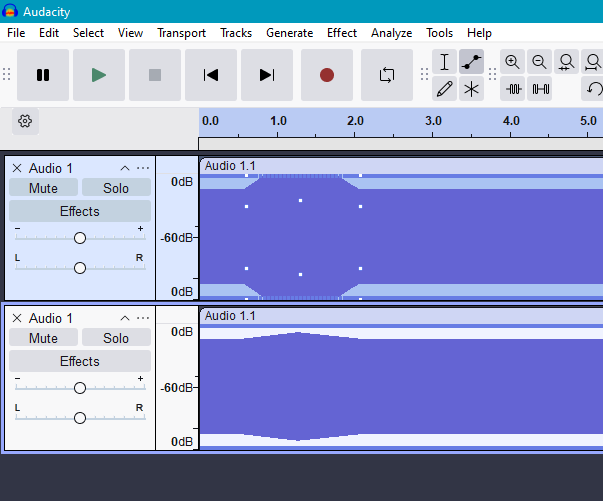
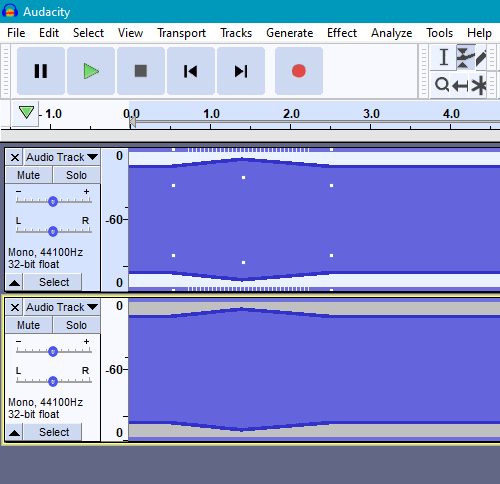
Hello, I am using Audacity 3.7.7 on Windows 10, and I noticed the Envelope tool is broken. The audio impact of the envelope control points is disconnected from what the visuals show. This makes it impossible to predict what a track will sound like based on the visuals. This is extremely frustrating.
I reverted to Audacity 2.3.3 (the previous version I used to use), and the envelope tool works as expected. For example, in Audacity 2.3.3, if I set some control points and then render to a new track, the waveform of the new track looks exactly the same. However, in Audacity 3.7.7, when rendering to a new track, the waveform is completely different.
It seems the audio impact of the envelope control points is the same across these versions, just the visualization in Audacity 3.7.7 is exaggerated. I also confirmed Audacity 2.4.2 has the same desired behavior as Audacity 2.3.3.
Is this a bug? Is this some sort of intentional change to make the envelope tool seem more responsive? Maybe there is a setting I’m missing? Are others having this issue, or is this just me? Please help.
Audacity 2.3.3:
Audacity 3.7.7: