Note that no one is going to look at your uploaded file unless you post a link to it.
Hi, i know you dont do this anymore but i just need a quick guide, when i type " audacity-project-tools -drop_autosave broken.aup3" it says that the fili is not a database do you know why?
Yes. The message is misleading. This message also appears if the file does not exist - which is probably your case. Make sure the file is named broken.aup3 and not broken.aup3.aup3.
Hi Jademan,
I’ve got another file that’s giving me the “file is not a database” message. I’ve checked and re-checked the extensions several times.
Any help you can offer would be greatly appreciated!
Sorry, I can’t look at these files anymore. Perhaps you wish to post a screenshot of your “cmd” session.
Perhaps you wish to post a screenshot of your “cmd” session.
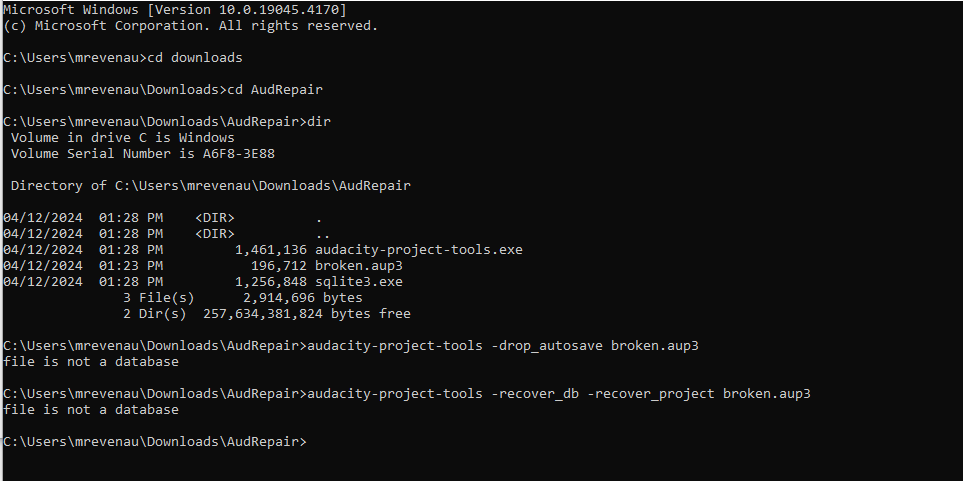
Here’s a session I did just now.
Any ideas what’s going wrong?
Perhaps I should have spotted this before:
If you open Audacity and then save the empty project, Audacity will create a 320kb .aup3 file. So if you include any tracks or data, the file will be larger than 320kb.
Yours is just 192 kb. So there is not even enough data in there to describe an empty project. I have no idea what happened or why. All I can say is you won’t find any significant recoverable data in this file.
Ah, I was afraid of that.
Thanks!
Hi @jademan .
I’m running into the same issue were I go to open my Aup3, Audacity Project Files, and I get the error screen with “Project is corrupt (Unable to work with the blockfiles)”.
I followed the instructions, but can only get as far as step 10, where even though I 've doubled checked the spelling half a dozen times, I still can’t get any command response other then "unable to open database file”.
I’d really apprecaite your pointers as to what I am doing wrong.
If you have any thoughts to it, I’d also love to understand if I did anything to cause this problem. After working on a project for a while (crtl-s’ing throughout), I went to close audacity, and as it was “compressing the file” the program crashed, and now we are here. Is this something Audacity just does sometimes?
Thanks a million,
Sam
Bellow is the error message.
“timestamp”: 1719185258,
“event_id”: “9da27c4df4ea6a4689918bd87e2a7ea2”,
“platform”: “native”,
“release”: “audacity@3.5.1”,
“contexts”: {
“os”: {
“type”: “os”,
“name”: “Windows”,
“version”: “10.0.19045”
}
},
“exception”: {
“values”: [
{
“type”: “Error_Opening_Project”,
“value”: “Project is corrupt\n(Unable to work with the blockfiles)”,
“mechanism”: {
“type”: “runtime_error”,
“handled”: false,
“data”: {
“sqlite3.query”: “DELETE FROM sampleblocks WHERE NOT inset(blockid);”,
“sqlite3.rc”: “11”,
“sqlite3.context”: “ProjectGileIO::GetBlob”,
“log”: “16:27:14: Error: Failed to load shared library ‘’ (error 126: The specified module could not be found.)\n16:27:14: Error: Failed to load shared library ‘’ (error 126: The specified module could not be found.)\n16:27:38: Loaded 1435 string Kb in size\n16:27:38: SQLite error (11): database corruption at line 71416 of [1b256d97b5]\n16:27:38: SQLite error (11): statement aborts at 8: [DELETE FROM sampleblocks WHERE NOT inset(blockid);] database disk image is malformed\n16:27:38: DBConnection SetDBError\n\tErrorCode: 11\n\tLastError: Project is corrupt\n(Unable to work with the blockfiles)\n\tLibraryError: database disk image is malformed\n”
}
}
}
]
}
}
If you get this error in step 10 it means the file name or file extension was simply misspelled. Perhaps the file is named “broken.aup3”. Perhaps the file is named “broken.aup3.aup3”. Sometimes the “dir” command can provide illumination.
PERFECT!
Thanks so much @jademan .
It was exactly that. Ended up being the “.aup3.aup3” end on.
My podcast team and thank you to the moon and back! Just saved us 6 hours of redoing work.
Hi, @jademan .
I’m able to open my .aup3unsaved file, but it appears to be completely empty, even though the file itself is over 1 GB large. Renaming it to an .aup3 extension has the same result.
If I follow your steps, I get the following after Step #12:
Project requires Audacity 3.0.0
Using ‘sqlite3.exe’ for recovery
Executing query #1573 (PRAGMA writable_schema = off;)…ks (blockid, sampleformat, summin, summax, sumr)…
Recovered 67 sample blocks from the database
No row to get a column from. executeStep() was not called, or returned false.
A broken.recovered.aup3 file does get generated, but it still appears to be empty. Any ideas on what the issue is or if the file is even recoverable? I would appreciate your help and insight with this issue.
I have personally never had any luck with .aup3unsaved files. Sorry.
@jademan I keep seeing that you’ve saved people’s corrupt audacity files and I was wondering if there’s any chance whatsoever you could try and save mine please? It’s a 39-ish minute chapter recording of an audiobook that I worked on for days. I have the raw data intact but whenever I open the aup file it’s blank. I am on my metaphorical knees, begging for your expertise and help please!! I only have a Mac so have been struggling to follow any of the protocols on here. If you can help me, you really would be saving my sanity!!
Link to the data:
https://drive.google.com/drive/folders/1NbTXJHAm9lB4KZz0Te-RcsO4d_XREBa5?usp=sharing
Thank you!!! Genevieve
Similarly, I have personally never had any luck with blank tracks. Sorry.
No worries, thanks for responding though!
Hi @jademan . Came back to use this utlity again and it doesn’t seem to be working anymore. It says in the processing that it needs Audacity 3.1.0 now, but I both haven’t downloaded a different version of the tool since I last used it, or updated my audacity to the new version. Because of this, it seems the corrupted file is locked into 3.0.0.
Is there anything to do about this?
Thanks
Apologies. Checked my numbers. At some point updated to version 3.5.1.
No problem. I hope you have your project back on track.
@jademan I tried this so many times but keep getting " audacity-project-tools etc… is not recognized as an internal or external command, operable program or batch file after I first put this in (step 9) but everything is typed correctly. does this mean it’s not recoverable at all?