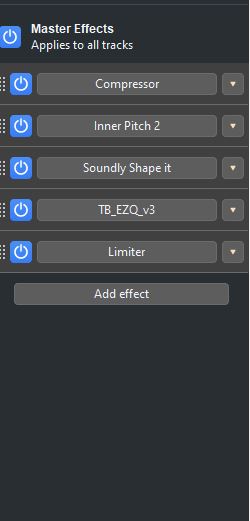
In multiple versions there seems to be a bug when you pause the audio that is loud and using a real time effect (limiter) to lower its volume, when you push play it plays at the max volume for a fraction of a second, so you get a loud POP or CLICK that is painful before limiter
My guess is its playing the audio at the volume level and takes a frame for it to get to the limiter effect that actually lowers and prevents it from being to loud, so you get a normal volume loud noise for a fraction of a second.
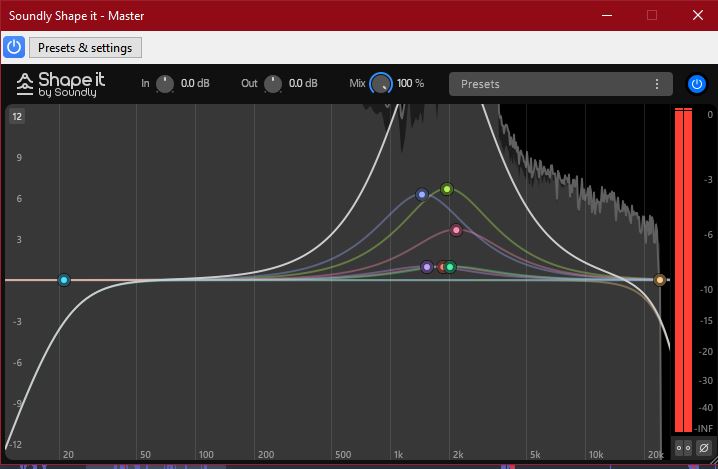
Seems might have something to do with Soundly Shape it being above it and having a high curve in that also. As when I reduce that curve the POP gets less noticeable.
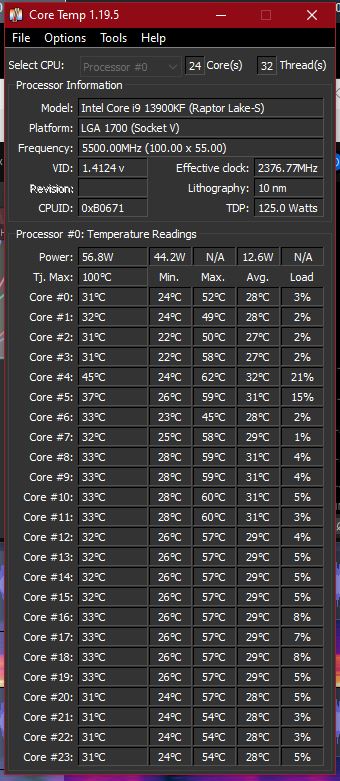
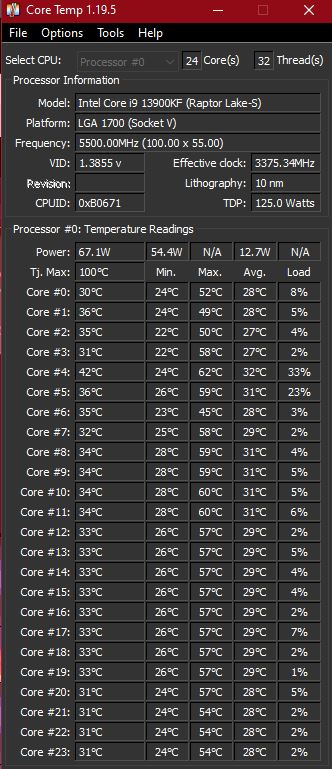
Thanks for the replies I appreciate it. FYI I do have a PC that bench marked in the top 1% of benchmarks when I built it 2 years ago. It has a Intel Core i9-13900KF processor, and I have never noticed any problems with the CPU. I rarely see it get over 5%-10% with audacity and I constantly have a HUD on my 2nd monitor to watch CPU/RAM/GPU/Network etc.
But I guess I will do more testing to see if lower # of effects makes a difference or fixes it, thank you for possible fixes that I can try.
I checked that also, the load on any single core is around 33% when playing the audio from above. It still has a lot of headroom before the CPU maxes out. But I can see how it might still effect playback even when not maxed out, but I will try some testing when I get some free time later today and see if that might be the issue.
I don’t think it’s that simple. You’ve got multiple cores but not multiple computers. There are shared data & address busses, memory, etc. And the operating system is always multitasking and interrupting, even if you’re only running one application. That’s why you need buffers (which are also delays) and it’s why you always have some latency through the computer.
You can get glitches even at a low CPU utilization. All it takes is for some application, driver, or process to “hog” the system for a few milliseconds too long and you get buffer overflow (recording) or buffer underflow (playback).
I don’t think that’s exactly what’s happing to you, but real-time audio or video is just “difficult” when you have an operating system getting in the way. Generally, computers have been powerful enough for “simple audio” for decades but as they get faster and more powerful, the operating system gets more complicated and computer manufactures install more “junk” on their computers, etc.
…I really suspect there is a bug in one of the plug-ins, or perhaps one of the 3rd-party plug-ins is incompatible with Audacity, or maybe some “strange” interaction between plug-ins, or maybe it’s just “normal” for the combination of plug-ins with the setting you’re using, or when they are combined.
You probably shouldn’t be “pushing things” with all of these real-time effects.
Thanks for the reply, I was just trying to make the issue known in case there was a fix in a future build available or if it was a known issue. As a software dev I really do understand that there are many issues that could be causing it and its not simple to figure out, even more so with lots of addons and plugins etc…
IMO it seems like it starts playing the audio before it runs the real time effects all the way through so you get a huge volume spike (aka normal volume set to loud) before it gets down to the limiter effect which reduces the volume, so you get like 1 frame of loud audio before its limited.
I will try a few different things to see if I can narrow it down to something specific, it was just getting really annoying having extremely loud pops every time I click play, it was starting to hurt my ears and I was hoping it was a known issue or a possible fix available.
But thanks again, it is a really great piece of software and has been very useful for me and the price was even better! Sorry if it seems like I am complaining (just a little), but I do appreciate all the work it takes to make something like this happen!