I have recently upgraded to a Macbook Air M3 running Sequoia 15.5 and Audacity 3.7.4. Previously I ran Audacity 2.4 on an Intel Macbook Pro. With my CAD Audio U37 mic I never had any issues on the previous system. But on the current system Audacity hangs after one successful recording with the U37 (i.e. attempting to record additional audio on the same track or opening a new project) and requires a Force Quit. It will work again after a restart of the Macbook or running sudo killall coreaudiod in Terminal and restarting Audacity. After the hang, console.app reports “90 seconds cpu time over 95 seconds (94% cpu average), exceeding limit of 50% cpu over 180 seconds”. Is there any fix for this?
“upgrading” from Audacity 2.4 to 3.7.4 is the source of your problems, rather than your mic.
Audacity 2.4 runs on modern Windows, but I don’t know if that’s possible on a Mac, (version 2.4 is 5 years old).
I’m a Windows guy, but yeah… It “can’t be” the mic.
Virtually all USB mics are “class compliant” which means they are plug-and-play with the drivers supplied with your operating system.
But, try another USB cable because a loose cable or connection might cause a crash. And/or, try unplugging it mid-recording to see if it duplicates the problem.
A flakey connection inside the mic could cause intermittent problems too.
Thanks all for the prompt responses.
I may have been wrong about the specific Audacity version I upgraded from - it was 2.something. I only did the Audacity upgrade because I also encountered the hang behavior with the earlier version on the new laptap, and thought “oh, this old version might not be compatible with Apple silicon.” The current version I installed was definitely for a Mac, and it runs fine without hanging when the internal mic is selected as audio source.
Also, the USB cable I’m using is the same one I have used with this mic for a long time. And the mic and cable work fine with Zoom and FaceTime - no issues. So this feels like an Audacity issue to me.
Audacity’s free competitor OCENaudio would reveal if the problem is specific to Audacity.
Thanks for this suggestion. Indeed, OCENaudio works fine with the U37 mic - no hangs, no unexpected behavior, expected sound quality. I was unaware of this alternative software choice and it is nice to have it as an option. Having become somewhat proficient with Audacity I’d prefer to continue working with the app I’m familiar with. (My wife is a voice actor and I’m her volunteer audio engineer for recording auditions, etc.) But until this apparent (probably obscure) Audacity bug gets figured out, or I switch to a non-problematic mic, It’s nice to have a working software option I can fall back to.
Multi-core support : don’t hold your breath …
[OCENaudio is multi-core].
3.4.2 and 3.6.2 are well-behaved and (I’m Pretty Sure) can be chosen to run on Apple Silicon.
Be sure to clear out the Mac preferences when you change versions.
Go (from desktop) > Go To Folder.
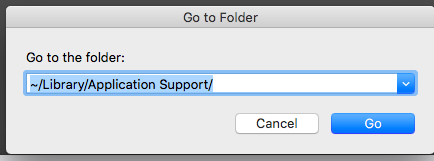
Trash or move the audacity folder.
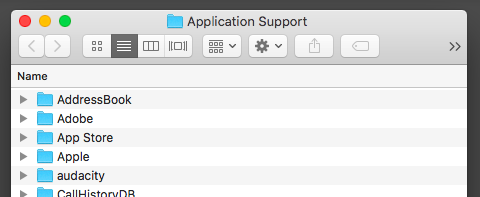
Then install the new Audacity.
Koz
@kozikowski - Thanks for your suggestion. When I originally upgraded my version of Audacity I didn’t do a full delete and reinstall, I just installed over the older version. Now I have done so, and the problem with the external mic causing hangs has disappeared. (Note that this time I installed v. 3.7.5 when previously I had 3.7.4 - so it’s also possible that the newer version is responsible for the fix.)
FOLLOWUP: Ignore the above. The 3.7.5 version of Audacity worked OK with my mic just long enough to write the above. Then the hangs came back. I have gone back to using OECN 
This topic was automatically closed after 30 days. New replies are no longer allowed.