It’s not made it in time for Audacity 4.0, but will get added in the future. In the meantime, I have added it to Soundscaper, my web port of Audacity 4.
same deal, it’s planned but not implemented yet, and is present in Soundscaper
I have also added that to soundscaper.
Between this and the initial Musescore 4 release, it really does seem like Muse has a policy of releasing things way underbaked…
I couldn’t find it either, having had over an hour of my time completely wasted on trying to find out what has gone wrong. A dreadful version of Audacity. It’s a bit like designing a new version of a Boeing 737 and not bothering to include any wings or engines in the new design.
Y’all are aware that I’m one of the biggest Audacity fans on the planet. But I am baffled as to why you would rush out the Audacity 4.0.0 release when it’s so woefully incomplete. The lack of macros is a HUGE issue for many users (my entire VO following can’t use Audacity 4 because of it, and I’m seeing a lot of traffic here from musicians who are in the same boat), and it seems that’s just scratching the surface of issues.
I have an enormous amount of respect for every Audacity contributor, but I really don’t understand the release strategy.
I uninstalled Audacity very quickly and went back to version 3.7.
Audacity 4.0 failed at even the simplest tasks: copying a sequence from an audio file and pasting it into a new project.
The program froze in the process. When I closed it, it dragged the open file (which, fortunately, was unedited) down with it.
That’s not the Audacity I know. Even though I’d been having more and more problems with Audacity over time (even with the simplest tasks, e.g., due to growing issues with integrating audio devices—headphones, microphones…) I’ve remained loyal to Audacity and blamed Windows, since Windows has actually always had some kind of issue in this regard ever since Windows 7. Even the (who hasn’t heard of it?) popular program Radio and DJ stopped working properly on Windows 10.
But when crashes and a lack of compatibility between two applications occur even during copy/paste operations, I’ll probably have to look for an alternative. It would be a shame, but the market offers plenty of alternatives.
I haven’t even downloaded it yet until my 3.0 offers the pushed download for 4.0. OpenVinu as a project is dead already and Audacity 4 didn’t give us it’s ow built in stem splitting tools for mastering 4 or more channels separately then merging them back as a flac so you have a clean tape.
I heard somebody say there is no split to mono in the settings that is vital for phase correcting the stereo on a tape as long as after you did the phase correcting you don’t save your track as the mono split version but first click make stereo track to rejoin the stereo sound or it’s not a proper full stereo phase correction.
OpenVinu has the noise reduction 3 which is the best for speech it allowed you to remove all your mic noise 1 click no loss if we had noise removal 3 with the get noise sample button we would have probably had today in Audacity 4 one touch music removal no loss as I think it was lack of a get noise profile button which made noise removal 3 pants on music.
We need the 2 Openvinu features people care about built into 4 as OpenVinu is dead we are not getting update yet alone version 4 builds and even if it got a audacity 4 build we still having got get noise profile with the combination of noise reduction 3 to make it work on both cassette tape music and voice recording single click next to no quality loss.
That is my main issue why I’m not making the switch, yet.
Here are a couple of things I would like to see added to a not so distance version.
Are they going to make Audacity 4 as a portable version sometime in the (near) future?
Also, I’ve not seen anyone mention this in a while, it would be nice to add a feature they had by default in older Audacity versions, that was to automatically put your saved or exported file in a folder inside the folder of the file you opened to work on by default, with the option to change that in Preferences.
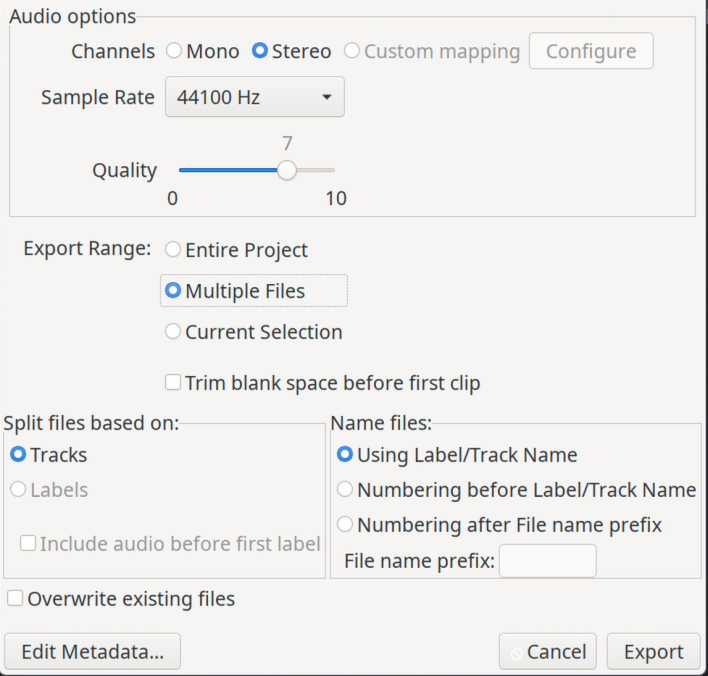
Delighted to see the arrival of Audacity 4. Thanks to everyone for getting us this far. Sadly two of the features I use on a regular basis are yet to appear - namely Macros and export multiple files from Labels. I shall wait before these become available before moving from 3.7.7. Hopefully the unusual behaviour of the playhead when editing will also be addressed. When editing data at the end (far right) of a track it’s quite annoying when “playing” that part of the track when the playhead repositions itself at the very beginning of the track rather than where I had placed it.
I look forward to updated versions of the app. In the meantime enormous thanks again to everyone involved.