New user here. I made this account to ask if the zoom in/out lag problem has been addressed. As in the timebar does not change while the waveform itself has changed size as normal. My laptop is new, & I am using the latest Endeavor OS. Thanks.
Its not working. Tell me the other way.
I want to open a .m4a file and read that I needed the FFmpeg plug-in. Dutifully downloaded the installer, the one ostensibly compatible to Audacity 3.3.3, relaunched the app and still could not open the file. Installed a second time, still nothing. Then, I tried opening it with a previous version (2.2.2) and it worked. Running Mac OS 10.13.6 on an iMac. FYI
Please be sure you follow the directions for MacOS here: Installing FFmpeg - Audacity Support
In some cases, you may need to use homebrew.
I’m afraid Homebrew is beyond my capabilities. I see code, and immediately am daunted. My needs are simple, for now anyway (opening .m4a and converting to .aiff) and I accomplished that – but thanks for the suggestion.
Thank you, better inough
Please bring back the keyboard shortcut for ‘split new’!
1 Like
You can do that yourself: Edit > Preferences > Keyboard > Defaults > Full should do it.
This is an unnecessary change that confuses my users and hinders workflow. If some Users want to reclaim that whole inch of space on their screen that’s fine, make it a toggle like all menu options should be.
1 Like
hello, new to audacity. every time i try to add a live effect audacity crashes. ive tried using audacity with wifi and bluetooth turned off. same effect. please help
You did not say which effect.
any of the preset live effects. bass, treble etc etc
This works for me under Windows 10:
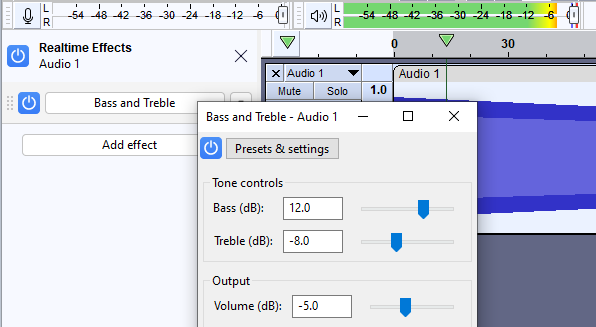
What OS and what version of Audacity are you running ?
3.3.3 and windows 11 os. When i click on the live effect to edit it i still get audio, but the program becomes unresponsive till i force it to close
Update, as i play around with it, it only crashes when i have not selected “add track”. If i add the effect after booting up audacity without adding a track it crashes. Not sure why, but progress for sure.
Hi there. I’m using 3.3.3 and can’t figure how to do something I used to be able to do. I use Audacity to convert audio files so we can use them for our Verizon VoIP phone tree greetings. I received some new recordings via the voice memo app from someone’s iPhone (.m4a). Files are roughly 650 KB. I need to convert these files to CCITT 8khz 8 bit mono U-Law and they need to remain under 2MB. Whatever I’m doing is either making the files bigger OR the audio sounds awful. Would anyone know how to help me out? Thanks.
Perhaps you need to set the Project Sample Rate to 8000 prior to export: Audio Setup > Audio Settings > Quality > Project Sample Rate
Since the release of 3.3 and newer versions, my macro causes Audacity to crash. It seems to always crashes when applying my graphic EQ settings.
However, it’s been weird while testing, for example…
I applied the macro to a project on version 3.2.5, where it worked, and I saved the project. Then I updated Audacity to v3.3.3, loaded up the same project, and when I applied the macro to the project again, it also worked.
BUT, if I take the raw unedited project, which is just a voice over that was originally recorded in Audacity, then apply the macro to that in v3.3 or higher, it will ALWAYS crash while applying the graphic EQ settings.
I’ve no idea what’s going on. This issue doesn’t happen in version 3.2.5 or older versions. I’ve tested this on two PCs, one running Windows 10 and another running Windows 11.
If anyone can help that’d be great!
The macro itself - Voice Over (use after Noise Reduction, increased normalization).txt (5.6 KB)
Not sure if this is helpful, but I’ll include it anyway - lastlog.txt (3.0 KB)
Thank you for new version
So I tried running your macro on my project and had no difficulties (3.3.3; Windows 10).
I tried it on a 5 minute DTMF track and a 65 minute DTMF track.