I’m not sure whether it is a feature or a bug. The aligning of an audio clip to a label works perfect, but the other way round it doesn’t (label to an audio clip).
Following explanation in detail:
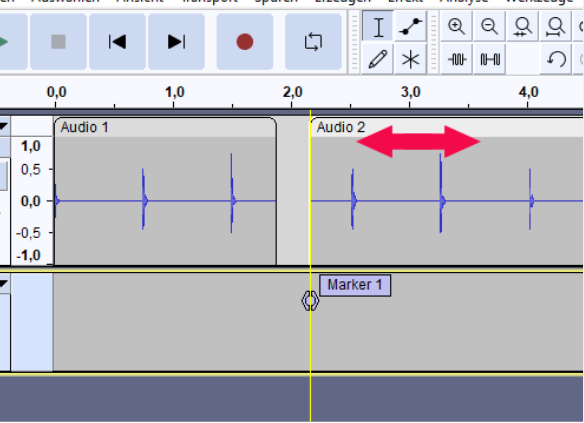
The following picture shows the alignment to a label when moving a clip (red arrow). That works perfect. The yellow guide shows the snap in. The yellow snap guide also appears, when hover the cursor around the “Marker 1” within a label track.
But often I want to align an existing label to a cut of 2 clips or at the edge of one clip, shown with the arrow in the next picture:
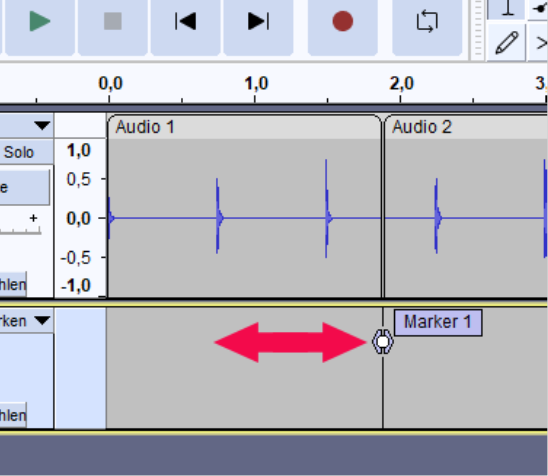
I move Marker 1 at the small white circle between Audio 1 and Audio 2, but no yellow snap guide appears. And the other negative: After having placed Marker 1 around the audio cut, I will no longer find the yellow snap guide when hover between Audio 1 and 2.
The workaround I found:
Make a copy of the label text (ctrl + C) → hover the cursor to the desired position within the label track until the yellow snap guide appears and left click the mouse → create a new label (ctrl + B) and insert the old text (ctrl + V) → select and delete the old label (ctrl + alt + K).
But the workaround can’t be a feature. So I tend to say: it’s a bug
I am working with V3.4.2 of Audacity and I tested this behavior also with 3.5.0-alpha-20240116

