to mr steve. llok i sorry if u think i insult. it partly language & temperament and partly i disapoint too about few fade types. u miss my point ag en…it is not about presets so your answer is OT and until mr gale finnally spoke u did not i think even try to anser but told me to use some other effect thta does not doo part fades. i thought was democracy and could speak even if not a developer, as others say they not wanna use fade boost so much… there is no graf, no prevue, u not anser about how i find what curve i want if i have to guess from slidder boost value.
really i like make more contribusion but i bit disharten.
If this plug-in goes ahead then I will write “usage notes” to help new users.
However, I think that with just a few minutes experimenting with the effect it is, in its current form (version 30b) simple enough for most users to discover for themselves how to use the plug-in effectively.
That ur opinion. i see ur votes and at least 3 ppl of 5 do nnot agree… maybe u should listen. it is not an insult unless of course any criticism of u is insulkt
These were the six pairs of “Fade Types” we had in v26:
Linear
Exponential
Logarithmic
High Curve
Cosine
‘S’ Curve
We already have Linear and “S”.
Can you remind me which of the above is like the current Cross Fade In and Out (would satisfy me as having sufficient volume at the start or end)?
Are any of the above impractical and why? Logarithmic seems potentially useful since Envelope Tool does not do that shape.
When we thought there would not be a Mid Fade Boost slider you suggested adding “normalized exponential” fade type (exponential that could fade to/from silence). Is that still useful, assuming a good judgement about the shape it has)? I think we agreed there was too much “near silence” with exponential otherwise? Would we be better with a Normalized Logarithmic instead of Normalized Exponential?
To cater for power users who may only see the need for linear and “S”, those two can go at the top if you prefer.
Yes that is my opinion. I think that most users should be able to discover how to use this effect quite easily, but I will also be providing instructions and tips for usage to help novice users get started with this effect. Please stop this childish sniping.
If you are referring to the poll that I posted then you are misinterpreting the results.
So far 4 people have voted (2 votes per person)
3 of 4 have voted in favour of the “Pro Fade Out” effect.
1 of 4 has voted in favour of a “Musical Fade-In” effect.
2 of 4 have voted in favour of “Adjustable Fade version 30”
2 of 4 have voted in favour of “Adjustable Fade - some other version” - Neither of the 2 votes for “some other version” has yet specified which version they prefer.
0 of 4 have voted for keeping the current “Cross Fade In” and “Cross Fade Out” effects.
Why do you think I made a poll?
Constructive criticism is not an insult, though I am struggling to see any constructive element in your post.
If you have comments or suggestions that are directly related to how to make the Adjustable Fade effect better then I will be delighted to read them. Off topic posts may be deleted by forum moderators.
Actually, version 30 has a “raised cosine” fade type (S-shape, which is a “double” curve in one direction, then the other) and a carefully crafted “single” curve that may curve higher than linear or lower than linear (or exactly linear when Mid-Fade Boost/Cut is zero).
I’ll give a summary first, then details for anyone that is interested:
Version 30. Curve summary:
Comparison with version 26
Linear: Type = Fade Up/Down. Mid Fade = 0 (default)
Mid Fade Cut/Boost can also be used with “S-Curve” types to raise or lower the amount of gain “mid fade” (not available in v26)
“Legacy Cross Fade In/Out” was not available in version 26.
Looking at each of the v26 “types” in detail.
Linear:
This is not (by definition) a “curve”. The change in amplitude is directly proportional to “t” (the time position).
This is an excellent “general purpose” fade type and is the default in v30 (Mid Fade Boost/Cut = 0).
Exponential:
This is a “concave” curve (dips down below linear) that is based on a “logarithmic scale”. This type of curve occurs frequently in nature. Of particular relevance is that it typifies the way that resonant sounds decay over time.
The property of this type of curve that is most useful is that: the change in perceived loudness is approximately linear over time.
It is this property that makes it the de facto standard for mixing desk faders (excluding the section from “quiet to silence”).
This type of curve becomes less useful at very low levels because the curve becomes increasing “flat” but never decays to complete silence. For this reason mixing desk sliders abandon the exponential curve for the bottom (lowest level) end of the slider and often revert to a linear scale over this section. The Envelope tool abandons the exponential curve at -145 dB and “jumps” from -145 dB to -inf.
An exponential curve may be “offset” by either a positive or negative amount. By offsetting the curve by the lower limit of the fade and then scaling to bring the upper limit back up to the original level, the fade will achieve silence as its minimum level. However it then becomes a complex issue to define the curve as it is dependent on 4 interrelated parameters.
Version 30 closely approximates an offset and scaled exponential curve, without the requirement to set multiple parameters, by using Mid Fade Boost/Cut < 0
Version 26 avoided the need for manually setting multiple parameters by hard coding “useful” ratios.
Logarithmic
This is a “convex” curve (curves above linear). I can’t think of any specific reason to use a logarithmic curve in preference to other “convex” curves, other than it is mathematically the “inverse” of an exponential curve. There are similar problems with logarithmic curves as for exponential curves. A “pure” logarithmic curve will produce a “divide by zero” error at silence because log 0 is undefined. It is therefore necessary for a logarithmic curve to be offset by some amount to avoid “infinite curvature”.
Version 26 uses a hard coded offset of -145 dB which will produce approximately the inverse curve of the Envelope Tool. Unfortunately this is likely to be curved too much for practical use when fading from or to silence. For this type of curve to be really useful the user should be able to specify the offset and the scaling factor in addition to the initial and final gain amounts, but this is getting really complicated and hard to visualise.
High Curve
This term is quite vague and just means “a convex curve that has a fairly high amount of curvature”.
In version 26 this was a logarithmic curve with an offset of -36 dB.
In version 30 a “high curve” is achieved by setting the “Mid Fade Cut/Boost” to a high value (> +50)
Cosine
Version 30: Type = “Fade Up/Down”, Mid Fade Cut/Boost = +50.
‘S’ Curve
Version 30: Type = “S-Curve”, Mid Fade Cut/Boost = 0
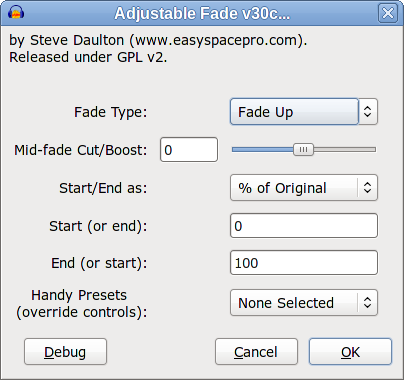
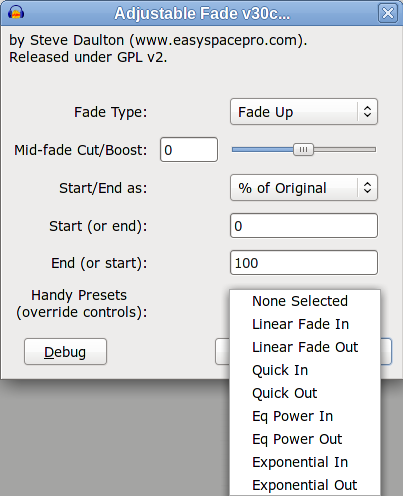
@Gale, As a last ditch attempt to find something that you might support - could you support version 30 if it had some “Handy Presets” for novice users?
I don’t think that they really make the effect “easier”, but they do provide “2 click” easy access to some common fades.
(“Quick In” and “Quick Out” are the “legacy Cross Fades” that you like - Feel free to choose another name for them if you have a preference).
Steve, I have made perfectly clear in that topic that my vote was for #30 but that I was very concerned about the reduction in fade types (hence I could not vote for #30 “as is”). I agree the “other person” has not made it clear (hence why I asked).
If the other person was not yulac, then I assume he/she means that makes 3 votes against your #30 “as is”.
I will respond when I have time to look at what you say properly. There isn’t an imminent Audacity release that I am aware of. Your #30 was a big step forward, but why try and bulldoze your latest downloadable version through like this? I think that is what has caused friction. I feel more explanation should have been given for the changes in your current version (as you usually do).
I like the idea of your boost slider but as I explained the audio editors I have seen are much stronger on giving the user some ready made choices. There may be a reason for that. Not everyone RTFM.
While Fade Up + 90 is something similar to Cross Fade In it is obviously (visually and audibly) not the same. The Cross Fade In carries on getting louder right to the end, but your variant with the slider doesn’t.
So at Mid Fade Boost + or - any values, the curve still decays to “approximately” silence?
Why do other editors include it then? To me it sounds nicer than the S curve.
Does this mean it is not an inverse of exponential, i.e. does not approximate to silence?
I think it’s unfortunate that the Fade Up/ Down can’t have a name that describes it, even if the curves are no longer linear if you actually use the slider. Is there a known term for it?
The real “problem” (for those who see it like this) is I guess the Mid Fade Boost? You could have a “logarithmic” fade type, but what this really does is set the boost to some number > 0. Since Nyquist cannot move that slider to whatever positive number we think is suitable as the starting point for a log fade, all the slider could actually do is act as a modifier on that starting point? We could no longer call it Mid Fade Cut/Boost. It would be Mid Fade Adjust or something? Is this too confusing? I’m not too confused by it.
But if it needs to be 30c after all that (which needs presets, disabled controls and one more control), please go for it if you can stomach it. I think it will make such a difference for beginners trying to learn.
I would have these presets myself but I’m interested what others think:
Linear In/Out
Exponential In/Out *
Logarithmic In/Out *
Old Cross Fade In/Out
‘S’ Curve In/Out
having some shape that doesn’t leave you listening to near silence for 1/3rd of the fade.
I have assumed (rightly or wrongly) that the EQ Power and Quick would be close enough to each other not to be worth having both. Or would I be disappointed using “EQ Power” as a standalone fade?
For the title of whatever we might use, I don’t think “Quick” is very good, but what to call this has always been hard. I have suggested “Old Cross Fade” but there is still a chance Cross Fade will survive.
Do you object to having the Handy Presets higher, like first or second? I actually don’t mind, even quite like them at the bottom, but they would not be very “handy” for screen readers down there.
BTW, the “c” in the second “S-curve” wants capitalising I assume.
I’m really surprised that you regard 30b as too difficult beginners
I’m certainly no geek in this regard - I’ve never used a real mixing board so to a large extent you could regard me as somewant of a novice with this stuff. When I was testing 30b for Steve I certainly found it probably the easiest to comprehend compared with all the previous versions. The controls seemed simple (well as simple as they can be for this effect) and clear.
Furthermore I’m struggling to understand why you say you need more preset curves. The choice between just the two shapes is one of the thingshat makes 30b so delightfully straightforward - but still capable of yielding powerful results.
As an example I tested using a 5-second generated sound wave so I could see the effects of the controls on the fade curve shapes - It took me only a little experimentation to get a curve of the same shape as the existing Cross-Fades that you are fond of.
+90 will be too high in most cases, but the slider range needs to be a bit generous for “special cases”. Mostly I prefer it at around +50. I’d guess that you might prefer it a little higher in most cases, but not as high as +90. The point about having a slider is that it can be adjusted to suit. A “better fit” to a arbitrary fade curve can be achieved with two “curve” sliders, but that was rejected a long time ago as “too complicated”.
If the end level is set to silence then #30 (and #26) will fade to (exactly) silence regardless of the Mid Fade setting.
If you mean a “mathematical” logarithmic curve, they probably don’t.
“Logarithmic” is often used in a loose sense to refer to some sort of “convex” curve (or in some software to mean an “exponential” curve).
In software that has a graphical click and drag interface for adjusting the curve it will often be a bezier curve. Bezier curves are a great way to produce close approximations to arbitrary curve shapes (I used this method in a previous version) but the are difficult to understand unless using a graphical interface.
Nothing jumps to mind. Perhaps “Simple Curve” or “Single Curve” (except that strictly “linear” is not a curve and “Simple (or “Single”) Curve Down” is a little too long to fit in the box).
I think we had something like that in a previous version but we changed to “Mid Fade Cut/Boost” because it described “what” was being adjusted.
I think that we could perhaps go back to “Mid Fade Adjust” but we lose the ability to compare the curvature with a linear fade. Would that make it harder to describe/document?
The “Quick” fade out ends much more abruptly than an “EQ Power” fade out. (Compare #30 with Mid Fade = +50 with the current “Cross Fade Out”).
and “Old Cross Fade” is a bit too long.
If these are non-adjustable we could go back to “Eq Power I” and “Eq Power II”.
“Eq Power II Down” loses the final “n” when selected (on my machine).
“Rounded” ?
“DJ Curve”? (because it is similar to a “medium cut” cross-fade slider curve)
“Medium Cut” (a DJ term, though it is probably a bit more gradual than on most DJ decks)
I think “rounded” is probably my favourite term today
I presume that non-mouse users would normally tab through all of the settings until they reach the “OK” button?
At the bottom it is perhaps clearer that the other options have been “skipped” whereas at the top it is perhaps less clear that “all” of the other controls are overridden.
If the other controls automatically moved according to the selected preset (or were even just greyed out) then I would put it at the top, but Nyquist plug-ins can’t do that. I would also like the interface to encourage experimentation with the manual settings as they can provide a lot more than can ever be achieved just with presets.
Good catch.
I’m OK with something like #30c. The presets do provide convenient shortcuts and don’t get in the way.
It also provides the “legacy Cross Fade” curve, which is good.
I like your list of presets with the addition of a “cosine” shaped “Eq Power In/Out”.
I’ll need to play around with some idea now. I’ll post again shortly (probably tomorrow).
Functionally it is identical to the other #30 versions but with the addition of a presets at the bottom.
As the GUI says, selecting a preset will override all other controls.
The preset effects currently return a message “not yet implemented”, so I’ve not bothered uploading it. #30d will follow shortly with the presets properly implemented.
Given that Steve has been working on this for about two years now the up-coming horizizon for a 2.0.3 looks fairly close - especially given that the impending holiday season will take a big chunk out of the available time.
If we miss the 2.0.3 opportunity then it will be at least four months or so until we get a chance again - and four more months that regular users (i.e. non-bleeding-edge-testers) will not get a chance to use this excellent tool. So I don’t think Steve is “bulldozing” - he’s just conscious of the narrowing release window.
But I totally agree that it is important to get it “right” - or as right as we can.
I don’t believe the Mid-Fade-Boost gives a curve exactly like Cross Fade. The end of the fade in is not the same. I looked and listened very carefully. Try it if you wish.
I’ve tried to explain about the “presets” (or “ready fade types” if the boost slider adjusted whatever the “ready type” produced). Even a year ago I was personally clueless about fade types (that is, more clueless than now). Without some “ready types” to latch on to, the effect still seems intimidating to me. There is the “Up” and “Down” (which I can live with but may be confusing - “is it the same as Fade In/Out?” - “I’ve heard of linear - is it that?”).
Then there is the “S” which beginners won’t have heard of and the orientation of the letter doesn’t explain the shape.
Then a slider which (as I guess yulac was trying to say) is hard to experiment with because there is no preview or graphical display of what the outcome curve looks like.
The ready curves give a beginner the confidence of some better known names which they know will produce the stated shape. They can see the shape that makes and learn. We can’t assume they will read the Manual at all (good as the documentation no doubt will be).
Yes I know holidays affect things and poor Steve has to do more coding, but this has always been difficult to get right because it’s both a common and complex effect at the same time. Not really the same as say compressor which many users can get away without or use a limiter.