Adding custom timestamp at the beginning of track

Audacity does not come with the “recording time” plugins installed:
you have to install them yourself. They are in a a zip file at the bottom of this 2017 post …

All three files in the zip must be extracted into tha Audacity plugins folder for the record-time plugins to work.
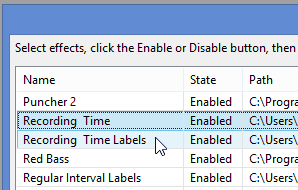
Two of the plugins need to be enabled in Audacity’s plugin manager …
'recording time' plugins enabled in Audcaity's plugin manager (Windows)
https://manual.audacityteam.org/man/manage_effects_generators_and_analyzers.html

You don’t need the latest Audacity for these plugins: they are from 2017.