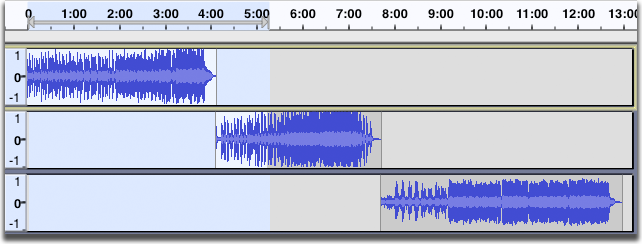
How do I add an intro and a exit to a track?
Intro
Use the Time-Sift tool (the icon with the horizintal line with arrowhead at each end) to shift your original tack along for the lenght of the intro (and probably plus a bit more - you can remove any gap later. Move cursor back to time zero and record your intro - it will create a new track
Outro
Move cursor to end of tracks (use the right double arrow icon - the one like a FF on tape/CD players). Then record your exit piece. A third track will be created.
You may wish to edit to tidy the gaps and/or do some cross-fades at the junction.
WC
For pre-recorded audio…
Import the intro audio file. Select that track by left clicking the area to the left of it’s waveform. Right click on that same area and click on Move Track Up.
Import the outro audio file.
Select all tracks by clicking the Select menu and then clicking All.
Click Tracks, then Align Tracks, then Align End To End.
You can drag the tracks left or right to add gaps between them, or cause them to overlap in the exported audio.