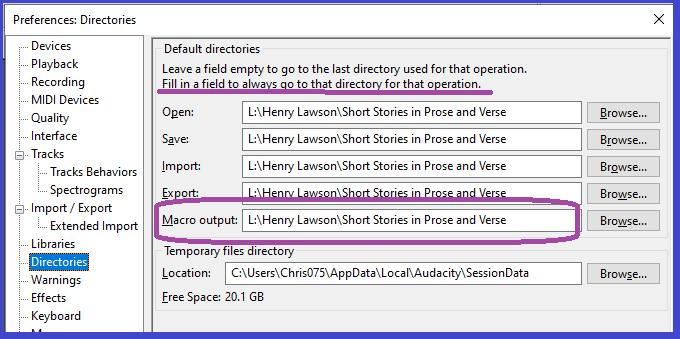
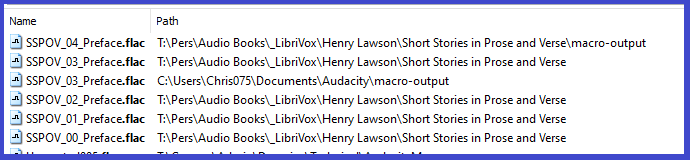
This page is a bit cagey: "If you leave the entry for Macro output blank (default setting) when running Macros on files, Audacity will default to creating a folder called “macro-output” in: …"
The first four entries are covered by “If you set a default folder for any of those actions Audacity will always offer that folder location when you invoke that action.”, which deludes the naïve novice developer into thinking that if the macro-output folder entry is filled in, then “… Audacity will always offer that folder location when you invoke that action”.
But the documentation page doesn’t say that.
The documentation page offers “empty/full” for four cases, and then only “empty” for the fifth case.
The documentation does not come right out and tell us what happens when that fifth box (macro-output) is filled in.
Apply Macro - Audacity Manual
This leads us to a documentation page which say in part:-
If the project has been Saved, then the exported files will be saved in a folder named “macro-output”. The “macro-output” folder will be in the location specified in Directories Preferences.
If the audio in the project came from an imported file as its initial step (that is, it is a named project), the “macro-output” folder will also be will be in the location specified in Directories Preferences.
If the project has not been saved and is un-named, the normal Export Audio dialog will appear enabling you to choose the name and location of the exported file.
The first two statements suggest that no matter what we do, output from the running macro is going to be saved in a folder “macro-output” somewhere. The “macro-output” folder might be found in a pre-determined place, but the output from the running macro will always be lodged in a folder whose name is “macro-output”. No matter what is keyed in in the fifth box.
The third statement suggests that despite Audacity macros being non-interactive, there can be an interaction with the user during execution of a macro. And still I am left feeling that no matter where I elect to save the project, the folder “macro-output” will be there to greet me.
I can imagine that deep in Audacity code there is something that has been written always to send output to the “folder macro-ouput within ”, and that probably won’t be changed.
That said, I realize now that my “beef” is not with the documentation at all, but with the Audacity Code! That dialogue box shown as the first image in this post displays the text “Fill in a field to always go …”, and that piece of text (which misled me) must be generated by Audacity Code; what misled me is hard-wired into Audacity code. The documentation is probably correct. It is the product of Audacity code that misled me.
(Phew!)
Personally I’m hoping that the handling of macro exports is improved (> Improvements to macro-output folder · Issue #2168 · audacity/audacity · GitHub> )
Me too, Steve; me too!
Thanks again
Chris