Thanks so much for all your help to resolve the problem.
I managed to get this same error after download FFMPEG for Windows v0.6.2 and trying to point Audacity 2.3.1 at it. This would come up every time I started Audacity and not be able to actually use the library.
Looking at the site to download the FFMPEG for Windows installer, the latest version that should be used is less obvious than 0.6.2
Hope that helps!
Thanks for that feedback - I’ve asked the site owner yo take a look at that.
WC
Windows 7 Home Premium SP1. Audacity 2.3.2 (upgrading from 2.3.1)
I get the same error that others have reported.
https://i.postimg.cc/g0PqZdmD/audacity-2-3-2.png is the error dialog.
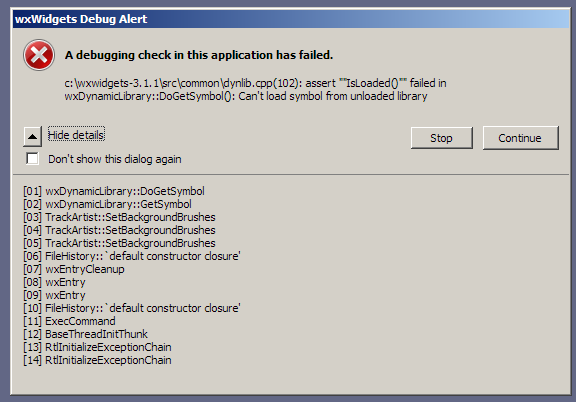
Pressing “Continue” a couple of times allows the program to load, and then I can open various files - there is no subsequent error for each file that I open.
I also got the same error with 2.3.1
Off to try to find a download for 2.2.x which I deleted after getting 2.3.1 - I never actually tested that after upgrading from 2.2.x to 2.3.1 
The current version of Audacity is 2.3.2
It is not possible to fix old versions of Audacity because they are already released and will not be re-released. Any fixes that are implemented will only apply to the next Audacity release.
If you are reporting a bug that occurs in the current release version of Audacity, please provide steps for how to reproduce the problem.
And indeed he has updated the site to make it all clearer:
WC
I think i can REPRODUCE this error.
My audacity was fine till i gotta the need of openning a *.mp3 file.
I tried to install lame manually, but did it wrong - after that ive started getting these debug error as same as the pring of the guys.
Do you recall what you did wrong?
Audacity can import MP3 files without LAME. LAME is required for exporting MP3s.
Are you now able to export MP3s?
LAME is now built-in into Audacity for 2.3.2 and all future versions of Audacity: https://manual.audacityteam.org/man/new_features_in_this_release.html#lame
So no need to download it.
WC
I have tried four times now to get FFMPEG to install with v2.3.2 on Win10 64-bit. The Libraries tab says Lame 3.100 (built in) but it cannot locate the library. I tried a sarch for the dll avformat-55.dll and it does not exist. I tried to install LAME from the provided links and all that down loads either in the insteller or zip version is the command-line version as an exe. This is soooooo frustrating as I have to run any m4A files through VLC to convert to mp3 before I can work with them.
Help, please? I can see others have a similar problem with the library not being installed.
In Audacity 2.3.2, LAME is installed by default as part of Audacity.
To install FFmpeg, follow the instructions here: https://manual.audacityteam.org/man/installing_and_updating_audacity_on_windows.html#winff
Did you download [u]Lame_v3.99.3_for_Windows.exe[/u]?
Did you then RUN that EXE to install it?
I tried to install LAME from the provided links and all that down loads either in the insteller or zip version is the command-line version as an exe.
LAME is now built-in so you don’t have to install it and you don’t have to “locate” it.
LAME is ONLY for exporting to MP3. It’s not used for any other formats and it’s not used for importing. The ability to open/import MP3s has always been built-into Audacity.
You don’t need to do that with Audacity 2.3.2 because LAME is included and installed by default with Audacity.
Sorry for the old bump, but it’s the first result on Google Search and the issue just happened to me on 2.3.2, and I fixed it on my end!
OS = Windows 7 SP1 64 bits
Previous installs : Audacity 2.0.6 and “FFMpeg for Audacity” 0.6.2
Steps followed:
-
Downloaded Audacity 2.3.2 on Fosshub, “Audacity Windows Installer”, MD5 = 42b470ba618d0e89427dcbc590e9d5be
-
Installed Audacity 2.3.2 over the existing 2.0.6, by simply installing it in the same folder.
-
Launching Audacity immediately produced these debug error messages.
-
Uninstalled Audacity, reinstalled Audacity 2.3.2, same errors.
-
Uninstalled Audacity, removed the remaining folder in Program Files, reinstalled Audacity 2.3.2, same errors.
-
After reading the post by sadmoody 2.3.0 Debug Error - #22 by sadmoody I uninstalled Audacity, but also uninstalled FFmpeg, then rebooted.
[might be unrelated to the fix] ~ 7) Tried installing the latest version of FFmpeg from the official website, but it seems it doesn’t come with an installer (got the 4.2.1, 64 bits, static from here, official link for Windows builds)
[might be unrelated to the fix] ~ 8) So I followed that Wikihow guide that included steps for the PATH modification. Followed the steps, checked the -version in CMD: it worked.
-
Installed Audacity 2.3.2, this time it’s launching without any debug error messages.
-
Checked the Preferences, it said FFmpeg was not detected. Followed the official Audacity instructions here, and it worked fine, detecting the library immediately. After this was done, I exited and launched Audacity again: no debug error, working fine, FFmpeg still detected.
…
So I believe that, unlike what is said here,
If you have the previous FFmpeg 0.6.2 installed to the same location, the FFmpeg 2.2.2 installation will overwrite the 0.6.2 installation with the new files. There is no need to uninstall FFmpeg 0.6.2 first.
… it seems it is necessary to uninstall the previous FFmpeg installation in order to make the more recent version of Audacity work.
 It could be that something needs to be changed with the way the installer updates/replaces/uninstall previous versions of FFmpeg.
…
One of the error log I got after installing Audacity 2.3.2 and launching it (step 3, 4 and 5):
03:51:11: Audacity 2.3.2
03:51:11: Error: Couldn’t find symbol ‘AudacityModule’ in a dynamic library (error 127: La procédure spécifiée est introuvable.)
03:51:13: > Trying to load FFmpeg libraries> …
03:51:13: mLibAVFormatPath (‘C:\Program Files (x86)\Ffmpeg For Audacity\avformat-52.dll’) is not empty. Loading from it.
03:51:13: Looking up PATH environment variable…
03:51:13: PATH = 'C:\Program Files (x86)\NVIDIA Corporation\PhysX\Common;C:\Program Files (x86)\Common Files\Oracle\Java\javapath;C:\Program Files (x86)\iis express\PHP\v5.4;C:\Program Files (x86)\Mozilla Firefox;C:\ProgramData\Oracle\Java\javapath;C:\Program Files\Common Files\Microsoft Shared\Windows Live;C:\Program Files (x86)\Common Files\Microsoft Shared\Windows Live;C:\Windows\system32;C:\Windows;C:\Windows\System32\Wbem;C:\Windows\System32\WindowsPowerShell\v1.0;C:\Program Files\Intel\Intel(R) Management Engine Components\DAL;C:\Program Files\Intel\Intel(R) Management Engine Components\IPT;C:\Program Files (x86)\Intel\Intel(R) Management Engine Components\DAL;C:\Program Files (x86)\Intel\Intel(R) Management Engine Components\IPT;C:\Program Files (x86)\Intel\OpenCL SDK\2.0\bin\x86;C:\Program Files (x86)\Intel\OpenCL SDK\2.0\bin\x64;C:\Program Files\Common Files\Lenovo;C:\Program Files (x86)\Common Files\Ulead Systems\MPEG;C:\Program Files (x86)\Windows Live\Shared;C:\Pr;;C:\Program Files\Intel\WiFi\bin;C:\Program Files\Common Files\Intel\WirelessCommon;C:\Program Files\Intel\WiFi\bin;C:\Program Files\Common Files\Intel\WirelessCommon'
03:51:13: Checking that ‘C:\Program Files (x86)\Ffmpeg For Audacity’ is in PATH…
03:51:13: Warning: FFmpeg directory ‘C:\Program Files (x86)\Ffmpeg For Audacity’ is not in PATH.
03:51:13: Temporarily prepending ‘;C:\Program Files (x86)\Ffmpeg For Audacity’ to PATH…
03:51:13: Checking for monolithic avformat from 'C:\Program Files (x86)> Ffmpeg For Audacity\avformat-52.dll> '.
03:51:13: > Error: Couldn’t find symbol ‘avutil_version’ in a dynamic library > (error 127: La procédure spécifiée est introuvable.)
03:51:13: > Error: Couldn’t find symbol ‘avcodec_version’ in a dynamic library > (error 127: La procédure spécifiée est introuvable.)
03:51:13: avformat not monolithic
03:51:13: Loading avutil from ‘avutil-52.dll’.
03:51:13: > Error: Failed to load shared library ‘avutil-52.dll’ > (error 126: Le module spécifié est introuvable.)
03:51:13: Loading avcodec from ‘avcodec-55.dll’.
03:51:13: > Error: Failed to load shared library ‘avcodec-55.dll’ > (error 126: Le module spécifié est introuvable.)
03:51:13: Loading avformat from ‘C:\Program Files (x86)\Ffmpeg For Audacity\avformat-52.dll’.
03:51:13: Returning PATH to previous setting…
The FFmpeg download site that you used is not the one that we recommend here in the Audacity Manual: https://manual.audacityteam.org/man/installing_and_updating_audacity_on_windows.html#winff
The link there takes you to Buanzo’s website (we cannot host it directly ourself for copyright reasons) - Buanzo is an Audacity Team member is our security expert:
https://lame.buanzo.org/#lamewindl
There we provide both an exe installer and a zip.
I am totally puzzled as to why you are running a 64-bit FFmpeg with a 32-bit Audacity application - I always thought that didn’t work. Windows currently remains at 32-bit on Windows.
On Mac, Audacity is now 64-bit (has to be as Apple is soon to drop support, or even run) 32-bit apps. And certainly for Mac we had to provide a 64-bit FFmpeg to work with 64-bit Audacity. On my Macbook test macjine I have both the 32-bit and 64-bit FFmpeg installed and both run respectively with all the various 32-bit and 64-bit Audacities.
I no longer have access to the older version of FFmpeg (FFmpeg 0.6.2 ) so cannot test installing FFmpeg 2.2.2 over it.
I may, though, soften that advice in the Manual where it says “There is no need to uninstall FFmpeg 0.6.2 first” to instead say “There should be no need to uninstall FFmpeg 0.6.2 first” - but if I do that will only be for the upcoming 2.3.3 Manual (and future versions).
WC
Update - a closer look at Buanzo’s site showed that he still hosts the FFmpeg 0.6.2 - but only for versions of Audacity up to 2.0.5.
So I:
- cleared out my pukka FFmpeg for Audacity folder from Program Files (x86) - just renamed it.
- ran up Audacity 2.3.2
- FFmpeg library not found (as expected)
- installed FFmpeg 0.6.2 in C:\Program Files (x86)\FFmpeg for Audacity
- launched Audacity 2.3.2
- FFmpeg library not found (as expected)
- trying to point Audacity at the .dll also failed (as expected)
- installed installed FFmpeg 2.2.2 in C:\Program Files (x86)\FFmpeg for Audacity - got one overwrite warning (licence I believe)
- examing C:\Program Files (x86)\FFmpeg for Audacity - showed both FFmpeg versions sitting there
- Launched Audacity
- got two debug check warnings (wxwidgets ones) - cleared both with “OK”
- Observe: Audacity launches ok
- Edit>Preferences>Libraries shows that the correct FFmpeg 2.2.2 has been found (and works)
So I will change the Manual to advise removing FFmpeg 0.6.2 before installing FFmpeg 0.6.2
But this has been a useful exercise for me (as an Audacity QA bod) as none of us on Team could formerly reproduce the wxwidgets debug warnings at step 11 on any of our Windows machines 
Peter.
I have updated our bug-tracker with the steps to reproduce (this may give us a chance to clear this bug)
And I updated the alpha Manual for the upcoming 2.3.3:
https://alphamanual.audacityteam.org/man/Installing_FFmpeg_for_Windows#Recommended_Installer
Peter.
I initially chose to use that other website (seemed official), thinking that maybe the Audacity manual was a little outdated (it’s sometime difficult for documentations to keep up with all the new releases of a software), so getting the latest FFmpeg would be better.
But later on I ended up using the link and installer that the Audacity Manual recommend (Buanzo’s website), as I realized the whole thing might be more complicated, so I should stick to the official Audacity guidelines.
Uh that’s just me being confused at 3 am, my bad  Sorry for the confusion…
Anyhow, thanks for developing Audacity and helping out the users so extensively, you’re the best! 
We actually work very hard on keeping the documentation bang up to date, particualry with new stuff - it’s my main task on Audacity Team, editing/writing the Manual (along with QA testing). But sometimes it’s all too easy to overlook stuff written a long while ago which is why feedback, like yours, is valuable to us 
Mostly I was curious to see if you had found a way to make a 64-bit FFmpeg library work with a 32-bit Audacity 
I certainly did not get 64-bit Audacity on Mac working with 32-bit FFmpeg when I was testing the alpha Mac build a while back.
And thanks for that vote of confidence - much appreciated. 
Peter.
Hi,
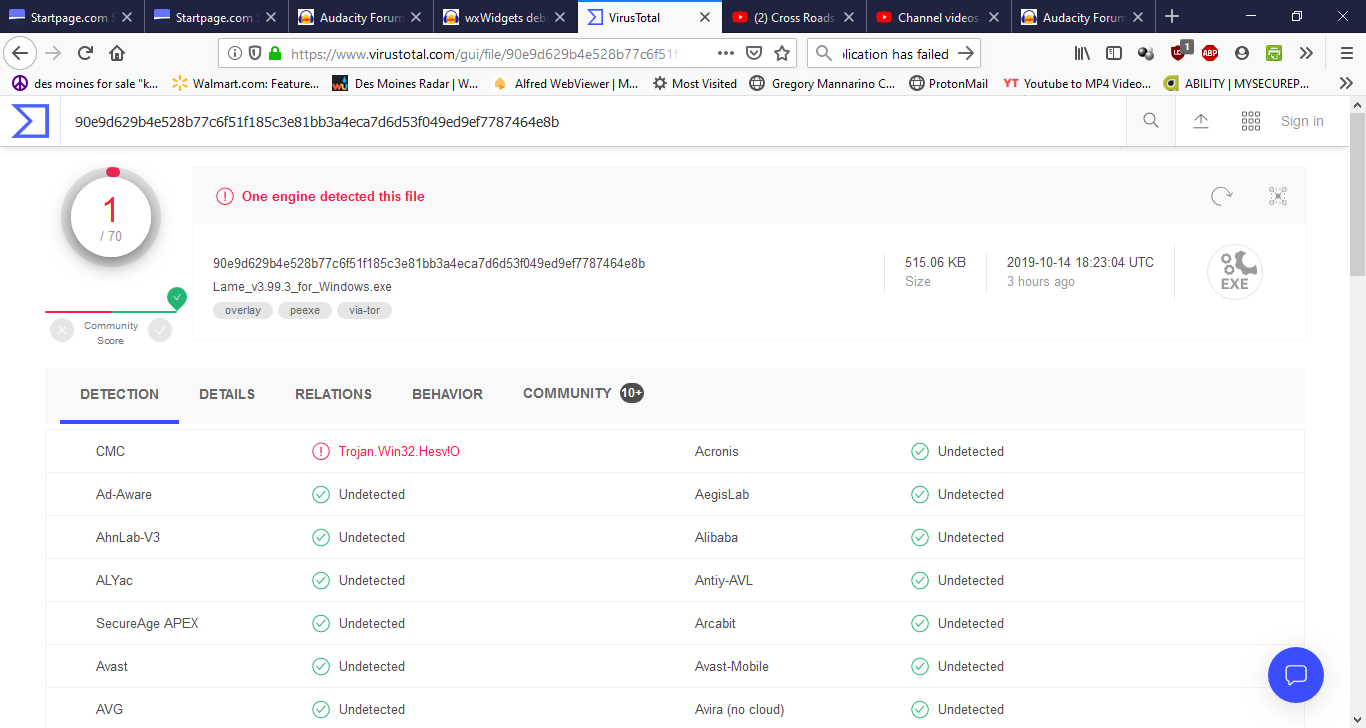
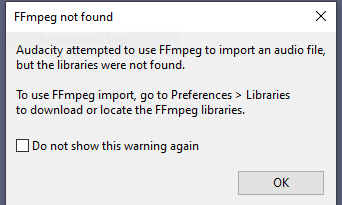
It appears that now you know what the problem might be with this bug. I too, was trying to get this version (Audacity 2.3.2) on Windows 10 64 bit to import an MP4 file and getting this message (capture2). Per the directions I read, I downloaded 3 different versions of lame_enc.dll (2 zip files and one installer file). None seemed to work to get past the error message in capture 2. If I remember correctly, when I got to the library page to "introduce"the lame_enc.dll to the system, I double clicked on this file and that is when the error message started to appear when opening Audacity. BTW… I decided to run the Virus Total program on the lame_3.99.3_for_windows.exe download and found the Trojan as shown in the first capture file.
Bottom line, I really can’t tell if you have found the fix for this problem or not but will await your reply before proceeding.