Can someone pleas ehelp me open my file. Its a chapter in my audiobook. I never had this problem before audacity 4 started causing issues. Its saved in 3.7 and has saved in the past.
Is that the complete error message or is there any more? Can it be copied to another folder and opened from there?
I tried to open a file Ive updated many times and always save it. It is giving me the dreaded c-drive error. I moved it to desktop . Same error.
"audacity failed to read a file in c:
When I try to open an .aup3 file in Windows Audacity 4, first it… hangs for a very long time, because I mistakenly decided to open a very large (1.8G) project file that was stored on a remote network share. But then it finally brings up this dialog:
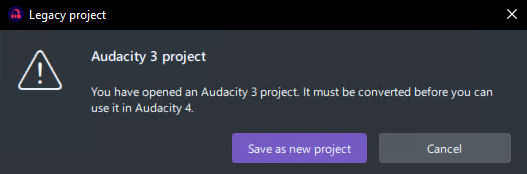
And after I click “Save as new project”, it hangs for an even longer time while it’s writing a new 1.8G file back to that network drive with an .aup4 extension instead of .aup3. Once that’s finished, it shows a “Project saved” dialog reporting the name of the new file (//remote/same/place/as/before/filename.aup4) with a single “Continue” button. Clicking that opens the new file in Audacity 4.
How far do you get into that process before you’re shown the error message you mentioned? Do you ever see the “Legacy project” dialog?
I’m wondering if, perhaps, the issue isn’t with the file you’re trying to open, but with some other part of Audacity 4.
Can you create new projects in Audacity 4 and save them?
If so, can you reopen THOSE files again, in Audacity 4?
I don’t know if you have seen this but maybe it might help: https://support.audacityteam.org/au3/troubleshooting/error-codes/error-audacity-failed-to-read-a-file-in-c-and-error-failed-to-open-database-file
It might be worth trying to open it on another computer if you have access to one. Failing that, if the file isn’t huge and you’re willing to share, I will try to open it.
1 Like
This topic was automatically closed after 30 days. New replies are no longer allowed.