I buy recently 2 mics and a usb c receiver to connect into a mobile or pc.
I expect with it, saving 2 tracks one for each mic.
The chip inside the receiver is the AC7063M2, but I don’t know how the manufacturer make the setup. Seems the signal from the 2 mics gets out mixed as 1 channel only.
Can somebody help me understanding this mics kit?
IF it’s going to work in stereo, you need to configure Windows (or whatever operating system) for stereo, AND configure Audacity for stereo.
A pro setup would be expensive… wireless mics and usually each one has its own receiver, or there are dual-channel and maybe multi-channel receivers. Then a separate stereo or multi-channel interface for the computer.
Thanks for the answer.
I want, for example with audacity, save a sound in 1 track for mic1 and a track for mic2. I tried, but as I am not an expert in audacity I could save it in stereo, but creates only 1 channel sound. I expect 2 channels…
I had the same thing happen to me. I bought dual wireless microphones, and after using them, discovered they both mix to a single channel when output to the field recorder.
I immediately went looking for true stereo wireless microphones, and when I discovered how much they cost, I decided using two wired microphones was what I could afford.
If I were made of money, I would buy two-channel wireless microphones with a receiver that records on an SD card and forgo the field recorder entirely.
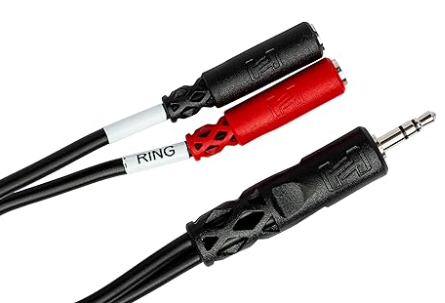
I connect the two microphones into the field recorder using a 3.5 mm TRS to dual 3.5 mm TSF stereo breakout cable. Search for it on Amazon and you should be able to find one.
Note that WrecksO is using a field recorder. Some (most?) microphone inputs on soundcards & laptops are mono. If you have a combination mic/headphone jack there is only one extra connection for a mono mic.
There are advantages to using a stand-alone solid state recorder… Computers are the least reliable things we own and there are lots of settings that can get fouled-up. (After recording you can still edit on the computer.)
In that case you might need a USB audio interface or a stereo USB mixer. Audio interfaces and mixers have “pro” balanced XLR microphone connections and they are not compatible with “computer mics”. Most have switchable mic/line inputs so you could connect a wireless receiver.
Most solid state recorders have built-in mics and some also have “pro” mic inputs as well as line inputs which could be used with a wireless receiver.
You may not be happy with the results of recording with two microphones. If you use the stereo track as it is, it will sound like sitting between two people talking on opposite sides of the room.
If this ends up being a problem for you, Audacity has tools to reduce the “width” of a stereo recording.
I have a very expensive and very old equipment, from B&K. I use 3 inputs, 2 for mics and other from odometer to measure the distance in a car.
I would like to use this cheap equipement to do a similar job.
I want to measure the noise with 1 mic and with other I would like to remove it and solder in their place the entrance from pulse counter.
So in 1 track i will have the noise from mic 1 and in other i will have a square wave from 0v to 0.1v for example and then i can synchronize the noise with distance.