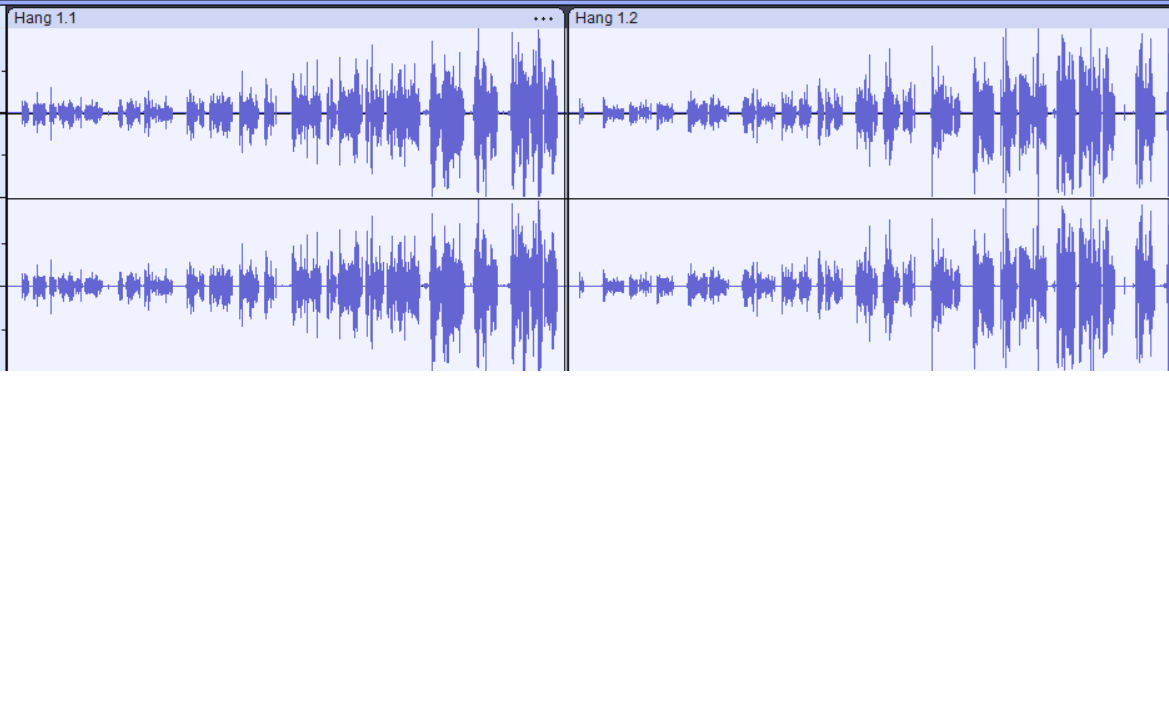
Someone please help! I have a new laptop, Windows 11 (I’ve been using a Mac so far without any problem). I record the audio files in Audacity. I’ve done everything the same way as before, but with all the audio is quiet at the beginning, then it gets louder and louder. I haven’t edited anything yet, this is the raw file. What’s wrong?
Make sure Windows “enhancements” are turned OFF.
The cause all kinds of weird problems. (It might be automatic volume control but for “good quality recording”, just disable them all.)
Thank you very much for your reply!
Just to clarify: if the issue was caused by Windows enhancements, does this mean I need to re-record the audio, or is there a way to fix the existing recording?
Yes, you’ll have to re-record. 
BTW - Audacity doesn’t mess-with the audio while recording but sometimes Window does. And those “enhancements” are one of the most causes common problems we see here.
This topic was automatically closed after 30 days. New replies are no longer allowed.