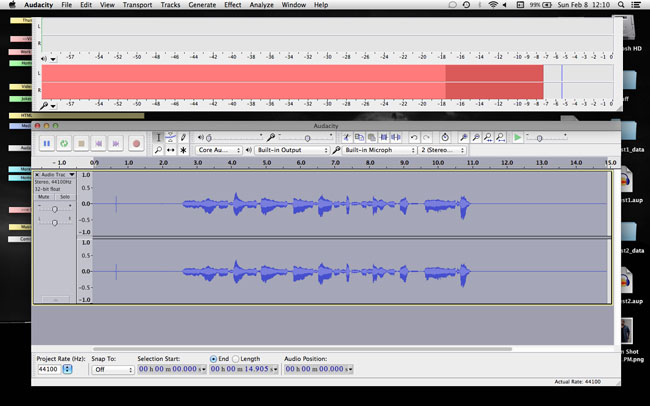
I got the clip to pass all three specifications as long as you don’t measure beyond “OK Folks.” All the dialog past that is too low. The performer’s voice fades into the sunset. Open the clip in Audacity. See how the blue waves get smaller and smaller toward the right? You can’t do that.
Attached is the setup for live recording in Audacity. Undock the meters and make them enormously bigger. Use the control strip on the left edge and the control corner in the lower right-hand. Make sure the meters are set for about 60 on the left. I think it will actually read -57 or so. That’s the right range.
Change that in Audacity > Edit > Preferences > Interface: Meter dB range.
Then, while you’re performing, make sure your bouncing red sound meter regularly peaks around -6 and never goes all the way up to 0. Note my blue waves are generally the same size and don’t wander up and down by very much? Yes, you do have to watch the meters and read the copy at the same time. The board operator on the other side of the glass in a real studio is adjusting levels and watching the meters. Now you have to do that. You get used to not being theatrical while you read. This isn’t a cellphone. You have to meet show standards.
Your sound clip is right on the edge. If you start wandering off announcing volume, you will not be able to make conformance.
Koz