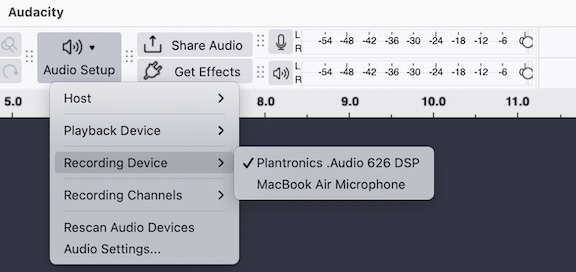
MacOS Sequoia 15.7.1, Audacity 3.7.5, Plantronics headset 626 DSP with USB A to USB C adapter.
Hello,
I can record audio with QuickTime, I can use dictation on the Mac, in fact I am dictating this right now.
Audacity is set up to use the headset, but when I record there’s no sound. I’ve restarted Audacity, I’ve restarted the computer, I’ve tried both USB-C inputs.
I can’t figure out why Audacity isn’t recording audio from this device.
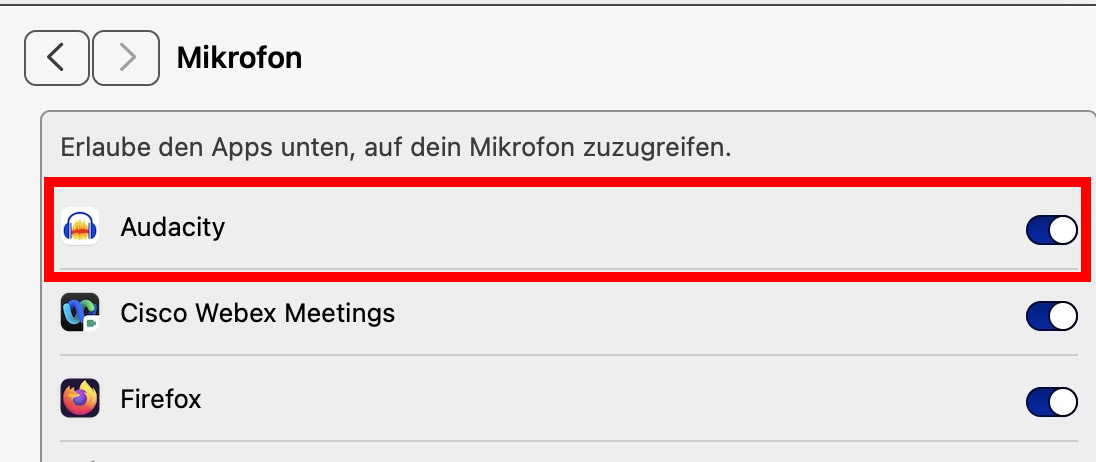
Thank you. I don’t know if Audacity didn’t alert me to that setting, or I have some notification turned off but that fixed it.
I’m so frustrated some times by how complicated MacOS has become. I’m showing my age, but I long for the days when you just plugged in a mic and it worked across all apps.
Well, Windows has this also… but you are right, Audacity should tell you about it. BTW - “Microphone” in Apple-speak stands for all sound input sources.
I recommend to join a local Mac user group (if such still exist in your area) or a forum / mailing list for Mac questions. If you speak German, I can give you some ideas where to look.
Thing about this issue specifically, is that I could not find any reference to enabling “mic access” for Audacity when using an external mic. Mic access is enabled by default when using the MacBook’s internal mic.
I tested Audacity with the internal mic and it worked perfectly. The confusion started with plugging in an external mic.
I have enabled mic access for other apps, and I actually remember the app asking for access to the internal mic when I installed them (Zoom, WhatsApp, Teamviewer). But they do not need additional permission when I plug in an external mic. I just tested them and they switched without an issue. Audacity does need me to flip that switch.
Thanks again for the tip, even after 35 years of Mac use, there is still something to learn.
No, the system setting also blocks the internal microphone if set to off. If you look at the permissions in system settings, you’ll see that the switch for Zoom, TeamViewer, etc. is also on. You either allowed the app to switch it on itself, or you switched it on in system settings.
In earlier versions of the macOS, I think the apps themselves could enable access (but they had to ask you before). This no longer works - they may open the system settings and ask you to enable access. I know that TeamViewer does this - but others don’t.
These changes in the operating system show how important it is to stay informed about any new developments.