I’m out until there are clear steps to reproduce the alleged issue.
So I have arrived at the edge of Audacity (like the edge of the flat earth), it seems.
Very well …
As stated:
 The edge.
Less than a day now. So all set. 
I have tested Noise Reduction on Linux with Audacity 3.7.5 AppImage. The test results indicate that Noise Reduction is working correctly.
I tested using this audio sample: https://drive.google.com/file/d/1dO9ONJGr8ZMv1easOShB23VyAByIc6_3/view?usp=sharing
The “gap” at around 17 to 19 seconds contains only low level white noise.
The rest of the file contains a mix of the low level white noise and a “Chirp” (from Audacity’s Chirp generator).
Mr. Steve, I had already said this:
Still why did you upload the file? It is not different in flavour from what I had said earlier.
Your sample’s upload wasn’t required at all.
I had further said:
But I also added this next part, and the Noise I was dealing with:
So why wasn’t this noise sample I uploaded used for testing, Mr. Steve?
Moot is that my older Audacity 3.2.4 is able to clean the noise I want to be removed, without spilling over to silent areas, as predicted. But the current one, 3.7.3, fails.
I had provided screenshots of the older audacity 3.2.4 in my above post no 10 to show how the older version worked correctly; and the newer one 3.7.3 in post no 6 to show the Spilling Over to the silent areas effect with the newer version.
I had clearly shown the effect in the respective screenshots.
Even with all these info why can’t I reach you, Mr. Steve?
I have learnt the root cause of the problem: Audacity has been primed up with artificially created noises, and thus fails to eliminate the naturally grabbed noise.
The Moot: Your team is testing and priming up Audacity for an artificial world, whereas Audacity should handle real world noises, without spilling over to the silent areas.
You may not believe me, but I am actually observing the Holographic Universe play itself out before me!
Please advise how I could run the earlier, older flavour 3.2.4 (the version that works predictably for me) AppImage in my latest Debian without virtualisation tools, and I shall stop my reasoning. I will simply not reason with the team Audacity any longer. Futile. Some matters are better to be let gone.
Because it did not exist in this topic.
I now have your audio sample, so will you now give me step by step instructions to reproduce the problem? Don’t make me guess - tell me exactly what I need to do, step by step, to reproduce the problem. Number each step for clarity.
Mr. Steve, you have enough wisdom and autonomy to replicate the steps that I followed.
However, I will try:
(1) Open the audio sample I’d uploaded, which you downloaded, zoom into the Ordinate (Vertical/Y-axis) to max, so that the noise curve is clearly visible.
(2) Please have a complete overview (Bird’s Eye-View, at a glance view) of the relatively silent areas in this audio sample.
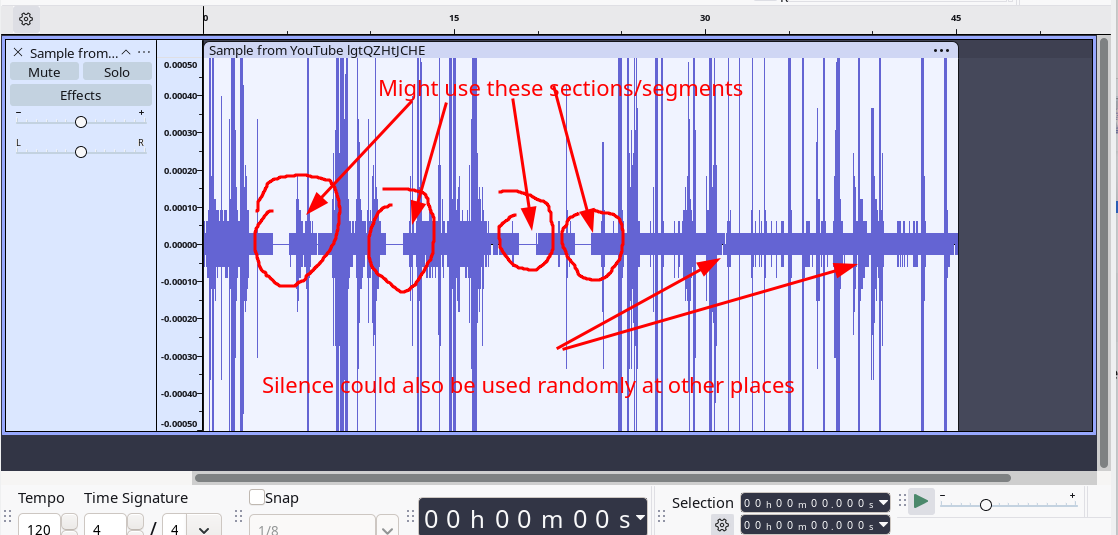
(3) Click on one such section/segment, at a particular relatively silent position (as explained in the pic above), Insert 1 sec silence with Generate ⟶ Silence…
Pls Note: Segment/Section selection: Your choice. Your freedom. Your discretion. Just choose the lowest noise amplitude areas as a better aid for ideation. You could replace the word “Section” with “Segment”.
Suggested: multiple sections.
(4) Repeat the same Silence insertion in a few such places.
(5) Then select the entire audio sample with double-click or Cntrl+A.
(6) Repeat Noise Reduction multiple times, if you desire.
You will find that noise increases with each application. Random noise in even silent areas.
Now use the earlier the version 3.2.4.
You, I am sure, will find the difference.
In 3.2.4 the spilling over of noise to silent areas doesn’t occur. Noise is also reduced with each subsequent steps of reduction.
Best wishes, my brother, a big grown up child! 
Which section exactly?
Altered the above note as a one-stop instruction set.
Thank you.
The problem is that Audacity 3.7.3 (and 3.7.5) import OGG files as 16-bit tracks. Unfortunately the Muse Group team decided to remove the sample format information from the panel on the left end of the track, so there is no visible indication that it has done this.
Comparing with Audacity 3.4.2: OGG files are imported as 32-bit float and the sample format is shown in the panel on the left end of the track:
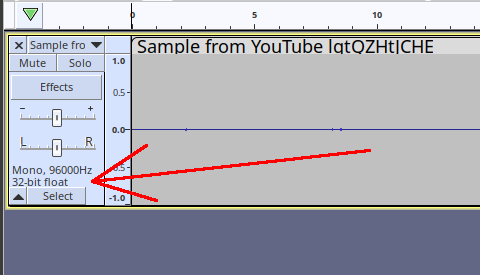
Technical description:
Because Audacity processes audio with 32-bit float precision, the 16-bit track cannot hold the exact 32-bit sample values, so values are rounded to 16-bit values. dither is applied automatically so as to avoid periodic quantization noise.
Solution:
Immediately after importing any OGG format track, change the track’s sample format to 32-bit float.
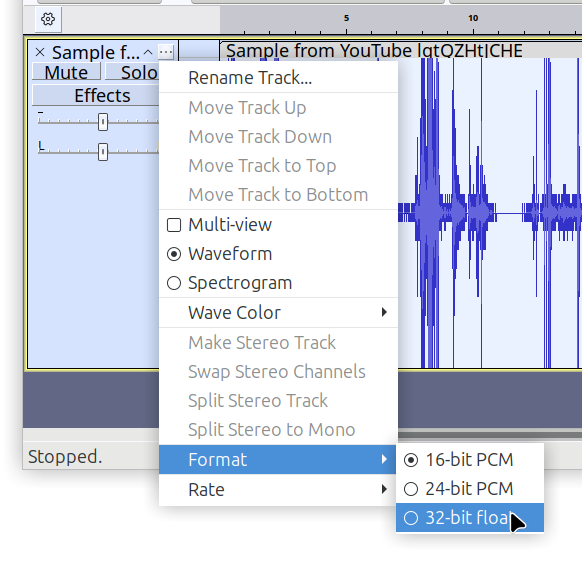
Update:
I’ve logged the bug here: OGG files imported as 16-bit · Issue #9950 · audacity/audacity · GitHub
Thank you, Mr. Steve, your solution works. Also serves as a reminder to me that I was right when I decided that I can’t be a programmer. The level of subconscious abstraction & deep NN processing is beyond me because of my time-continuous Awareness, thus too many questions and intent to find answers for those questions, instead of relying on the clockwork system of innumerable cogs that works.
Serves me right as a physics buff, but detrimental for programming in high level languages.
I for example am very much alive to continually observe FOSS failing & dying, like a Phoenix, then rising up from its own ashes. While everything else failed, some things in some places clicked to pull up the near-failed system.
It is also a reminder to me that I was right about my deep attachment with Audacity & my belief in you.
In hindsight, the current flaw seems very trivial, but caused a huge effect in performance. Other members tried to convince me that all is well, while it isn’t.
Thank you for evidence-based trust upon one of the many users, & for listening.
The thread may be closed now. It has served its purpose.