Sounds neat Paul but won’t work with my workflow. I usually do all the big stuff (noise removal, normalize, declicker, compressor, etc.) to the entire audio track in Audacity and then import that into Vegas where I then preview both audio streams (game and vocal) together along with video, and do my more individual edits. So an audacity tool where I have to locate clicks by listening to the entire track in Audacity will not work for me.
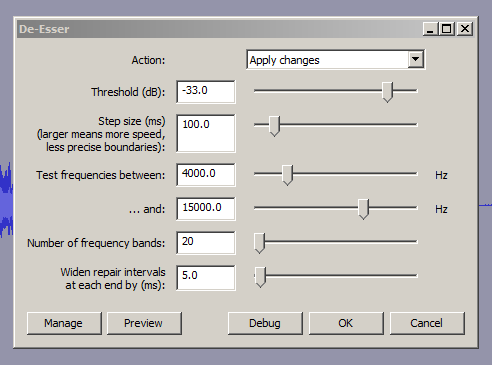
So I take it none of the settings I mentioned will catch the kind of clicks I’m talking about, tho ones that come right in the middle of a loud sharp part of a vocal? I may try lowering the threshold then, after testing to make sure it doesn’t distort good audio. Raising the bands to 20 still misses these very few but very annoying clicks. To be fair, I can’t see them on the waveform either, I can only hear them.
I was using this DeEsser plugin for a while. Unfortunately there is a memory leak in it. When deessing a large file (e.g. 2 hours) plugin consumes a few GB of memory. Sometimes for this reason Audacity crashes with OOM. I was wondering perhaps someone knows how to debug and fix this issue?
Or maybe there is a better way to do deessing in Audacity? I was looking for compressor which compresses different frequencies with different parameters but didn’t manage to find it. I also tried to use Equalizer and TAP DeEsser. Both do a lot of damage to the sound. Maybe I’m using them with wrong parameters, I don’t know.
A workaroubnd : De-ess your 2hour show in smaller manageable chunks.
If you’re using windows there is a free multi-band-compressor VST-plugin called Gmulti which does that.
[ I’ve used Gmulti to de-ess in Audacity, just using Gmulti’s high-frequency “band 3” ]
[quote=“afiskon”]
… I was looking for compressor which compresses different frequencies with different parameters but didn’t manage to find it.
[/quote]
If you’re using windows there is a free multi-band-compressor VST-plugin called > Gmulti > which does that.
[ I’ve used Gmulti to de-ess in Audacity, just using Gmulti’s high-frequency “band 3” ]
We should persuade the author to document and release them…
Heavy on the document.
I attach a sound test from a poster who got dangerously close to producing an AudioBook compliant sound clip with no corrections short of a minor volume change.
However, there is a word “resist” at about 8.3 seconds that is a little bright. Turns out it’s bright enough that it stands in the way of meaningful equalization of the performance. Any attempt at making the voice crisper causes that word to go thermonuclear.
So describe whether or not this could be an essing problem and how you knew that.
If it is, describe how you would adjust the DeEssing tool including all the measurements, screens, sliders and sound cues.
Look at it as the first pass for the user document.
Here’s my De-Ess suggested settings for using Paul-L DeEssing tool on that “resist the temptation” track …
The threshold setting on Paul-L’s DeEsser is critical, as it is a hard “brickwall” limiter.
I lower threshold setting in 1dB steps until it’s audibly* taking too-much off, then raise the threshold by 1 or 2 dB above that too-much setting.
[ * it’s also visible on spectrogram when too-much sibilance has been removed, when visually comparing it with normal sibilance ].
BTW
There is a mouth-quelch noise between the S&T of “resist” . I had a go removing that mouth-noise with the equalizer, Audacity’s new spectral editing tools would do a similar removal job , but I’ve yet learn how to use them.
Drag-select the Essing sound similar to Profile in Noise Reduction > OK.
Select the whole show or segment.
De-Essing Value:
More---------------^--------------Less
OK.
The computer can figure out the frequency bands, intervals, step sizes, etc. from the Essing Profile.
I should have replied. I have been using the plug ins and have been very pleased. The “wet mouth” thing mentioned is mostly removed and the intended use of these is great.
I downloaded your plug-ins but I’m a total technical newbie. I’m most interested in the deesser, to take out my lispy s, but eliminating lip clicks would be great too.
My difficulty is that I don’t really understand any of the variables. I ran the deesser with the defaults and it sounded horrible, very muffled. I’ve played about with the variables, but I really have no idea what I’m doing. Could you suggest some variables to use? And some ranges to change specific variables that would be a good idea to play around with? I can send you an audio file if that helps.
Yes it’s for any computer that Audacity runs on, though it won’t work with very old versions of Audacity.
The current version of Audacity is 2.1.2, which is available here: Audacity ® | Download for Mac OS.
I’m back, necro-ing this thread after over a year, haha.
Been using this for some time, and had a weird occurrence I wanted to ask about. Recommended # of passes is 2. I’ve been doing that standard for years. However, the longer the length of the file, it seems to get exponentially longer. For example a 20 min file takes about an hour, two passes, while a 30 min file takes about 2 hours.
Here’s where it gets really strange though. If I take that same 30 min file that takes 2 hours with 2 passes, and I lower it to one pass, it only takes 25 min! So then that stands to reason that if I just run the de-clicker with 1 pass twice, it would take 50 minutes, or less than half the time of running it once with 2 passes. Does this make a difference? Does multiple passes have some other effect? I’ve noticed the big hang in processing time happens between the passes, so wherever this plugin is dragging, it’s there.
I’ve also noticed that it never uses more than about 20% of system resources, even if I use the task manager to raise the priority of Audacity higher. If it could somehow be enhanced to use all my system resources (though I have no clue in the world how this can be done) it might also run faster.
I’m just always looking for ways to cut down processing time, and so I thought I’d share this with y’all. I do prefer the results of 2 pass as 1 pass misses some clicks, but I haven’t yet tried running 1 pass twice.
I’ll leave most of the points that you raise to Paul (the developer) as I find the code almost incomprehensible.
Audacity is almost exclusively “single core” at present, so on a 4 core machine you are likely to see Audacity’s CPU utilization ‘capped’ to 25%. As multi-core systems are becoming the norm, Audacity is likely to make more use of multiple cores in the future, but this is pretty complex stuff to program so it’s not going to happen overnight.
I just want to tell you that I am still uding your ingenious DE-CLICKER as much as I use Noise Removal, tho I IMMEDIATELY DE-CLICK … t h e n I remove the silly ol’ BG noize … haha I typed UDING! Who cares, Im leaving it for all to enjoy! I commented way-back-when after my first few uses and knew immediately that YOU’RE ON IT DOG GONE IT! I mean YOU HAVE NO IDEA what a life & time saver DE-CLICKER is and NOT that I have WET MOUTH SOUND like your friend, bc I DONT, I just LOATHE mouth sounds whether they be wet or dry in nature (OK maybe not all teehee) and YOU, SIR, ARE A GOD … I tell everybody about you and your DELECTABLE DE-CLICKER!!
Oh Oh … so I just upgraded (no notifs/i forget to check) so YTF is it not included in the download pack? It’s a MUST-HAVE! More ppl would DL freakin Audacity to have a/your DE-CLICKER! Thank god google showed me the way!

 … so I just upgraded (no notifs/i forget to check) so YTF is it not included in the download pack? It’s a MUST-HAVE! More ppl would DL freakin Audacity to have a/your DE-CLICKER! Thank god google showed me the way!