Unable to open Audacity files

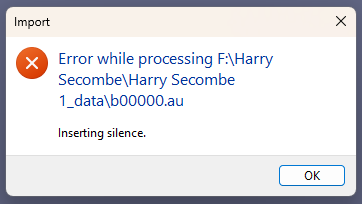
I have several Audacity files that I cannot open and get the following message:

I am using Audacity 3.7.7 on a Windows 11 computer.

I have found also that I can no longer record from my turntable to Audacity.

I have been transferring vinyl mp3 files for years with great success.

Any help appreciated.

With older versions of Audacity ? … https://www.fosshub.com/Audacity-old.html

Audacity 2.4.2 is the last version to use the “_data\au” format to store projects.

I believe 3.7.7 is supposed to open the old AUP format but it can only save AUP3 files.

The old format was an AUP folder with an AUP file inside along with AU files which contained the actual audio. The folder and files had to stay together as a package. If you move the AUP file without moving the whole folder the AU files will be “missing”.

Whatever the issue, I’m not sure if you can recover unless you can find the files/folders and re-assemble them. :frowning: But if you exported a WAV or MP3, it should work fine.

The new AUP3 format is “all-in-one” but it’s still a bit more fragile than regular audio files. I recommend exporting to WAV or FLAC immediately after recording whether you make an Audacity project or not.

I have found also that I can no longer record from my turntable to Audacity.

Let’s start with- How is the turntable connected to the computer?
The turntable is connected via a hard-wired RCA(?) cable from the unit to the microphone plug on the back of my Dell computer.

A microphone connector is only mono - you should either use a stereo input connector or an “external sound card”.

This worked and I have been able to recover old files and export them to .wav files.

Thank you

I will try that.

Thank you,

The line input (normally color-coded blue) will work with a regular line-level signal.

You DO need a line level signal. A direct connection from a phono cartridge won’t work without going-through a phono preamp.

This topic was automatically closed after 30 days. New replies are no longer allowed.