What model Olympus Dictaphone? Looks like some are advertised to support .mp3 format, while others might use .dss or only .ds2.
From the info presented, it seems like the file is an MP3, but due to a bug in the recorder or perhaps an issue with the storage format (FAT16?) long/big files can break.
Is it possible that you have some .mp3 and some .ds2 files? Does mplayer play the audio of the problem file? Is the original post output confirmed from the problem file or is it from one of the working ones? FYI: You can use three backticks (`) to start and end a code block like:
```
program output or code
more program output or code
```
Your goal might be to figure out how to rescue your files by converting them to WAV.
The answers at command line - Convert a .mp3 to wav file with mplayer - Super User might help with converting. On Windows I use File Converter for a GUI solution (also open source).
What I tested:
A sample .dss file loads without issue in Audacity. soxi can’t identify it but ffprobe does:
Input #0, dss, from 'DS230002.DSS':
  Metadata:
    author          : DS2300
    date            : 2005-11-16T13:52:53
    comment         :
  Duration: 00:00:10.93, start: 0.000000, bitrate: 14 kb/s
  Stream #0:0: Audio: dss_sp, 11025 Hz, mono, s16
mplayer:
MPlayer Redxii-SVN-r38151-6.2.0 (x86_64) (C) 2000-2019 MPlayer Team
Using FFmpeg N-94664-g0821bc4eee (2019-08-26 16:09:11 -0700)
Compiled on 2019-08-28 01:29:43 EDT (rev. 1)
getch2: 6 can't get number of input events  [disabling console input]

Playing DS230002.DSS.
libavformat version 58.31.104 (internal)
libavformat file format detected.
[dss @ 000000000229de00]Estimating duration from bitrate, this may be inaccurate
[lavf] stream 0: audio (dss_sp), -aid 0
Clip info:
 author: DS2300
 date: 2005-11-16T13:52:53
 comment:
Load subtitles in ./
Load subtitles in C:\Users\howareyoudoinggoodsir/mplayer/sub/
==========================================================================
Opening audio decoder: [ffmpeg] FFmpeg/libavcodec audio decoders
libavcodec version 58.55.101 (internal)
AUDIO: 11025 Hz, 1 ch, s16le, 0.0 kbit/0.00% (ratio: 0->22050)
Selected audio codec: [ffdsssp] afm: ffmpeg (FFmpeg Digital Speech Standars - Standard Play  mode (DSS_SP))
==========================================================================
AO: [dsound] 11025Hz 1ch s16le (2 bytes per sample)
Video: no video
Starting playback...
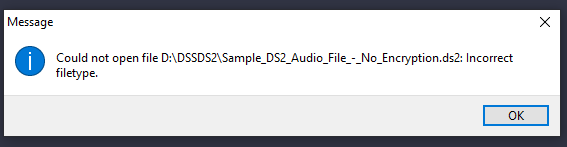
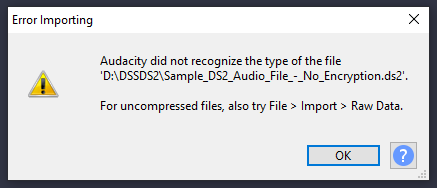
None of the three .ds2 sample files (“DSS Pro”) that I could find load in Audacity:
Could not open file Sample_DS2_Audio_File_-_No_Encryption.ds2: Incorrect filetype.
Audacity did not recognize the type of the file
‘Sample_DS2_Audio_File_-_No_Encryption.ds2’.
For uncompressed files, also try File > Import > Raw Data.
ffprobe:
Sample_DS2_Audio_File_-_No_Encryption.ds2: Invalid data found when processing input
mpv:
mpv.exe Sample_DS2_Audio_File_-_No_Encryption.ds2
Failed to recognize file format.
Exiting... (Errors when loading file)
mplayer:
$ ./mplayer.exe  Sample_DS2_Audio_File_-_No_Encryption.ds2
MPlayer Redxii-SVN-r38151-6.2.0 (x86_64) (C) 2000-2019 MPlayer Team
Using FFmpeg N-94664-g0821bc4eee (2019-08-26 16:09:11 -0700)
Compiled on 2019-08-28 01:29:43 EDT (rev. 1)
getch2: 6 can't get number of input events  [disabling console input]

Playing Sample_DS2_Audio_File_-_No_Encryption.ds2.
libavformat version 58.31.104 (internal)


Exiting... (End of file)