For years I’ve been using Audacity to rip vinyl from an Audio Technica AT-LP120 to a Mac Book Pro and it’s worked great. In recent months the sound quality took a nosedive, sounds muddy/choppy now and so far I’ve failed to properly diagnose the issue. I don’t believe it’s the turntable itself (which still sounds great when outputting through BlueTooth to speakers) & I suspect it’s not an Audacity issue ultimately, as it seems to also be happening when I try using QuickTime to record–probably a Mac thing, but I’m curious if anyone else has encountered this issue or found a solution. Thanks.
What other devices are involved? How is everything connected?
Just a USB cable direct from the turntable to the Mac. I have also experimented with different cables/connections. Even tried running RCA outs from the turntable through a converter into USB. Same results in each case.
Could the Mac be applying an “audio enhancement” , like vocal isolation / noise-reduction / noise-gate ?
@Trebor
There is no such thing in native macOS up to 26.7.1 “Tahoe”. I do not know about 27.x “Golden Gate”, but I suspect there is also none.
If there is, then @username4 would maybe have installed it on purpose.
Right, I haven’t (intentionally) installed any enhancement. My OS is currently Sequoia 15.7.7. I can’t say with any kind of certainty, but I was slow to switch to Sequoia and I think perhaps when I finally did is when I started to have these issues.
What you could try to identify the problem:
a) connect the turntable to another computer
b) depending on the model of your MacBook Pro, it could have a swichable input/output[1]. Switch this to input in system settings → sound and connect to a line-out[2] of an amplifier
c) connect the computer via the line-out[2] of an amplifier (you need an “external sound card” to do this)
d) check whether the bit rate of the USB-out on the turntable is the same as set in Audacity
e) change cables (which you said you already did)
[1] I think, the last such MacBook Pro was from 2012, which - without any tricks - could run no operating system newer than 10.15 “Catalina”.
[2] If the turntable has a built-in phono pre-amp, you may also connect directly, without amplifier.
I don’t use v4 and have no plans to do so anytime soon. Are you willing to share one of your audio captures by exporting to WAV and uploading to Google Drive or similar? I can have a listen on my system and see how it sounds.
Have you checked the Mic Mode setting in the macOS Control Center while recording? macOS sometimes defaults USB inputs to Voice Isolation, which tries to filter out non-voice sound—making vinyl audio sound completely muffled, choppy, or distant. Changing it back to Standard usually solves this issue!
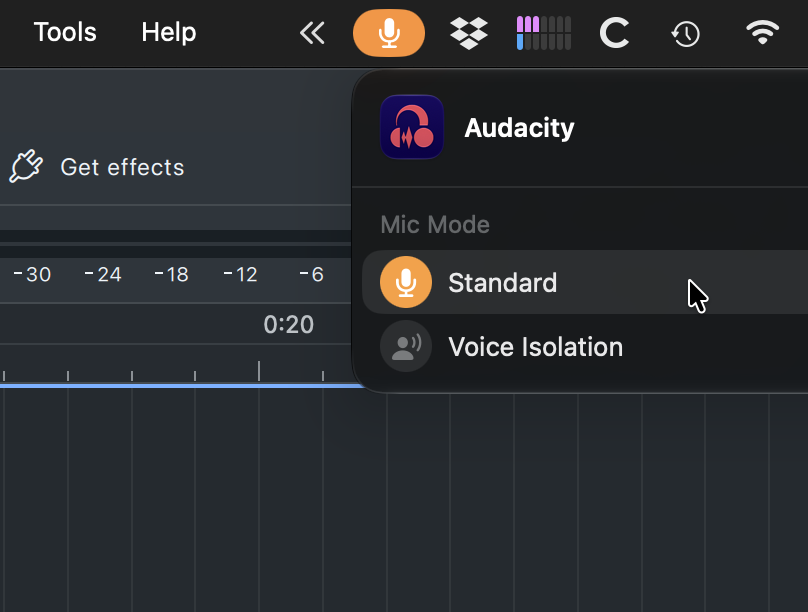
On macOS 27 (and all the way back to Monterey 12, apparently), while Audacity is recording, click on the orange microphone icon in the menu bar. This is where you can choose between “Standard” and “Voice Isolation”.
You can also open System Settings > Sound and the orange microphone icon will appear in the menu bar.
I’m not sure what is meant by “the macOS Control Center”.
Forgive my ignorance here–when I record in Audacity I do see an orange dot appear in bar top right of my screen, but when I click on that I’m not seeing anything that says Mic Mode or anything that would appear to be an adjustable setting for such?
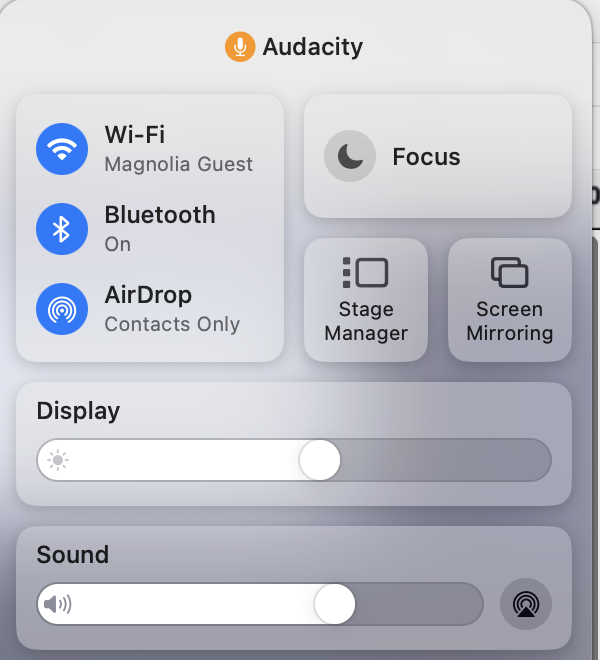
Screenshot here, not sure if I’m looking in the right place. I can click on sound to get more sound controls, but no visible Mic Mode there either.
I came here to say the following:
- Macbook Pro i9 2.3GHz 16G 15.8
- been using Audacity < 4 for .. more than a decade? anyway long time.
- been ripping some audio from boxes of old cassettes and LPs for a while now.
- recently upgraded to Audacity 4.0 and also tried latest release.
- preferred audio interface is an Onyx Blackjack but I often use another M-Audio interface. Both exhibit the same performance issues / observations.
- when reinstalling Audacity 3.7.9 alongside, none of these issues occur, and things work fine.
Observations:
-
display is triggering. When the waveform being recorded is being drawn on the screen, the entire wafeform prior to the head position “flickers” as if it’s constantly being re-gauged and re-drawn at a sub-15-framerate, giving the illusion that the entire “line” is “alive and wiggling like a spastic snake” as my kids describe it. Compared to the old version, it’s visually distracting and my system performance TANKS and it looks to be very high on processing just to “draw” what is happening on my screen.
-
- the biggest issue. If I record for more than a few minutes, I’m not sure if it’s buffer under-runs or what, but monitoring-while-playing begins to “chop” and fragment, and worsens when other things are done (if I open Finder and look at downloads, or if I open Terminal and copy a file to my archive server, etc) - anything done on the mac (even simple tasks) results in Audacity 4 freaking TF out worse, and it worsens the more you do things. Again, 3.x, this doesn’t happen. If I just “don’t breathe” after hitting record and let it go, SOMETIMES i can get 15-20 minutes before this artifacting begins to surface, but heck that’s not good enough to get through Side A on a cassette. For a minute I thought it was just on the playback side, perhaps a symptom of monitoring-while-recording / transport settings. It’s not. It’s on the recorded audio. Even with monitoring disabled, 10-15 minutes into a recording this will start to occur. Again, 3.x versions? no issues at all. I’ve literally recorded hours straight without issue.
btop / system monitor shows little else consuming resources, other than Audacity, and the resource utilization of v4 seems “terribly obscene” in comparison.
Other than that, I really like the improvements and changes in 4, but until the chop issues get fixed, I’m afraid I can’t really make use of it. .. with an i9 mac. which seems NUTS to me but oh well  here we are.
I’m hoping to keep testing as the 4.x version develops, maybe things will improve. I can deal with the visual stroke-inducing waveform drawing if the audio issues get smoothed out (i’m here for audio, not visuals, after all..)
EDIT - yes I did play with the buffering / device settings. I have not been able to find a combination that eliminates any of the issues.
Welcome here.
Please open a new discussion thread with your problem. It doesn’t even remotely have to do anything with the original question of @username4 .
1 Like
Apologies slow reply–attaching here a 30 sec sample of an Audacity wav rip from my turntable, for what it’s worth. Thank you!
Check this page for “mic mode control” on macOS 15. The icon is a green video camera.
I’m not sure I’d call that muddy or choppy but it is pretty distorted.
Yes, this (Standard) is also what I see for mic mode when I record on Audacity. So alas I don’t think it’s the voice isolation that’s giving me the distorted sound.
& yes this turntable (Audio Technica LP120) has built-in phono pre-amp. I have tried connecting it to another laptop with same results. I haven’t remembered/bothered to confirm bit rates are lined up every time I have tried recording, but I know that that was one of the first things I checked on, and that didn’t solve the problem at the time. Running out of ideas!