I copied a lot of cassette tapes of family recitals, etc and then had health issues and am now just trying to access them. Whether as .wav or .mp3, Audacity shows the waveform like the sound is there, but I cannot find an adjustment that will give me sound on playback. Can anyone help me find the sound? I don’t know if I’m trying to open them in the wrong version of Audacity or If I’m missing a plugin or what. Other things I’ve recorded do play. Thanks.
First guess is the playback volume slider of Audacity, which might be set to “no output” (left edge). See the image below..
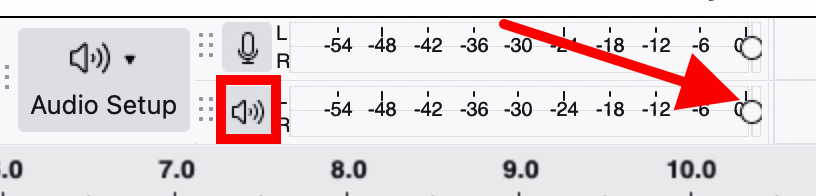
Or the output volume of your computer is off.
If this does not help, please supply more information on file type, computer, operating system, OS version, Audacity version, etc.
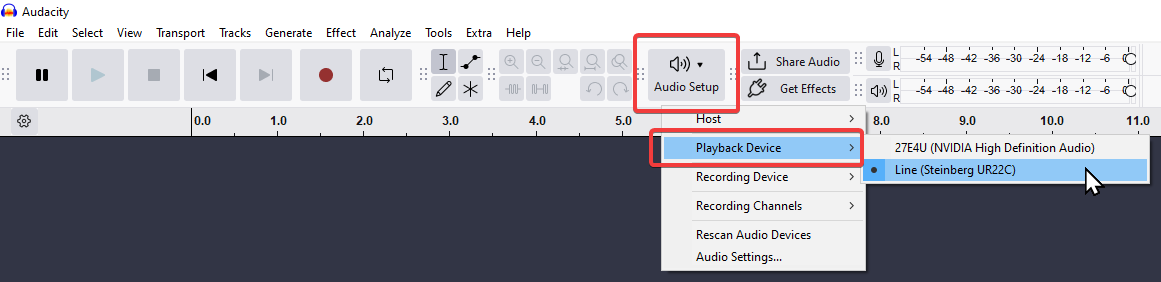
Another factor might be that the right playback/output device has to be picked via Audio Setup toolbar:
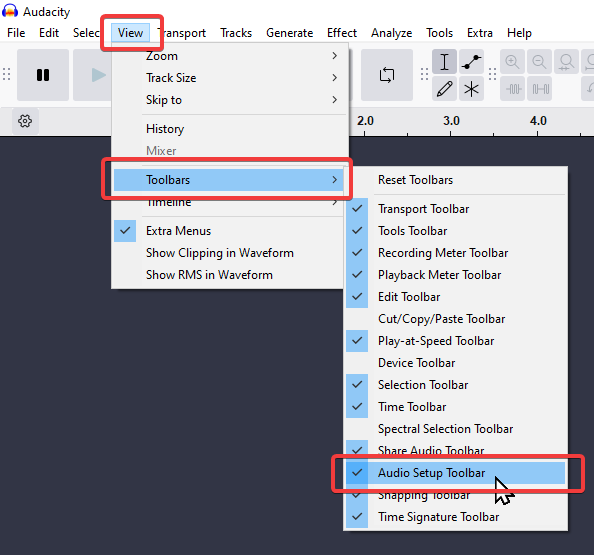
If the toolbar is missing:
Thanks for getting back to me. The recording level when I hover over the top bar indicates 58 % and the playback indicates 94 %. The green meter looks like it is playing something when I click play, but there is no sound. There is also no sound when I open in Windows Media on these files. Other files play fine, so I don’t think it is my computer setup. The files were recorded on my last computer running Windows 10, I believe, and Audacity version 2 plus. The files now open in Audacity 3.7. I’m not sure if I have successfully upgraded the FFMPEG plug in. My current computer is an HP running Windows 11, version 25H2.
Thanks for your reply. I’ve tried the 3 audio settings Audacity displays in the audio setup, MME, Direct Sound, and WASABI, but it makes no difference.