I’ll be very interested to see how you handle a track with an envelope but no waveform. To me, Audacity’s “standard” envelope display would make no sense without the waveform to envelop. Not to belabour my Pro Tools bias, but a controller-level model makes more sense to me in this situation.
I’ve come into this topic late (as usual for me) but I like the ideas being kicked around here. The most recent of my AV sequences had opening and closing sections of the sound track each built up from five separate sound files. In order to apply a fade in at the start of the sequence and a fade out at the end, my choices lay between exporting a fully mixed WAV and then re-importing it and applying fade in and fade out before exporting another WAV or taking the fully mixed WAV into the AV sequence builder software and enveloping the start and end in that. Having the ability within Audacity to apply fades in and fades out to the ends of an entire soundtrack assembly would be a very useful feature for me. And, if I have understood correctly, it would be “non-destructive” editing done using the Envelope tool? If that’s right, it is even better; if I get it wrong first time, I can go back and try again.
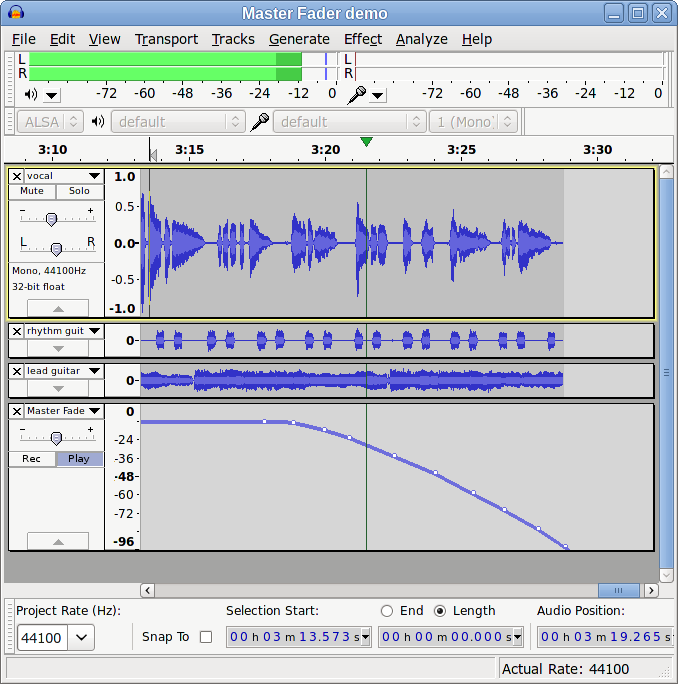
I think Bill is right that a “Lock” button is probably not needed, so I’ve replaced it with a “Play” button (not necessarily the best word). The idea is that:
When the “Rec” button is pressed, moving the Mater Track gain slider (or the equivalent slider in the Mixer Board) will write control points to the Master Track envelope.
When the “Play” button is pressed, the Master Track envelope will cause the Master Track gain slider (and corresponding Mixer Board slider) to follow the envelope, which in turn will adjust all audio track sliders by the same amount (relative to their current setting).
When neither the “Rec” or “Play” buttons are pressed, the Master Fader is inactive, thus providing a convenient way to return a track to its unmodified playback level for solo track editing.
Deleting the Master Track will automatically disable the Master Track, returning all channels to their “normal” (unmodified) positions so there is no possibility of track gain sliders becoming “locked” in the wrong position.
I think that this would provide (amongst other benefits) a much easier way to non-destructively fade out a multi-track project.
The other major benefit being an easy way to non-destructively lower (or raise) the level of a multi-track project without altering the track balance, particularly for avoiding clipping.
Sure you can, it’s only a mock-up. You can have it in polka-dot if you like
There would be a lot of detail to sort out if this was implemented, much of which would require developer input, for example how to handle “thinning” the controller data and whether “Play” is active while in “Rec” mode. The ability to select and delete multiple control points would also be very useful. I’m not too concerned about the fine detail at this stage, just in the outline idea.
If you have enough tracks you will probably have them collapsed or auto fitted so if you delete the Master Fader track, you won’t be able to see the gain sliders move on the other tracks.
Are you saying you cannot move the Master Fader slider unless playing or recording?
When the “Play” button is pressed, the Master Track envelope will cause the Master Track gain slider (and corresponding Mixer Board slider) to follow the envelope, which in turn will adjust all audio track sliders by the same amount (relative to their current setting)
I think advanced users will really like applying an envelope to multiple tracks but I’ll still play silly user here. What envelope are we following - one added by the user? How do you add points - with Envelope Tool?
What happens if there is a per-track envelope already?
What happens if the user does not add envelope points? Is the envelope line then visible at 0.0 or 0?
I think it would be a shame to over-complicate what could be a really “simple” time saving feature with a multi-track envelope unless the envelope was well hidden away, either in Preferences or with a button on the Master Fader track. The way Audacity does it, It can get really confusing if you have an envelope and envelope changing effects combined.
Reading Gale’s post I think the master gain should not affect the individual track gain sliders but should instead simply apply gain to the overall mix. This is simpler and to my mind more transparent. It also leaves open the possibility that eventually track envelopes will be reflected in the track gain slider and the ability to have per-track automation.
With no envelope points in the master fader track, the envelope would be a line at whatever setting the master fader is at.
Envelope points are added with the envelope tool, same as with the Time Track.
When the fader is in “automation-write” mode (during playback), touching the fader causes envelope points to be written. When playback is stopped the envelope points are thinned.
When the fader is in “automation-read” mode, it follows the envelope and the envelope is applied.
When the fader is not in “automation-read” mode, the envelope is ignored the fixed setting of the master gain fader is applied.
From previous discussions I think we were in agreement that it would be better to have the track sliders and buttons higher (above the track info) in the track control panel, which would help in this situation. If it is essential that the gain slider is visible at all times, then Audacity already fails in this respect.
I think Bill’s comments answer the other questions raised by Gale.
That would also work, though I think this could be argued either way (and may eventually be decided by the technicalities of programming the feature).
The case for moving the individual track gain sliders is possibly most easily seen if there are a lot of audio tracks. In this case, the Master Fader Track may not be visible, but if there is a Master Fader envelope (for example, a fade out), then it’s presence will be obvious from looking at any of the audio tracks and seeing the track gain slider move.
If the Master Fader track “simply applies gain to the overall mix”, then it may be less obvious what is happening when looking at one or two expanded tracks if the Master Fader Track is not visible.
Per-track automation is not precluded by this proposal. It would be possible to have both single track automation and Master Track automation. I think that how this would work would be intuitive and easy to understand in practice, though quite difficult to explain as a theoretical concept (but I’ll try )
Let’s say that the Master Fader track has a fade down from 0 dB to -3 dB. On “read automation” playback, all track sliders would move from their current position to 3 dB lower.
Now let’s say that Track 1 is given an envelope (with the Envelope Tool) from 0 dB to -3 dB. On read automation" playback, the track gain slider for this track would now move from 0 dB to -6 dB.
One thing that is probably worth considering is that normally a user will either be using the Master Fader feature, or not using the Master Fader feature. A lot of the “potential confusions” that are being raised are unlikely to happen in practice because such confusion is based on the premise that there is a Master Fader and the user is unaware that there is a Master Fader. This would simply not be the case. Just as there is no Time Track unless a user explicitly creates one, so too there is no Master Fader track unless the user explicitly creates it. Users that are simply transferring vinyl to digital would have no need for ever creating a master fader track (just as they are unlikely to ever have need of creating a Time Track).
This is why I suggested the Master Fader should always be visible, especially if the gain sliders are not visible or are not allowed to move. I think if there are “automation” features, the track gain sliders should move, otherwise it is not clear what is happening.
I would thus see the Master Fader Track as a fixed piece of UI which would clip to the bottom of the Timeline. You can drag it upwards towards the Timeline to make it less tall.
What do you mean by “thinned” - some points are discarded?
So to clarify, you mean that any envelope points are ignored, but not the (implied) vertical level of the envelope?
In which mode is the fader when you export?
I still feel that closing the Fader Track would require a warning and a Preference for that warning - it would be really dangerous if the gain was set to unity on close. What happens if you do close Fader Track then re-open it - do you lose only the envelope points or also the fader gain?
I think there may still be a need for a permanently visible fader gain slider. Fader Track respects the fader gain slider if open, but does not modify the fader gain slider if the Fader Track is closed. Fader Track thus just becomes a way to expose the advanced envelope functionality.
How about if the Master Fader Track were always created at the top, immediately below the Time Track (if one exists)?
I think that it is important to allow for extensibility in the design, which is why I particularly like the idea of a “Master Track”.
I’ve been using the term “Mater Fader Track” throughout this discussion for clarity regarding the feature in this context, but it could be called “Controller Track” or something similar as track automation can usefully go a lot further than only automating the mix level. As examples, eventually the “Master Track” track could also control a real time output EQ and MIDI controller data (for controlling outboard, or virtual outboard gear).
As Bill has been suggesting, it is more usual (in DAWs) for that not to happen, but Audacity is not like other DAWs in that it is primarily a destructive editor, and as such I think that visual feedback of what is occurring on the track level is more important than for real-time DAWs. I don’t have a very strong preference regarding this, but on balance I prefer that track gain sliders move in response to Master Track automation.
That’s how other multi-track applications handle it, though I think that whether it is necessary will depend on implementation. “Recording” slider movements may generate a lot of controller points, which may produce an unacceptable overhead (particularly for MIDI data that has a limited throughput). “Thinning” the data (discarding very tiny intermediate control points that lie between between other control points) can help to reduce the overhead with no audible difference.
If a Master Fader track was being used then the user would invariably want it to be enabled for export, so I’d have no objection to a warning if the Master Track was not in Play mode on export, even without a “don’t show again” preference. For my own use I would always leave this warning enabled. If the user really wants to export without Master Fader automation then they can either, delete the automation data, remove the Master Fader track or dismiss the warning. Exporting without automation (when automation is present) is most likely to be a user error, so should require definite action from the user.
The case for Export Multiple is somewhat less clear. In most cases I would expect that Mater Track automation would not be wanted when using Export Multiple for exporting based on tracks. This should probably be the default option in the Export Multiple dialogue.
What happens if you close any other kind of track?
Do we currently have a FR for “Export Envelopes”?
The Master Fader will move, and I think that is enough visual feedback.
“Closing” (i.e. deleting) the Master Fader track is the same a deleting any other track, including a Time Track - the information it contains is discarded. So, yes, this probably needs a warning.
If the Master Fader track is not in automation-read mode the envelope is ignored but the level of the fader (which is now independent of the envelope) is applied.
The mode on export is whatever mode is set on the track - automation-read on or off.
I’m not trying to turn Audacity into Pro Tools, but we have had requests for non-destructive fades and my feature request page addresses that
including the ability to treat track envelopes as fader automation.
Another nice feature to have would to be able to move the entire envelope up or down without adjusting every envelope point. Perhaps alt-drag of the master fader could do that.
Still doesn’t help that much if your tracks don’t fit in the vertical scroll. Do other DAW’s not keep the Master Fader Track always on screen?
You would lose the data, though I don’t see that as given for a Fader Track if there is a separate Master Fader Slider; I could see people actively wanting to close the Fader Track, roll it up or otherwise get it out of the way. You could “reset” the Master Fader Track Envelope with a warning. Possibly you should be allowed to close or minimise it in some way that indicated it still existed then retain the envelope. Possibly you could even “mute” (disable) the envelope temporarily.
I would think we should redesign the Track Control Panel and make better use of space when rolled up before embarking on the more exotic things in this thread.
Three explicit votes versus 21 for some (presumably “simple”) “Master Fader”.
The type of missing envelope that is much more often requested is a panning envelope (42 votes). But I don’t sense too much interest in it ourselves?
No, and people don’t generally have a problem with that. Mixing is usually done from their “Mixer Board” view.
That can be done within Bill’s proposal.
If neither “Play” or “Rec” are enabled, then all it needs is for the Master Track to be set to unity gain, and it is in effect “disabled”.
This feature would be very useful when working on a soloed track (especially as, if making an edit to a quiet part of the soloed track, the playback level can be temporarily boosted without changing the track gain, by switching off “Play” and “Rec” in the Master track, then pushing up the Master Track gain fader - as soon as “Play” is enabled in the Master Track the Master Track gain fader will be pulled back down to the “recorded” level as shown by the Master Track gain envelope).
I don’t think that this current proposal is particularly “exotic”. It just requires one more track - the Master Track, which has a counterpart in the Mixer Board.
Whether the individual audio track faders “follow” the Master Track, or whether the Master Track operates “post audio track faders” is a detail that can be discussed but does not conflict with the overall idea. All of the “operational details” that have been discussed are just “consequences” of having a Master Track (that can be automated), and in considering these consequences, they all look good. The idea is to add a Master Track, then see what logically follows from having a Master Track.
Whether the audio track gain sliders follow the Master Track is a question of whether:
a) The Master Track is a “controller” for the audio tracks.
b) The Master Track is a “post audio track” channel.
Option (b) will be more familiar to users of DAWs and mixing desks.
For Audacity I think I prefer (a) because we are not (conceptually) dealing with real-time routing of audio signals (as is the case with a real-time DAW). In the Audacity model we are dealing with, you do something and Audacity does something - in this case, move the Master Fader and it affects the tracks.
And I prefer (b) for Audacity. We may not be a DAW but I see no reason to go so far from normal DAW behaviour. Also, having the Master Fader adjust the individual track gain sliders would complicate any later addition of fader automation for tracks.
I don’t have strong opposition to (b). I consider it to be a “detail” of implementation that we can decide on later (with developer input regarding the practicalities of coding it). The main idea that I’m enthusiastic about is that of adding a Master Track/Master Fader combination (as an option).
 To me, Audacity’s “standard” envelope display would make no sense without the waveform to envelop. Not to belabour my Pro Tools bias, but a controller-level model makes more sense to me in this situation.