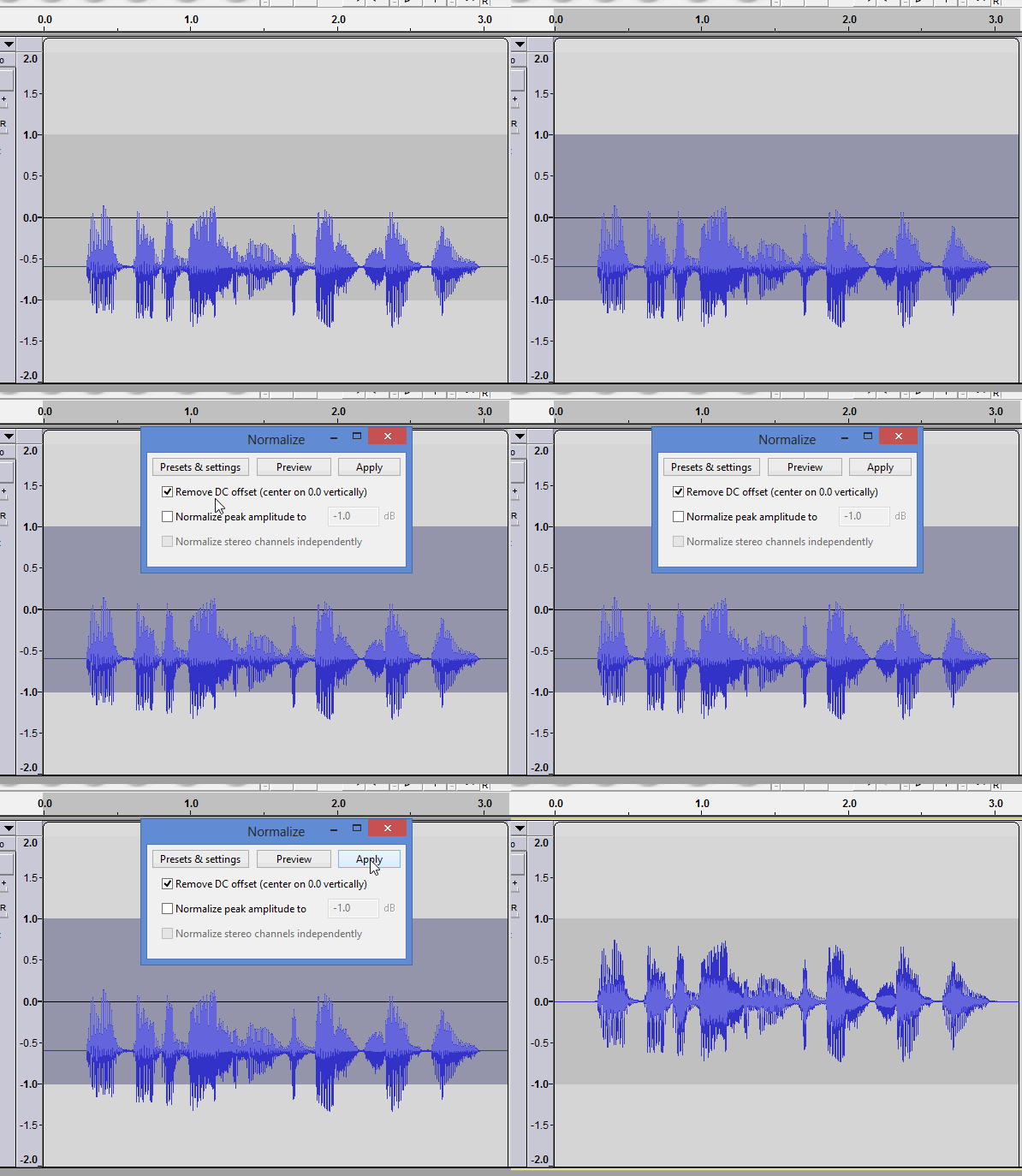
Hi all, my first post here, though a long time user of Audacity.
A friend recorded 3 tracks and sent them to us to familiarise for a rehearsal tonight, however this one plays with ffplay/mplayer on Linux etc, but resolutely refuses to play in Moises, an app I use extensively. Trying to work out why this one track does not play properly I decided to up it in my audio Swiss Army Knife (audacity) and found this unusual waveform.
a) How do I “move it up” so it sits normally?
b) What is it?
c) What could cause such an odd audio file? So maybe I can help my musician friend to avoid making unplayable tracks again.
What could cause such an odd audio file? So maybe I can help my musician friend to avoid making unplayable tracks again.
It’s usually the soundcard.
The bad news is, it if’s unplayable, correcting the offset won’t fix the sound.
You can’t hear constant DC (zero Hz) and usually it will get filtered-out but the electronics, BUT it’s caused clipping (distortion) on the negative half of he waveform and the sound of the distortion can’t removed. The other side-effect is that it makes a click when you start/stop and the DC suddenly kicks-in and kicks-out.
Thanks for taking the trouble to think about and answer this. Oddly he’d made 3 recordings using the same equipment (he’s a multi-instrumentalist recording via a decent audio-interface but no more technical detail beyond that, yet) so the soundcard would be odd ideed.
However this problematic audio file (downloaded on the WhatsApp Linux app it’s an formatted in a mp4 container, really mp2 and on WhatsApp android app it downloaded as an m4a) and uploaded as an m4a, mp4 or after ffmpeg conversion to an mp3 all failed on Moises, but would play using regular desktop Linux players: ffplay, aqualung, mplayer, etc.
The click on start/stop kept on happening even when I removed a bit of blank start containing that click - so thanks for explaining that too!
Using the tip from @Trebor I moved the waveform up, to the centre. Then the asymmetry was more pronounced, so decided to correct that: split to mono, invert the “right” channel, then recombine into a stereo track. It still looks weird. But it plays in Moises and everywhere else, so problem solved. A happy customer
It would be nice to avoid all those lossy-to-lossy conversions but I don’t think they caused that problem. And for your use, “sound quality” probably isn’t super important as long as it’s not annoying/distracting.