Thank you Peter.
I see there has already been some work done on VST3 support.
Managed to find an old Win 8.1 laptop so installed 3.1.3 (64 bit) on it.
For some reason, even with some “heavy” plugins, Win 8.1 seems so much smoother than Win 10.
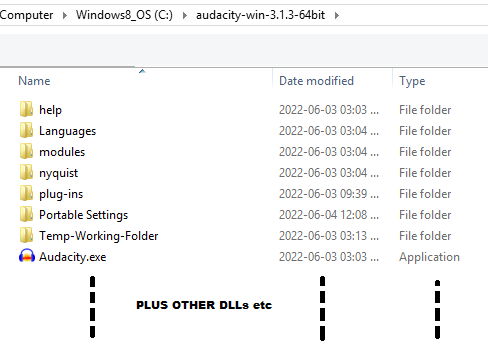
I downloaded the zip archive and not the installer, then copied the zip contents directly to a folder in C:\ drive
called “Audacity-3.1.3-64”.
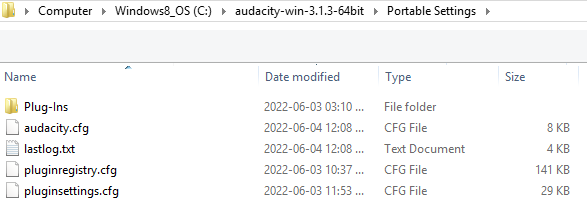
In there, I created the “Portable Settings” folder, along with another folder for Audacity to use a a temp working area.
By default it uses the one in “roaming” which is shared by older versions.
Also did not associate any file types (projects included) with Audacity in case Windows got confused.
For the Nyquist effects that I use, I placed them directly in the “Plugins” folder.
I did not link to the ones in the older version, but copied them to the new one.
Yes, duplication but .ny files are tiny.
As for VSTs (all VST2 64 bit), did the same, created sub-folders in the “Plugin” folder and placed them there.
Did not link to any in the regular …\Steinberg.… folder.
This way, if I decide to delete a new version, can do it all by just deleting the main folder.
This way, the new “test” version of Audacity is as isolated from the other version as much as possible.
So far, so good.
Thanks for your help and suggestions guys.
One small issue, even when using the “Portable Settings” folder, Audacity still defaults to using the normal
macros folder which is in …\roaming.…etc on Windows.
Tried going to preferences and changing the macro output folder but makes no diffs.
Am I missing something?
Are you referring to the
Users//AppData/Roaming/audacity/Macros/
folder?
Yes.
If present, Audacity should use (and does for me):
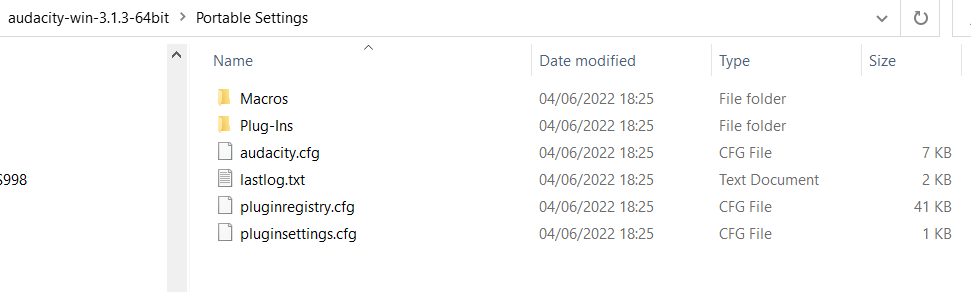
…/Portable Settings/Macros/
Nope, not in my case.
Perhaps it only uses it if one creates a sub-folder called macros in “Portable Settings”, which I did not do.
I created “Portable Settings” but that was it.
Thanks for testing Steve.
No idea why it didn’t work for me, very weird.
Not a catastrophe but it would be nice to keep everything in one folder.
Been testing extensively on this Win 8 computer before maybe setting it up on my production Win 10 computer as well.
As a safety, will also keep 2.4.1 for bigger projects and use 3.1.3 for smaller ones only.
Must also mention that took a bit of a chance today and did a short (5 minute) insert for a local radio station using 3.1.3
Admittedly it was only 3 tracks, some NR, mixing to stereo and some compression, but all went well.
I installed 3.1.3 (same version as before) on Win 10 and the Macros folder was created,
and I put one macro in there manually.
However, it still tries to read from the default “Users//AppData/Roaming/audacity/Macros/” folder.
I have several in there which I use on 2.4.1 and those were the only ones presented to me, not the single one I placed
in the “Portable Settings\Macros”.
When you tested it on your Desktop, did you also have a “Users//AppData/Roaming/audacity/Macros/”
folder on the same computer and did you open Audacity to see which macros it picked up?
The reason I ask is that there definitely seems to be something wonky with the way it uses the macro folder.
Are you sure that your normal user account has read / write access to the new …/Portable Settings/ folder?
I’d suggest that you try unzipping to a normal user-space location, such as your Desktop or Documents folder (or anywhere else in /Users/Your-user-name/)
That could well be it, Steve, although Audacity quite happily updates the .cfg files in the folder.
Not being a fan of windows (only been using it for several months now due to a big project that requires it), I’m not that familiar with it.
Not keen on re-installing Audacity so kept it in the same location and found a work-around.
Open Audacity, then go to the macros menu.
Import the one that is required, do a simple edit then change it back (just to activate the save option) and save it in the new location, in my case it was “C:\Audacity-win-3.1.3-64bit\Portable Settings\Macros”.