Hello everyone. Whilst I was recording, the sound suddenly cut out, and now there’s a microphone icon on the Start button. I might have accidentally pressed a keyboard shortcut. Can anyone help me get rid of it? Many thanks.
Although I do not use Windows, I know a “start button” from Windows - but this doesn’t usually have any other icon than the Windows icon. In Audacity 3, there is a row of buttons like on tape recorders (record / play / pause etc.) - but none of them is labelled “start”. So, please explain where this microphone icon appears. And please tell us what operating system and version thereof you use, and what version of Audacity.
I’d like to send you a screenshot of what is hard to describe in words. Is there a possibility to attach a png or pdf?
I’d like to send you a screenshot of what is hard to describe in words. Is there a possibility to attach a png or pdf?
Oh, ok thank you! 
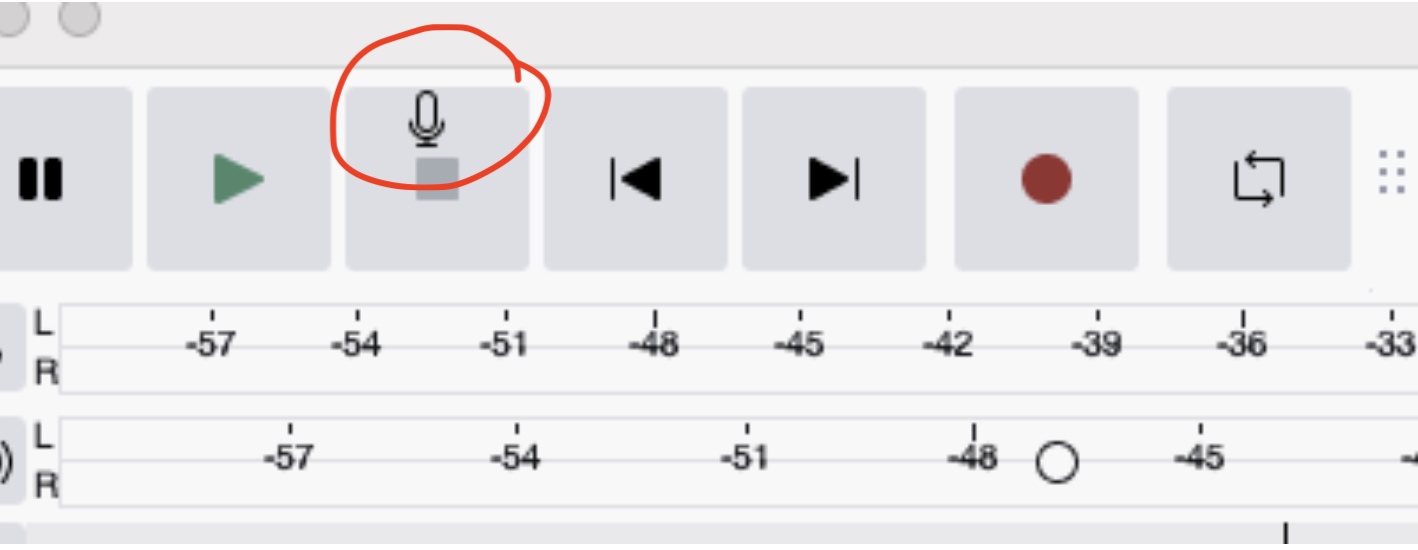
This button means STOP, not start. Recording is done with the red dot button, play is the green triangle.
However, I have no idea where the microphone symbol comes from… Does ist remain there if you quit Audacity and start it again? If so - what happens after a restart of your computer?
You might - if the problem persists -also want to remove the Audacity settings while Audacity is not running. For a Mac, they are in
~/Library/Application Support/audacity
Just move the folder “audacity” out from there, maybe to your desktop. It will be rebuilt when you start Audacity again. However you will lose all adjustments you made to your installation.