You still need to submit an Audition to ACX before you read the whole book.
I can sense you keep oozing away from that.
Koz
You still need to submit an Audition to ACX before you read the whole book.
I can sense you keep oozing away from that.
Koz
Thank you for the reminder to ooze less. Will submit to ACX when the first 15 are set (still working on them!–editing takes a while).
A question about editing and file saving and order of operations. At the moment, I have raw first pass files (just what happens in the recording session), edited files (nipped and tucked for timing and breaths), and final De-Clicker+Mastered files, which eventually I turn into mp3s for sending off. Am I missing anything?
The basic question I am dealing with is how much I can do to the edited file before I make it harder on myself to plug corrections in later. The De-clicker is especially tricky to know how to fit into the mix. I’ve been doing it with the Mastering chain because it is a single process that I apply to the whole file. But I would rather apply it while nipping and tucking, since declicking sometimes doesn’t take care of everything.
Also an audiobook reader on the interwebs said she masters first before any editing, so she can hear what the actual sound will be. But it seems difficult to punch corrections back into, but maybe since the mastering chain you recommend wouldn’t doubly affect the parts already mastered, it could work…your thoughts?
Thanks for all your help and for your suggestions on mic placement.
mastering chain you recommend wouldn’t doubly affect the parts already mastered,
Actually, that was one of the design criteria. If RMS Normalize and Limiter aren’t needed, they don’t do anything. Filter Curve does have a double effect and should be avoided, so yes you could master first and then reapply the last two later if needed.
I noted early on that DeEssing works far better after mastering because it likes stable, well-behaved voice to work on. Further, “essing” doesn’t change the loudness of the show very much, so the mastered works generally stay mastered. It’s possible DeClicking could work that way, too. I have no experience.
Jury’s out if you need a suite of corrections in addition to the mastering suite. You are encountering what happens when you walk into a performance already in disaster recovery. The tools can conflict/interact.
The De-clicker is especially tricky
I can feel the words escaping my lips: “If you weren’t recording on the computer, you wouldn’t have the clicking.”

How are you dealing with Room Tone? The silence before and after each chapter has to match the quiet parts between sentences.
Will submit to ACX when the first 15 are set
In other words after it’s too late. “Sorry, you failed.” Now what?
I’m just sayin’.
Koz
You are about to experience a Forum Feature. It’s not a help desk. It’s users helping each other.
nipped and tucked for timing and breaths
How? I had an ACX Audition fail for breath noises and tongue ticks. You are now the expert.
Koz
Hi Koz,
Ok, so nipping and tucking for mouth clicks and breaths…
Well, I have an odd book project because it’s a language learning text book, so there’s a lot of vocabulary lists that go like this: Apple…apfel…apfel. ALL those spaces have clicks, room noise, breaths, etc. So every time I record I leave 10 sec of room noise at the beginning (that I delete later), so I can punch-copy and then punch-paste in nice clean room noise in those spots. If I run the declicker first, then I get a lot of them cleared out but not the breaths.
Since breaths and clicks are super easy to see on the spectrogram, I’ve been going through with the file at spectrogram view and punch-pasting in room noise on the replace setting (very important). I’ve gotten skilled enough at seeing the spaces that need doctoring, that I don’t even listen unless it’s a tricky section or if I think I pasted too close to the speaking sections. So I can do a sweep of a chapter by eye and clean up the dirty spots, which saves time. The key to doing it by eye is not getting too close to the vocal sound wave. Usually I don’t have too much issue with crossfading the clip since its room noise to room noise, but if I do, I just crossfade the boundary a little bit to prevent that blip sound. All of these are on hot keys, so it makes it a little faster. I like Ctrl+Shift+C for punch copy and Ctrl+Shift+V for punch paste, personally.
If you know all this already, sorry to bore you. And if you need more info, I can send screen shots.
Hope it helps!
-PrettyLoud
H again Koz,
I suppose if one didn’t want to totally eliminate breaths, one could do the same spectrogram sweep, but with a macro for amplify -20 or some number to apply to the individual breaths. Foggy clouds with red in them is a telltale sign that my breath needs some deamping.
If you know all this already
I don’t. I’d be hunting and pecking—badly.
Koz
Hi Koz,
I think that Punch Copy/Paste and Punch Paste are two plug ins you have to add.
Make sure that in Punch Copy/Paste, Select Action is set to Copy (REPLACE). That way you’re just pasting room noise over the time space that you have a breath. And that way it doesn’t matter if you have 20 seconds of room noise in your Punch Copy, you can just Paste in .74453 second of that room noise if you want. And as long as you don’t punch/copy something else, it stays copied to your Audacity clipboard thing for the duration of your session on that track.
So glad I could offer some help FOR ONCE!
oh, one more thing. Make sure to Paste: Loop Mode is set to Enable looping. That way if you only have 1.5 seconds of good room noise to copy, it will automatically loop the sample to fill in a much longer silence.
Make sure to Paste: Loop Mode is set to Enable looping.
Writing that down.
Koz
Hi all,
Does Batch Processing mean that I can ask Audacity to run a macro on a whole folder of sound files? Or does the “batch” just refer to the chain? Sorry if this is a super dumb question, but the manual left me wondering with their reference to “A number of”…
Manual’s words: “Batch processing is processing a chain of effects in preset order, either on tracks in the active Audacity project window or on a number of imported audio files.”
Specifically, I am wondering if I need to do my EQ-RMS Normalization-Limiter-mp3 chain to every single chapter (there are 213), or can I just put Audacity to the task of doing that to my folder of files ready for mastering?
Thanks for your advice as always!
Eagerly awaiting the answer.
Koz
Just reading over that again. We were able to pick up quite a few more restrictions and roadblocks as we progress.
Do you fall into one of these categories (scroll down to the bottom)?
https://www.acx.com/help/200878270
Can I buy it on Amazon? Expand the last entry, bottom right.
https://audible-acx.custhelp.com/
Koz
Hi Koz,
I don’t think I quite understood your reply and how it pertains to batch processing for a lot of sound files.
But my hunch is that I have to open each of the 213 files separately and then run the chain. Does that sound right?
Even if I can do mastering myself at a basic level based on the recommendations I’ve gotten from this forum, does it make more sense to have a professional sound engineer master your ACX recording before submitting? Will they be able to make it sound better? Just wondering…
Audacity’s Macros can do either. You can make a Macro that chains multiple effects which you can then apply to the current project, or you can create a Macro that can be applied to multiple audio files. When creating a Macro for batch processing multiple files, the final command should be one of the “Export” commands so that the changes are saved.
See also: Macros - Audacity Manual
I have an odd book project because it’s a language learning text book
how it pertains to batch processing for a lot of sound files.
I’m doing the overall view from 10,000 feet. If your goal is publish with ACX, you may have stepped outside their guidelines. Is there a story? Am I likely to load this up for a listen on a hike around the forest? Back and forth to work on the subway/metro?
ACX tends not to like projects with an automatic restricted audience.
Can I buy it on Amazon?
These are Corona Virus-related guidelines we found out about when another poster had trouble getting published in spite of meeting the technical recommendations.
Koz
Hi Koz,
I didn’t write the book, I just got hired to read it. The Rights Holder has the print version of the book on Amazon already, and as for whether or not people will buy it, I would imagine someone learning a language would want to have access to an aural experience of the book. How else would one know how the language sounds? So the Rights Holder asked that each vocabulary list and grammar lesson be split into its own chapter, hence the 213 chapters, all of which are 30 sec-5 minutes in length.
I’m learning a lot from this project, so that’s good. It’s also taking a lot of time maybe because I’m being so thorough about editing for mouth-clicks and the like. It’s all part of my learning process–and nothing teaches you more about voice acting than listening to yourself! 

nothing teaches you more about voice acting than listening to yourself!
I can do better. There’s nothing like getting to the end of the book and realizing how dreadful you were at the beginning. Fortunately, that usually only happens once.
Good luck.
Koz
Hello All,
If I wanted to hear my .aup files of all of my chapters all in a row, is there a way I could do that easily? I’d like to hear a group of chapters together in a row before I master them and turn them into mp3s, just to know if they sound ok the way I’ve timed them.
Thanks!
I wanted to hear my .aup files
Just a caution here. You don’t have “aup” files. You have Projects with AUP files and associated _DATA folders. It’s a common error to lose, move, damage, or rename one or the other and that chapter will no longer open.
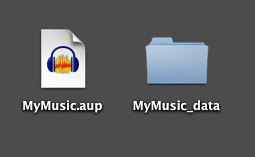
It’s also a new user error to speak into a Project and then take that one, single project all the way through mastering and then make the submitted MP3 file. Projects don’t have the stability of single, common sound files and the forum is full of people who did everything perfectly and their Project just will not open.
Right after you perform, File > Export a WAV of the work, so that if everything else falls apart, you won’t have to announce it again. Then, near the end, after mastering, Export a WAV (not the same name) as the edit master. Only then export the submission MP3. You can’t change the MP3 once you do that without causing quality or sound damage. So the final Project or the Edit Master WAV is a big deal.
I wanted to hear my .aup files of all of my chapters all in a row
Darn good question. I know how to do that with a lot of work, but maybe there’s an easier way. I’m pretty sure there’s a pre-baked way to do that. We can wait for another elf if I can’t find it.
Koz