how do i send you a direct message? i cant find a link to do that .

I cleaned the cfg file of any paths to my personal files and attached it to this message.
audacity.cfg (11.1 KB)
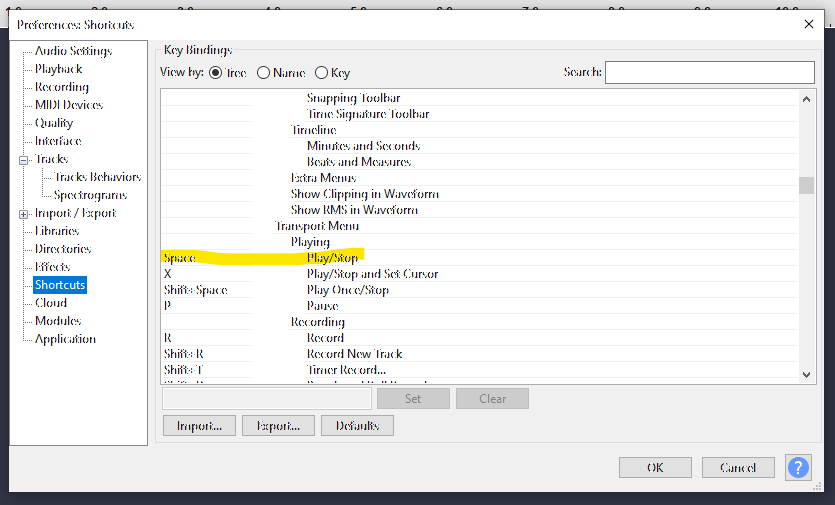
The culprit appears to be PlayStopSelect=Space in the [NewKeys] section of the audacity.cfg. The UI name seen in Key Bindings is Play/Stop and Set Cursor. It is also available via Transport Menu:
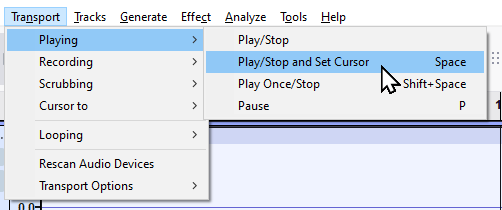
By binding Space to Play/Stop (DefaultPlayStop=X in the uploaded cfg), pressing OK in the Warning window and pressing OK to save the preferences, you can restore normal behavior. Alternatively, with your old key bindings, you can use the X key to stop playback normally.
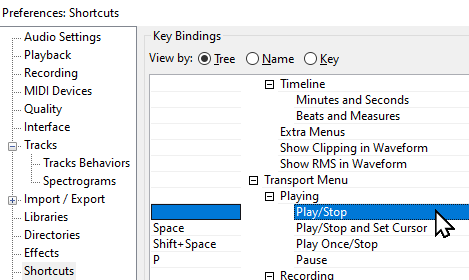
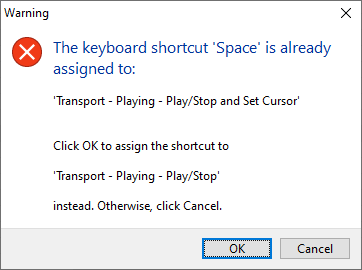
It does seem that the behavior of creating a selection merely because playback was started by clicking the timeline might be a bug. (Cutting before playing was not necessary, the cursor just needed to be placed anywhere first.)
Sorry, I didn’t think of the possibility of accounts having different privileges. Thank you for putting the file up. (I deleted all lines with a path set to something like C:\Usersas Audacity would otherwise crash on start.)
If you think one of the replies in particular would help others with the same problem finding this forum thread, you can mark it as the solution at the bottom right of the post: