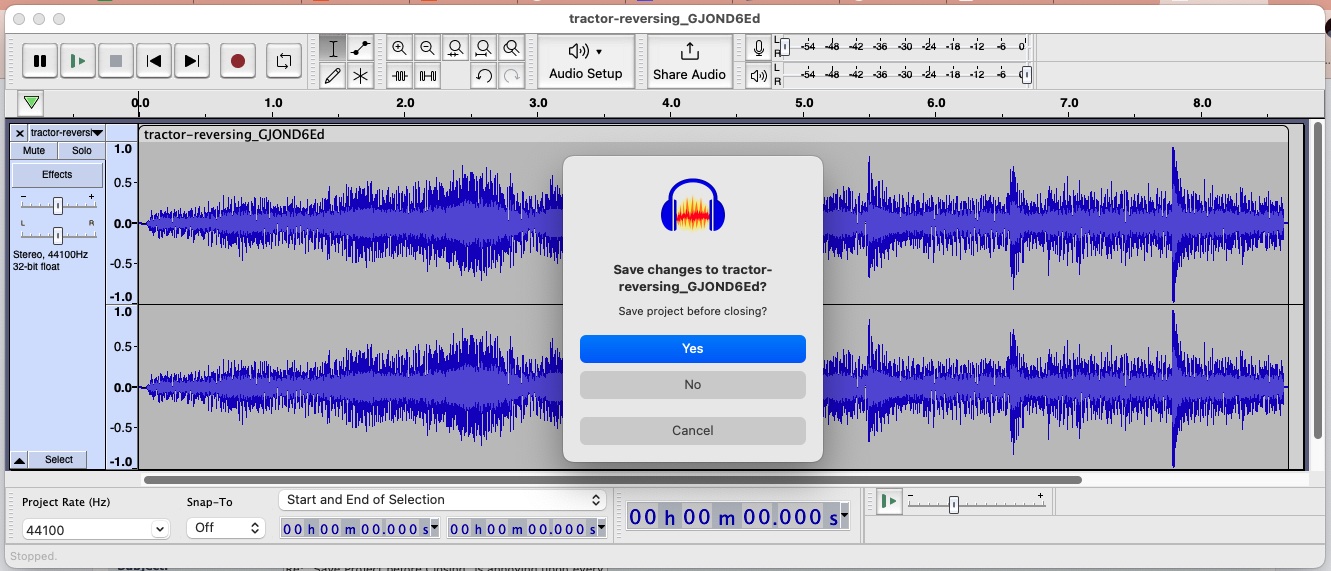
Part of the problem (for some users) is that if you change the cursor position or the selection while you are “just looking” at the project then the project will become “dirty” - and this is because Audacity stores the current cursor position or selection in the project as part of the project so that when the project is reopened the last cursor position or selection is restored,
This was not always the case in Audacity versions 1.0 through 1.2.6 Dominic Mazzoni did not do that (I haven’t got time right now to bisect when this was introduced).
Maybe there should be a new preferences setting to say “Don’t store the cursor or selection with the project” - or something like that. And then those folk that just want to look at their project, which could involve playing from a cursor position or playing a selection without making any other changes would then not get a "dirty"project and should be able to Exit without seeing the Save/No/Cancel dialog.
Or maybe Audacity should not be saving the cursor position or selection in the project at all - but I suspect some users may value that and taking it away would certainly create a regression.
I do happen to agree that if the user does:
Open an existing project
Export in some format
then Exit
In this case the project should not become “dirty”.
However it is different if you “open” an existing audio file at step 1 then this use-case is different - as you don’t actually open the audio file. Rather Audacity opens an Audacity project and imports the audio file into it converting it to Audacity’s AUP3 project structure (as Steve pointed out earlier in this thread). And hence with this you then immediately have a “dirty” project.
An Aside Personally I have long thought that it was wrong (and dangerous) to allow the “Open” command to work on non-native Audacity project format files - as that encourages users to wrongly believe that they are indeed working directly on the audio.
For my money I would reserve “Open” to Audacity projects and only allow audio files to be “Imported”. It is this way at the other end where one “Saves” a project and must “Export” to get an audio file. So there is a bit of asymmetry her between Open and Close/Export.
This has long bee a favorite hobby-horse of mine that gets a canter around the paddock from time to time - but sadly I don’t see it getting fixed any time soon …
Waxycylinder— Really? This doesn’t work for me.
Yepper really …
I just retested with 3.2.2 on my Macbook Pro running Monterey 12.5.1 and yes: Tab, Tab, Spacebar does indeed exit without saving the project.
Doesn’t work for me. I see no blue ring.
This is what I see on my M1Max, OS12.4 when I close:
And, as stated, no typing Tab or any key does anything except Enter, which yields an unwanted Yes.
Can anyone else test this? I would assume this inconsistency would be due to OS or Sys Prefs.
It’s in System Settings (if you’re on macOS 13).
System Settings > Keyboard.
Turn on the switch for “Keyboard navigation”. When you do this, tab moves between controls (there is a subtle blue border around the selected control) as well as text input boxes, and spacebar “clicks” the selected button, whereas return or enter still clicks the default button.
The setting is in System Preferences > Keyboard in macOS 12 and earlier, but I can’t at the moment remember what it’s called.
Thanks, Billw58! In OS 12 it’s in SysPref/Accessibility/Keyboard/Navigation.
I’m going to enable that, try it out and ensure I don’t regret that functionality mucking my life up in some other app. It’s slightly klunky but any quick key combo is better than dragging my mouse!
Hi Peter. I’m with Koz on this one. One simple user preference and the arguments are gone!
Back to the MS definition of dirty: Excel2003’s (yes!) all too frequently treats a file as Dirty when I believe I have not operated on it at all.
Access is the application closest to Audacity; add/change a record to your database and the changes are effected immediately - too bad if you then realize that you shouldn’t have changed the record, the changed data is now spinning at 7200 RPM.
The Access database corresponds - roughly - to the Audacity project, and the database record corresponds - roughly - to the FLAC/MP3 file.
Audacity treats the project as dirty as soon as I open an MP3 file, possibly because the name of that MP3 file is added to the Projects list of tracks. I understand that. Access, however, doesn’t treat a new data record as a new, individually-named record; it’s just the 2,007th record that is a clone of the earlier 2,006 records.
And that, I submit, makes a Database differ from a Project.
And that means that there is no easy solution via the dirty/not dirty distinction.
Which, I believe, leads us back to a user option that allows the user to use Audacity with total disregard for the “dirty project” concept.
Further, Audacity can then add in more triggers for “dirty”, and it won’t affect the risk-taking user at all.
To quote Koz: “If Failure to Save bites you, it’s your own fault.”
Cheers, Chris
It’s not me you need to convince any more Chris, that’s all down to Muse now - so if you really want to campaign for this you would need to argue your case on the Muse GitHub issues log:
Actually a tad more complex than that. Despite the Audacity command nomenclature, you are not “opening” an MP3 file (or any other audio file come to that) - what happens when you use Audacity’s File > Open on an MP3 file is that Audacity opens a project file (a SQLite database these days) and Imports that MP3 file into the database, adding water to convert it into Audacity’s internal project structure - it’s no longer an MP3 when it’s in Audacity. Hence you have a “dirty” unsaved project - and that is the case if all you want to do is just look at the waveform or play the “MP3”.
As I said above this is Muse’s call these days - but I would still argue strongly for the safety-net retention with no optional opt-out.
Even with such a safety-net one can get caught out. I was editing an Excel file a couple of weeks ago, got distracted by a phone call and when I returned I was sure I had saved all the changes I wanted and quickly dismissed the Microsoft naggagam with a “No, don’t save” - only to realize later that I had not actually saved the changes - D’OH …
Wow, such great, in-depth responses. Users like me are reduced to blithering nincompoops when we are invited to gaze upon the furtive and deep discussions and considerations of all you brilliant gatekeepers. Thank you all so much.
However, I tried re-jiggering my System Prefs to outline all YES/NO options so I could take between then, but then I realized it made workin in MS-Word etc. a minefield. So I had to disable it.
I still just want the ability to have a shortcut/quickkey which can easily say “delete” when I’m prompted to Save. May be someone has addressed this, but I can’t see it if so. And I’m still unclear why that’s not possible.
waxycylinder, my name is also Peter, this thread can get confusing (e.g. “did I post that?”)
-Peter
I have wanted this feature ever since I started using Audacity, too, and just found this thread (once again looking for a solution!). I understand the argument for NOT having it, but how about a compromise - if the user just loads a track and plays it, then tries to exit, why not let him then exit without the annoying prompt? He isn’t going to lose anything, because he hasn’t done anything. Seems like this doesn’t even need to be an option, just the way the program behaves. As soon as he user makes any change, loads a second track, etc., then you get
the prompt at exit. This seems like it would make a LOT of people happy, with no risk to anyone. Can you please think about adding such a feature? I LOVE this program, but I curse that dialog every time I exit, and I have yet to ever create a project…
This would also be consistent with the way most other programs (Word, Excel, etc.) work - if I open a file and make no changes, I can exit with an extra step.
The prompt to save when nothing has changed, is annoying, and somewhat lazy programming. I used to think, oh, it didn’t like that I selected a portion of a waveform and played it back, and now it wants to make sure that I want to save that new selection. I would think of options that would let some people specify what constituted a change in the file, and act according. However, it is worse that Audacity asks to save even when the MP3 that is opened is unchanged. Open, hit close, answer prompt. You’ve opened 20 MP3s trying to find the right sound or waveform? Well, you can’t close them until you answer each alert dialog.
I’ve seen the arguments, “Microsoft does it in …”, “Adobe…”, but just because some other stupid software does it, doesn’t mean that we should perpetuate the asinine behavior. There are plenty of software that don’t do this, and handle this decision better. I said lazy before because it really is a simple question to answer: Is the user going to be able to get back to this point again later, easily, if they need to, if we don’t save? If all it takes to get there is to reopen that MP3, then there’s your answer. It really doesn’t matter what all happens under the hood, and how elegant the code is that does the beautiful work of opening a file and creating (an unwanted) project, around it.
If opening the MP3 file creates a new project and that project can be recreated in the same one-step flow if it is not saved, then you don’t have to save it - nor ask the user if it should be saved.
And honestly, you really should listen to your users. Always be watching to see how they’re using your products, and what they’re doing with them. If a % of them are trying to do something different than what you and your team envisioned, you don’t tell them, no no, you have to use it the way we tell you. You watch, you see what they’re doing, and you figure out ways to make the experience positive for them. You don’t force them to keep doing the thing they’re unhappy/complaining about by convincing them that they just don’t get it.
I think the argument that Microsoft and others prompt to save like that is just wrong. For example, if I open a Word document, scroll around reading it, and then eventually exit Word, I don’t get a nag about saving the document. In fact, I can’t think of any other product that asks the user if they want to save anything when they are just viewing a document without making any changes. In my opinion, this shouldn’t even be a new option; it should just be the normal behavior - if no changes are made, there shouldn’t be a prompt to save anything.
That’s because the Word document hasn’t been changed. If you modify the document, then you will be prompted to save.
Waxcylinder hit the nail on the head in an earlier comment:
So in the case of Audacity (but not MS Word), changing the cursor position modifies the project.
My personal view is that the cursor position should be considered transitory, and not saved in the project. If this were the case, then you would be able to open and play a project without modifying the project (just like you can with a MS Word file).
If you open an Excel file and all you do is to copy a cell or cells or just a data string to copy elsewhere - then on closing this unmodified Excel file you will get the Microsoft naggogram asking if you want to save the “changes” (when no changes have actually been made to the file).
All these comparisons to other programs are off the mark, IMO.
The rule is: “Safety First”. If the project has been changed, ask the user if they want to save it. With respect, preventing users from accidentally losing hours of work trumps a few users who are upset at having to click the “No” button.
“Changed” includes opening an audio file in Audacity. That creates a new project. It is not so easy to determine whether or not a user meant to create a new project containing an imported audio file, or if they just wanted to look at or listen to the file. Steve’s example of the user who imported 77 files, got distracted, then closed the project and lost that work, while extreme, makes the point IMO.
AFAICT the devs are not keen on creating new user settings. For example, there is controversy about what happens when you click on the line between two clips. It used to join the clips. It has been changed to merely set the cursor to that position. There are users who prefer one action over the other and the suggestion was made for a user setting to specify that behaviour. It was shot down.
FWIW, on Mac if you just want to listen to an audio file, click on the file in the Finder and press the space bar.
Trivial to you, perhaps. For others of us who use Audacity differently, it’s a repetitive nuisance that could be easily addressed.
People mentioned above that it prompts you to save if all you did was move your cursor. However, if I open a file in Audacity and ask to close it, without touching ANYTHING (which I do often), it asks if I want to save.
Could it be made a settings/preference? Where a user has an option to select if you want to get stopped or not each time you close a file? I’ve seen that in other apps, and looked in prefs for it initially, hoping it was an option there. In fact, there is, under Preferences/Warnings a tick box to show warnings/prompts for “Saving projects” but that doesn’t seem to matter if I untick that.