Hi, so I’ve noticed sometimes when I import a file into audacity, it’s well past 0.0dB and displays as a solid, clipped waveform. I naturally assume, then, that de-amplifying the waveform will retain that clipping i.e. bringing the levels down on a waveform that’s already clipped will not “rescue” the clipped data. Yet with some files, this isn’t the case (see screenshots): I can reduce amplification from a point above 0.0dB and the resulting waveform will retain its original shape/character! How is this possible? Like, if I were to create a track that pushed past 0.0dB in Audacity, exported it, then brought it back into Audacity, I wouldn’t be able to de-amplify it to recover the original non-clipped waveform: so how does one bypass this apparent contradiction?
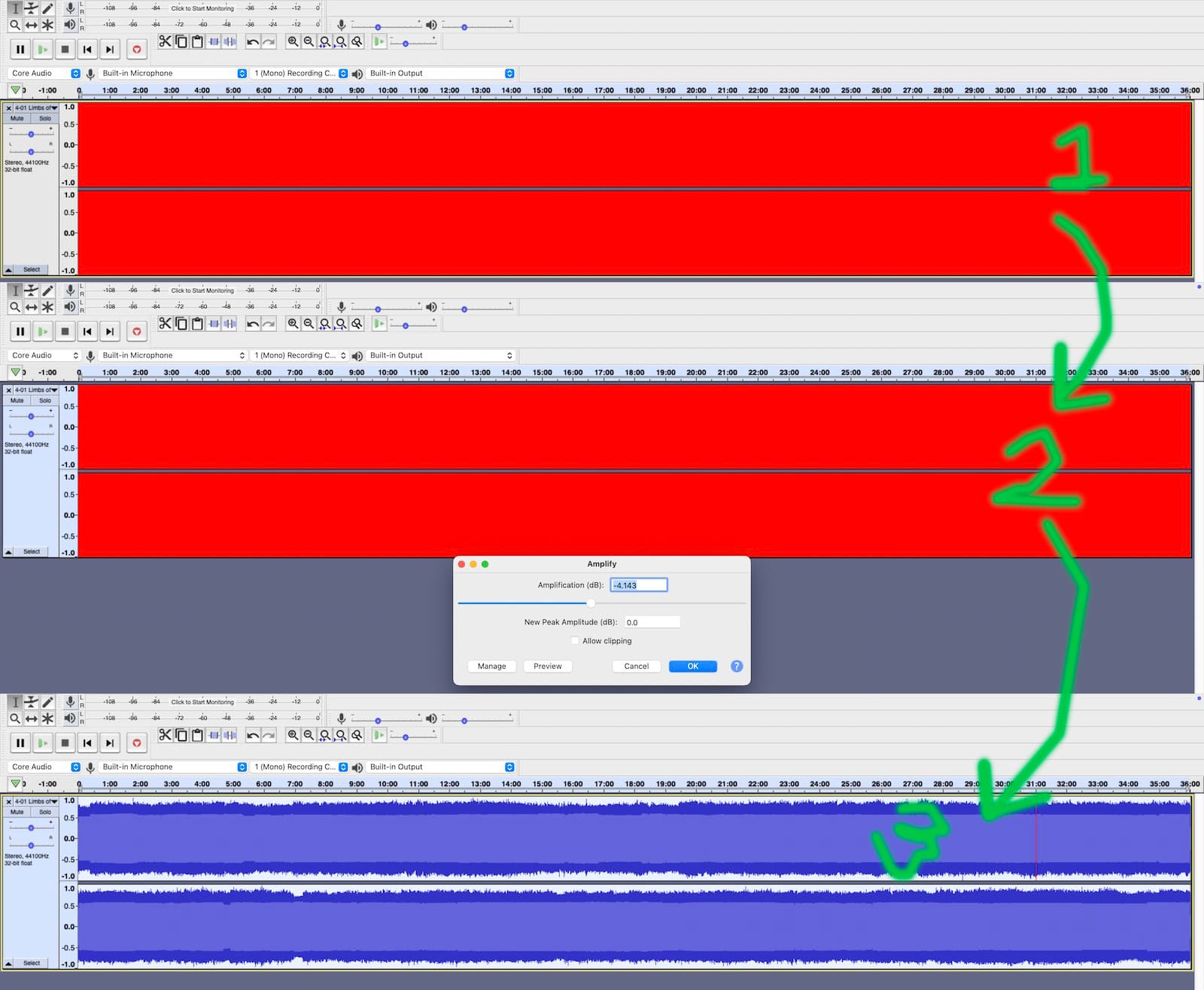
MP3 (and I think most lossy formats) can go over 0dB without clipping. Floating-point WAV can also go over 0dB. (For all practical purposes, 32-bit floating point has no upper or lower limits.)
Audacity uses floating-point internally so it can also go over 0dB. If you boost the bass, or mix, or something, and it goes over 0dB, everything will be OK if you run the Amplify or Normalize effect to bring the level down before exporting.
MP3 compression changes the wave shape making some peaks higher and some lower, and probably half of the MP3s I’ve ripped from CD go over and “show red” in Audacity.
Audacity “shows red” for potential clipping. You can get false positives and false negatives. If the files is clipped, lowering the level won’t restore the wave shape, but Audacity will no longer show red.
The issue is, your digital-to-analog converter can’t go over dB so the audio can be clipped if you play at “full digital volume”.
As far as I know, the slight clipping that you get when MP3 goes over dB is not audible, as long as the original didn’t go over 0dB.
Your analog-to-digital converter (recording) is also limited to 0dB with the exception of a few floating point recorders and interfaces.
And of course, CDs and “regular” (integer) wave files are limited to 0dB.
With integer PCM audio, 0dB is defined as the maximum you can “count to” with a given number of bits. 24-bit files have bigger numbers than 8-bit files but everything is automatically scaled at playback time so the 24-bit file isn’t louder.
Wow that was thorough, thank you!
I guess my only other question then would be what you mean by “full digital volume”
I guess my only other question then would be what you mean by “full digital volume”
If the volume control on your Mac (or the application) is at 100% and the digital audio goes over 0dB, the DAC will clip. You can avoid it by lowering the volume digitally before it goes to the DAC.
Most applications only go to 100% but VLC player can actually go over 100% and amplify.
The “rule” is to keep your peaks at or below 0dB but I don’t worry when MP3 compression causes it to go slightly over 0dB.
This topic was automatically closed after 30 days. New replies are no longer allowed.