Hi all. I was using an older computer for awhile for my recordings and even though I would make them all in a soundproof booth, it seems that some of them still picked up the sound of the computer’s fan/humming a bit in the background. I’ve tried the noise reduction feature as much as I possibly can but I’m still getting the the sound in the background that I can hear during silent moments when I listen to the recordings using headphones or earbuds. Does anyone have any suggestions on how to fix this without having to entirely re-record? Thank you so much!
There is a free DeHum plugin for Audacity, that removes 50/60Hz mains hum & its harmonics … https://plugins.audacityteam.org/nyquist-plugins/effect-plugins/filters-and-eq# hum-remover
It does a better job on mains-hum than Audacity native noise-reduction, but can add ringing artefacts.
If the hum is something other than mains, need a store-bought de-hum plugin like Izotope DeHum.
Audacity comes with a noise-gate which can attenuate noise during “silence”.
I invite you to think about the possibility of using WaveParse, which has tools that can actually separate out the floor periods for filtering or other adjustment without affecting other parts of the track (my assumption is that the hum is mostly not discernible in the program material). You can take a tour of WaveParse at my video “Installation and Resource Tour”, https://youtu.be/EmOyl41i050. WaveParse is free. It is still in beta, but works wonderfully, and fast. If you would like the download link, write me at [email protected].
Just because waves are cut at zero-crossings does not necessarily mean there will be an inaudible join …
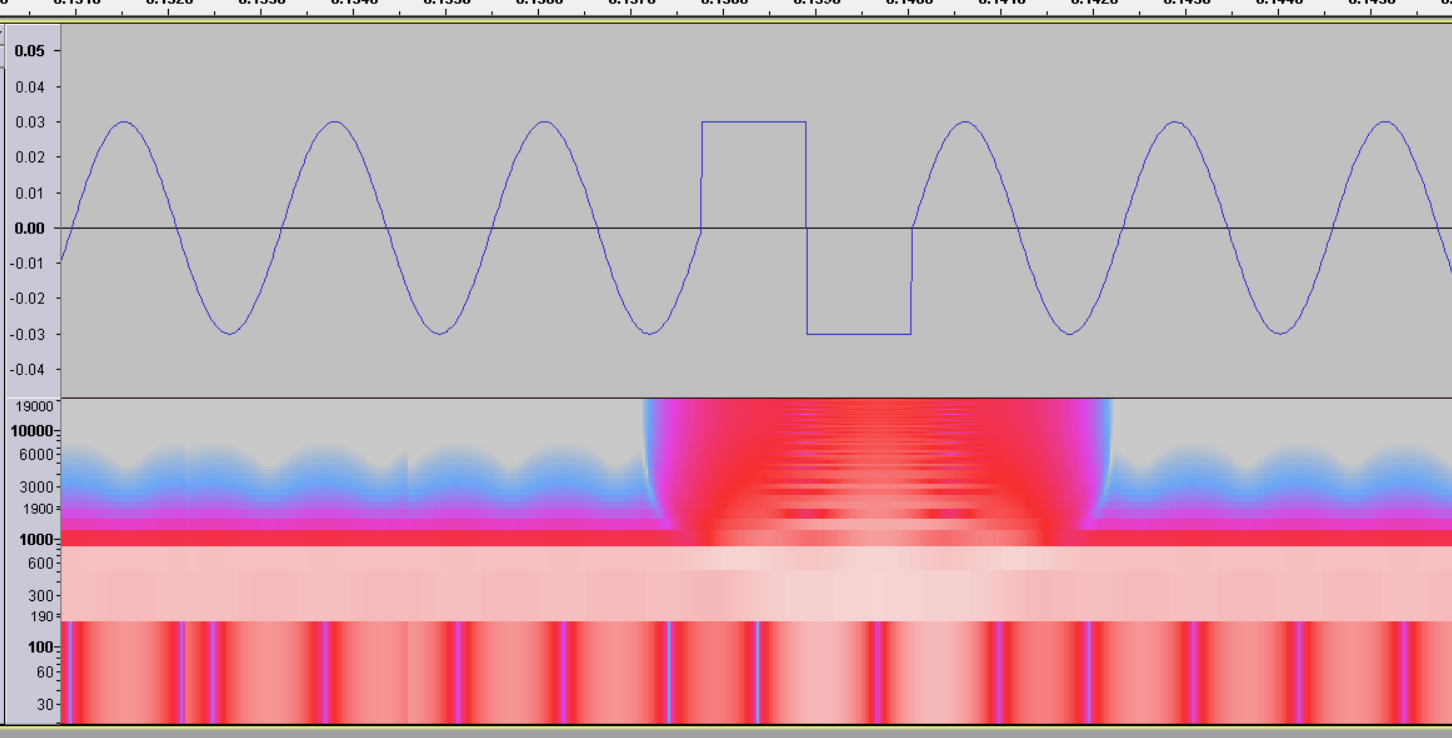
Yes. Though I have a background as a degreed electrical engineer (embedded systems, mostly), I have not undertaken a full analysis of the various issues that can result from careless (or undiscovered) issues resulting from trimming things at zero-crossing yet having the various adjustments on the separated portions, when mixed, create a terrible result. Your example of a square cycle is extreme, yet in ordinary audio I have seen and heard strange results – and the more extreme the source the more likely the poor result. This is why my videos have included the advice about “You can’t make a silk purse out of a sow’s ear,” encouraging that careful recording and preprocessing provide the best possible recording and result before undertaking the WaveParse adjustments to achieve ACX compliance. Even so, with care, I have been able to rescue some pretty extreme problems – but not everybody is willing to spend the time I did, even with a powerful tool.
The most aggravating result in extreme cases for me has been the unusual waveforms from some voices where every other cycle in the program material is substantially above the intervening cycles. Over-adjustment of these extreme peaks can create a ‘buzz’ artifact in the result. Along with the proverbial advice pointed out above, I have a standard disclaimer. I didn’t put it in the current video, but I should go back and add it to the description. It reads: “I want to be clear that WaveParse is a tool and has a learning curve and best practices. If misused, it can have bad results.”
What I can say clearly is that I use WaveParse routinely and note that with experience I have learned about dealing with both extreme and ‘normal’ cases. Some of this experience will turn into options in new plugins. Some will be unexplainable and other users will have to develop their own instincts. I’m not gaining any particular personal or professional benefit from creating and promoting WaveParse – it is powerful, in my opinion, and does some useful things. I’m in the process of documenting, in videos and other forms, the ‘track cleanup’ features that currently exist, and will then turn with greater detail to the compliance features (which is where the zero-crossing cuts become the feature that permits gain-only compliance). I hope that in that new documentation, I can spend at least one video exploring the extreme problems (as described, but including the cases where some peaks exceed 0 dB, where the floor is at -35 dB, and where the mid (body) needs to be turned up while the peaks need to be turned down).
Overall, I believe there is value in the approach. And there is special value in the cleanup toolset (which doesn’t involve any zero-crossing cuts), even where the user would subsequently NOT use WaveParse’s gain-only features to achieve ACX compliance. In cleanup, the ability to find many audible (and even inaudible) anomalies without actually listening in real time is going to be a valuable asset for those who really care about the quality of the track, but don’t really have time to carefully listen to hear every dropout and click.
I invite you (I invite everyone) to acquire WaveParse and experiment. It installs cleanly with a batch file, nothing manual (other than running the batch file) and it uninstalls cleanly with another batch file if you decide you don’t want it anymore. When it is stable, the installation package and all the source code will be put on GitHub, and I hope that there will be enough interest that some knowledgeable persons will want to maintain it after I pass on.
This topic was automatically closed after 30 days. New replies are no longer allowed.